Home / Electrical Accessories
Sigma 14145WH Outlet Box Cover Installation Manual
Quick installation guide for the Sigma 14145WH all-weather outlet box cover. Includes steps for horizontal mounting, adapter plate configuration for GFCI or round receptacles, and essential safety warnings.
Table of contents
Manual images
Click an image to enlargeImportant information for installation
The Sigma 14145WH is an all-weather, horizontal-mount outlet box cover designed for various receptacle configurations. Before beginning, ensure the power is turned off at the source. This device should be installed by a certified electrician or qualified person in accordance with the National Electrical Code and local standards.
Installation procedure
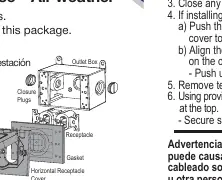
- Turn off power: Always disconnect electrical power before starting any installation work.
- Wiring: Wire the device according to the manufacturer's instructions.
- Mounting: Mount the device to the outlet box following the manufacturer's instructions.
- Seal: Close any holes in the outlet box as required.
- Gasket preparation: Remove the necessary tear-outs from the included gasket to fit your specific device.
- Final assembly: Using the provided screws, mount the gasket and cover to the outlet box. Ensure the hinges are positioned at the top. Secure the screws firmly, but do not overtighten.
Adapter plate configuration
The cover is pre-configured for Duplex outlets but can be adapted for GFCI or single round receptacles:
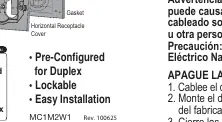
- To remove the existing duplex adapter plate, push the center of the plate from the backside of the cover towards the front until it snaps out.
- Align the required adapter plate with the top and bottom screw holes on the cover.
- Ensure the "BACK" marking on the adapter plate is facing the back of the cover.
- Push the plate until it snaps securely into place.
Safety warnings
Improper wiring of any electrical device can cause serious injury or death. This product contains materials that may pose a risk of cancer and reproductive harm from exposure to lead; consult www.P65Warnings.ca.gov for more information.
Official resources from the manual
Practical help
Common problems
Cover does not fit the receptacle type
Use the included adapter plates to switch between Duplex, GFCI, or 1 3/8" Round configurations.
Gasket does not fit around the device
Remove the necessary tear-outs from the gasket to accommodate the specific device shape.
Before use
- Ensure power is turned off at the circuit breaker.
- Verify the outlet box is compatible with horizontal mounting.
- Identify the required configuration (Duplex, GFCI, or 1 3/8" Round).
- Ensure you have a certified electrician for installation if unsure.
Specs in practice
- Horizontal Mount
- Designed to be installed with the hinges at the top for horizontal orientation.
Images and diagrams
- The assembly diagram shows the order: Outlet Box -> Gasket -> Horizontal Receptacle Cover.
- The adapter plate installation requires pushing the center plate from the back to remove it, then snapping the correct adapter into place.
Model compatibility
- Compatible with Duplex, GFCI, and 1 3/8" Round receptacles.
- Designed for horizontal mounting only.

Manual page author
Michael Turner
Technical manual editor
Reviews PDF manuals for structure, safety notes, and practical product details so readers can find the right information quickly.