Furniture / Home Furnishing
Assembly Guide for Sim-Lab Pedal Slider Baseplate
Step-by-step assembly guide for the Sim-Lab Pedal Slider Baseplate. Includes mounting instructions, compatibility patterns for various pedal sets, and hardware lists.
Table of contents
Quick guide from the manual
This document provides assembly instructions for the Sim-Lab Pedal Slider Baseplate (Version 2.3). Before beginning, verify that all parts listed in the bill of materials on page 14 are present. The assembly requires basic tools and some time. If you encounter issues with slot-nut installation, you can use a small hex wrench to wiggle the nut into the slot from the side.
Tools needed
- Hex keys: 4mm, 5mm, 6mm
- Wrenches: 8mm, 10mm, 13mm
- Tape measure
Assembly instructions
Base plate installation
The base plate can be mounted directly onto a profile or a pedal deck. Follow the specific diagrams for your cockpit type (e.g., P1X PRO or GT1 EVO). Ensure you use the correct spacers and bolts as indicated in the assembly diagrams.
Pedal slider installation
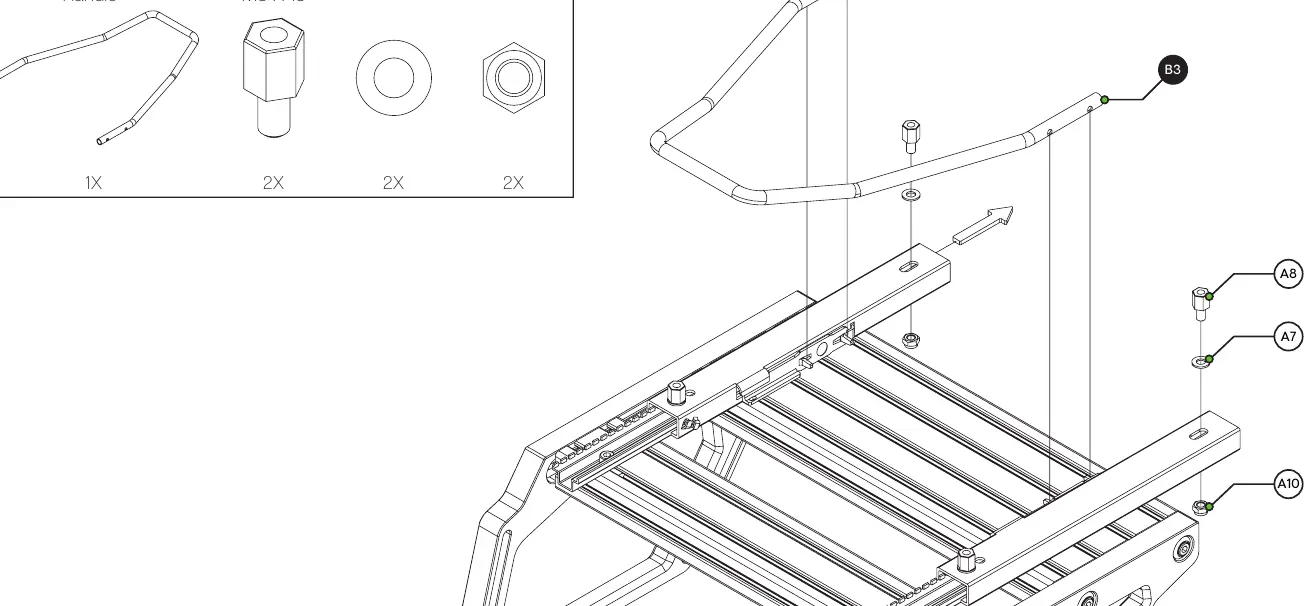
Attach the left and right pedal sliders to the base plate. If the handle does not fit snugly between the sliders, it may need to be widened slightly by bending it until it fits properly.
Heel rest installation
If you have purchased the optional heel rest, follow the assembly steps on page 11. Use the provided M6 bolts, plastic sleeves, and lock-nuts to secure the heel rest to the base plate.
Compatibility
The baseplate is compatible with a wide range of pedal sets. Pages 15-17 provide specific mounting hole patterns for various brands, including Aseteck, Fanatec, Heusinkveld, Simagic, and Thrustmaster. Always check the specific diagram for your pedal model to ensure correct alignment.
Support
If you have questions regarding assembly, contact the support department at [email protected]. You can also join the Sim-Lab Discord server for community assistance.
Practical help
Common problems
Slot-Nut is difficult to insert
Use one of your smaller Hex wrenches to help wiggle the Slot-Nut into place from the side.
Pedal slider handle does not fit snugly
The handle may need to be widened slightly by bending it until it fits properly between the sliders.
Leftover parts after assembly
Some extra parts are provided intentionally as spares; do not worry if you have leftovers.
Before use
- Check the bill of materials on page 14 to ensure all parts are delivered.
- Gather required tools: 4/5/6mm hex keys and 8/10/13mm wrenches.
- Identify your cockpit type (e.g., P1X PRO or GT1 EVO) to follow the correct assembly path.
- Verify your pedal set model to use the correct mounting pattern from pages 15-17.
Images and diagrams
- Pages 15-17 illustrate the specific hole patterns required for mounting various pedal brands like Fanatec, Heusinkveld, and Aseteck.
- Page 2 shows the correct method for inserting Slot-Nuts into the profile.
Model compatibility
- Compatible with P1X PRO and GT1 EVO cockpits.
- Supports various pedal sets including Aseteck, Fanatec, Heusinkveld, Simagic, Simtrecs, and Thrustmaster.

Manual page author
Emily Carter
User documentation editor
Prepares concise manual descriptions and highlights the most useful setup, operation, and maintenance information for readers.