Industrial / Air Sampling Pumps
Operating Instructions for SKC QuickTake 30 Sample Pump
A comprehensive operating guide for the SKC QuickTake 30 Sample Pump. This manual covers battery charging, flow rate calibration, sampling modes, maintenance procedures, and technical specifications.
Quick answers from the manual
Quick answer
- The SKC QuickTake 30 is a portable, battery-powered air sample pump providing constant airflow from 10 to 30 L/min. It features programmable run times, intermittent sampling, and flow fault detection. p. 1
Key actions
- Charging the battery p. 2
- Calibrating flow rate p. 5
- Replacing the battery p. 11, 12
First start
- Charge the battery fully before first use. p. 2
Show 4 more answers Show less
Problems and fixes
Flow Fault (FlOF)
Check for excessive back pressure or blockages. Correct the blockage and restart.
p. 8Maintenance and reset
- Reset to factory defaults p. 12
Technical specifications
| Parameter | Value | Meaning | Pages |
|---|---|---|---|
| Flow Range | 10 to 30 L/min | Operating flow range | p. 14 |
| Battery | 7.4 V, 10.4-Ah, 77 Wh | Battery specifications | p. 14 |
| Weight | 4.8 lbs (2.2 kg) | Unit weight | p. 14 |
Where to find it in the PDF
- Introduction and Kit Contents p. 1
- Getting Started (Charging) p. 2
- Operation and Button Sequences p. 3
- Mounting Sampling Media p. 4
- Calibration p. 5
- Run Time Modes p. 6, 7, 9
- Maintenance p. 11, 12
- Accessories and Specs p. 13, 14
Table of contents
Manual images
Click an image to enlargeQuick Guide from the Manual
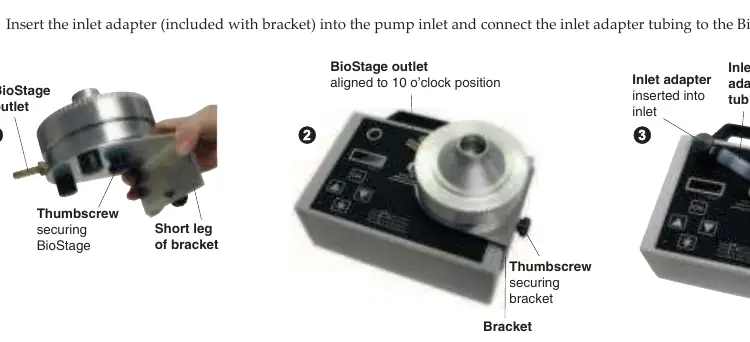
The SKC QuickTake 30 is a portable, battery-powered air sample pump designed for constant airflow between 10 and 30 L/min. It is compatible with various samplers, including BioStage impactors and spore trap cassettes. Before first use, ensure the battery is fully charged and the pump is calibrated with the specific sampling media you intend to use.
Getting Started and Charging
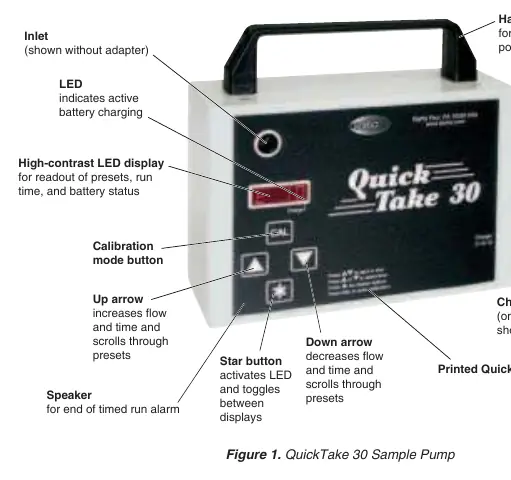
To charge the battery, ensure the pump is turned off and insert the charger plug into the charging jack. A red LED on the display indicates charging. The battery charges fully in approximately 5 hours. The pump can also be operated using AC power, though the charger is not a battery eliminator and will not provide indefinite run times.
Operating the Pump
The pump is controlled via the LED display and button sequences:
- Power On/Off: Press and hold the Star button for 2 seconds.
- Navigate Presets: Use the Up or Down arrows to scroll through presets and displays.
- Run/Hold: Press both Up and Down arrows simultaneously to start or pause the pump.
- Calibration Mode: Press and hold the CAL button for 2 seconds while in a run time preset.
Sampling Modes
The pump offers three primary run time modes:
- Timed Run: Performs a single sample for a predetermined time (1 to 999 minutes).
- Continuous Run: Runs until manually stopped.
- Intermittent Sampling: Allows programming of run time, delay time, and number of cycles.
Calibration
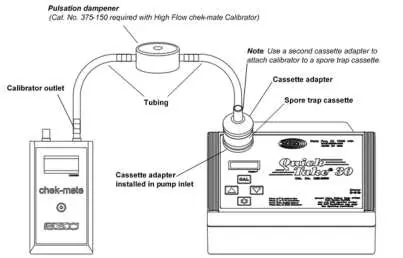
Calibration must be performed with the representative sampling medium in line. Ensure the pump has run for 5 minutes before calibrating. Connect the pump inlet to the sampling medium and the calibrator to the inlet of the sampling medium. Use the CAL button to enter calibration mode and the arrow keys to adjust the flow rate until the desired value is displayed on the calibrator.
Maintenance and Battery Replacement
Keep the pump clean and free of dust. To replace the battery:
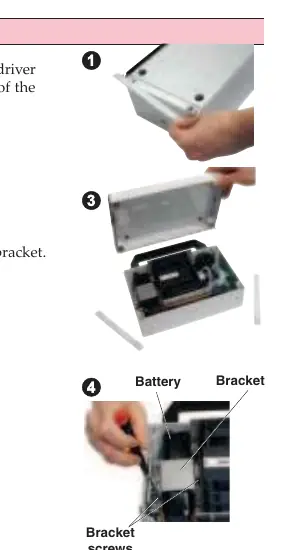
- Remove the two strip panels on the back of the case to reveal four safety screws.
- Loosen the screws and lift off the back of the pump case.
- Loosen the two screws securing the battery bracket and remove the bracket.
- Disconnect the battery harness and remove the battery.
- Install the new battery, ensuring the harness wires face away from the case handle.
- Reassemble the unit in reverse order.
Troubleshooting and Faults
If the pump cannot maintain flow due to excessive back pressure, a Flow Fault (FlOF) will appear. The pump will beep and stop. You can attempt to correct the blockage and restart the pump. The fault restart feature is enabled by default and will attempt to restart the pump every 10 seconds up to five times.
Practical help
Common problems
Flow Fault (FlOF) displayed
Check for flow blockages in the sampling media or tubing. Correct the blockage and press the Up and Down arrows simultaneously to place the pump in Hold, then resume sampling.
Battery low or Low Battery Fault
Recharge the battery using the SKC-approved charger. If a Low Battery Fault occurs, the pump will stop and go to sleep in 10 seconds.
Calibration not matching
Ensure the pump has run for 5 minutes before calibrating to allow it to reach a steady state. Ensure the correct sampling medium is in line during calibration.
Before use
- Ensure the battery is fully charged.
- Verify that you have the correct sampling media (e.g., BioStage, VersaTrap).
- Use 3/8-inch ID Tygon tubing.
- Run the pump for 5 minutes before performing calibration.
- Ensure the charger is an SKC-approved model.
Show more Show less
Specs in practice
- Operating Temperature
- 32 to 104 F (0 to 40 C).
Images and diagrams
- The calibration train diagram shows the pump connected to a spore trap cassette, which is connected via tubing to a pulsation dampener and then to the calibrator.
- Battery replacement diagrams illustrate removing the back panel, the battery bracket, and disconnecting the battery harness.
Model compatibility
- Compatible with BioStage viable cascade impactors, spore trap cassettes (e.g., VersaTrap), asbestos cassettes, and microvacuum cassettes.
- Requires 3/8-inch ID tubing for operation.

Manual page author
Emily Carter
User documentation editor