Wearables / Watches
SKMEI 1155B Digital Watch
Quick guide for the SKMEI 1155B digital watch. Learn how to set the time, date, alarm, use the chronograph, and operate the EL backlight.
Table of contents
Quick Guide
The SKMEI 1155B is a digital watch featuring a 12-digit LCD display, daily alarm, hourly chime, 12/24H time format, chronograph with split function, and an EL backlight. This guide provides instructions for basic operation and settings.
Button Functions
The watch is operated using four buttons:
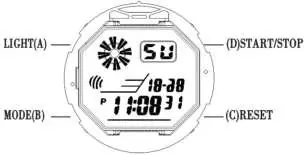
- A (Light): Activates the EL backlight for 3 seconds in any mode.
- B (Mode): Used to switch between modes (Time, Chronograph, Alarm, Time Setting).
- C (Reset): Used for selecting settings and resetting values.
- D (Start/Stop): Used to adjust values and start/stop functions.
Time and Date Setting
- In normal time display mode, press the B key three times to enter setting mode. The Seconds will flash.
- Press the D key to reset seconds to zero.
- Press the C key to cycle through the settings: Hour, Minute, Date, Month, and Week.
- For each setting, press the D key to adjust the value.
- Note: When adjusting the Hour, the watch will automatically convert between 12H and 24H formats.
- Press the B key to exit the setting mode.
Alarm and Chime Settings
To set the alarm:
- In normal time display mode, press the B key twice to enter alarm mode.
- Press the C key to select Hours (flashing). Press D to adjust. Pay attention to AM/PM indicators (A/P for 12H, H for 24H).
- Press the C key to select Minutes (flashing). Press D to adjust.
- Press the B key to exit.
To toggle Alarm and Chime ON/OFF:
- In normal time display mode, press the B key twice to enter alarm mode.
- Press the D key to turn the alarm and chime function on or off.
- The alarm/chime symbol appearing on the display indicates the function is ON.
Chronograph Function
- In normal time display mode, press the B key once to enter Chronograph mode.
- Press the D key to start the chronograph.
- Press the D key again to stop.
- Press the C key to reset the chronograph to zero.
Manufacturer information
Guangdong SKMEI Watch Manufacturing Co., Ltd.
Practical help
Common problems
Alarm or chime is not working
Ensure the alarm/chime symbol is visible on the display. If it is not visible, enter alarm mode (press B twice) and press D to toggle the function ON.
Time format is incorrect (12H vs 24H)
The watch automatically switches between 12H and 24H formats when you adjust the hour setting. Ensure you are observing the A/P (AM/PM) indicator for 12H or the H indicator for 24H.
Before use
- Verify the display is active
- Identify the four buttons (A, B, C, D)
- Check if the current time and date are correct
- Test the EL backlight by pressing button A
Specs in practice
- 12/24H Format
- Selectable time display format; 12H uses A/P for AM/PM, 24H uses H.
- EL Backlight
- Electroluminescent light for viewing in the dark, lasts for 3 seconds.
Images and diagrams
- A: Light button
- B: Mode button
- C: Reset button
- D: Start/Stop button

Manual page author
Michael Turner
Technical manual editor
Reviews PDF manuals for structure, safety notes, and practical product details so readers can find the right information quickly.