Wearables / Watches
User Manual for Timex Command Encounter 08T-095000 Watch
Quick guide for the Timex Command Encounter 08T-095000 watch. Learn how to set time, date, world time, alarms, and adjust analog hands.
Table of contents
Manual images
Click an image to enlargeQuick guide from the manual
The Timex Command Encounter watch features both analog and digital displays. The watch is operated using four buttons:
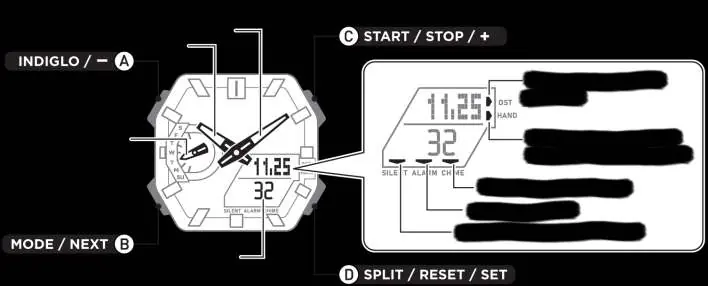
- (A) INDIGLO / -: Activates the backlight and scrolls backward during settings.
- (B) MODE / NEXT: Scrolls through watch functions and advances to the next setting field.
- (C) START / STOP / +: Starts/stops functions and scrolls forward during settings.
- (D) SPLIT / RESET / SET: Resets functions, enters setting modes, and toggles specific features.
Watch Features
The watch includes a real-time digital calendar (2000-2099), 12/24-hour time format, world time (48 cities/31 time zones), a stopwatch, a countdown timer, daily/weekday/weekend alarms, an hourly chime, and the INDIGLO backlight.
Setting Home City and Time
To begin, you must configure your Home City and Daylight Savings Time (DST) settings:
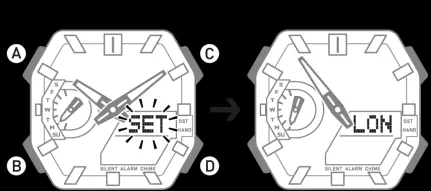
- Press (B) to scroll to 'TIME' mode.
- Press and hold (D) until 'SET' flashes and disappears, then the current city code scrolls across the display.
- Press (C) to advance or (A) to scroll back through the City Code list.
- Press (D) to save and return to timekeeping mode.
To set the digital time and date:
- In 'TIME' mode, press and hold (C) until 'Set' flashes.
- Press (B) to cycle through settings: DST, 12/24H format, Seconds, Hour, Minute, Year, Month, Day, Key/Mute, and Light duration.
- Use (A) or (C) to adjust values.
Adjusting Hand Positions
If the analog hands do not match the digital time:
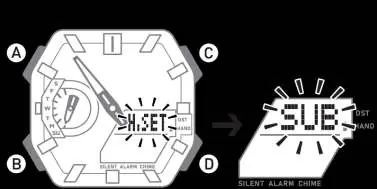
- Press (B) to scroll to 'Time' mode.
- Press and hold (D) for approximately 5 seconds until 'SUB' flashes.
- Use (A) or (C) to align the day-of-the-week hand to 'SU' (Sunday).
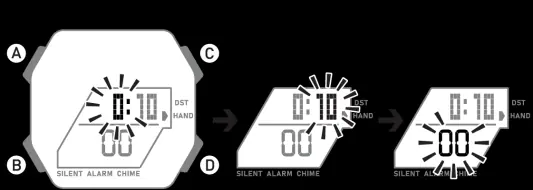
- Press (B) to move to hour hand adjustment. Use (A) or (C) to move the hour hand to the 12 o'clock position.
- Press (C) to move to minute hand adjustment. Use (A) or (C) to move the minute hand to the 12 o'clock position.
- Press (D) to return to 'Time' mode.
Modes
Press (B) to cycle through the following modes:
- TIME: Time of Day.
- WT: World Time.
- STW: Stopwatch.
- TMR: Countdown Timer.
- ALM: Alarm.
Stopwatch and Timer
In Stopwatch (STW) mode, press (C) to start/stop and (D) to reset. To take a split time, press (D) while the stopwatch is running. In Timer (TMR) mode, hold (C) to enter setting mode, adjust the time, and press (C) to start the countdown.
Alarm Settings
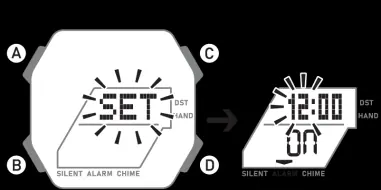
In Alarm (ALM) mode, press (C) to select an alarm (ALM1-ALM5) or the hourly chime (SIG). To set an alarm, press (D) until 'SET' flashes, then use (B) to select hours/minutes and (A) or (C) to adjust.
Maintenance and Water Resistance
The watch is water-resistant to 100 meters (328 ft). Rinse with fresh water after exposure to salt water. Timex recommends having the battery replaced by a professional jeweler or retailer. Do not press buttons while underwater.
Manufacturer information
Timex Group USA, Inc.
Practical help
Common problems
Analog hands do not match digital time
Use the Hand Adjustment mode (hold D for 5s until SUB flashes) to align hands to the 12 o'clock position.
Buttons do not make sound
Toggle the Key/Mute setting in Time mode.
Water resistance compromised
Do not press any buttons while the watch is submerged.
Before use
- Set your Home City.
- Set the correct date and time.
- Synchronize analog and digital time.
- Check battery status if the watch is not functioning.
Specs in practice
- Water Resistance
- 100 meters (328 ft).
- Countdown Timer
- Maximum run time of 23 hours, 59 minutes, 59 seconds.
Images and diagrams
- Button A: Indiglo/Light.
- Button B: Mode/Next.
- Button C: Start/Stop/+.
- Button D: Split/Reset/Set.
Model compatibility
- Water resistant to 100 meters.
- Battery replacement should be performed by a retailer or jeweler.

Manual page author
Emily Carter
User documentation editor
Prepares concise manual descriptions and highlights the most useful setup, operation, and maintenance information for readers.