Wearables / Watches
User Manual for Timex 03J-095000 Digital Watch
Quick start guide and user manual for the Timex 03J-095000 digital watch. Learn how to set the time, use the stopwatch, countdown timer, alarms, and dual time features, plus maintenance tips.
Table of contents
Manual images
Click an image to enlargeQuick guide from the manual
This guide covers the basic operation of your Timex 03J-095000 digital watch. The watch features a 24-hour stopwatch, daily alarms, a 24-hour countdown timer, dual time, and the INDIGLO night-light. Please note that to maintain water resistance, do not press any buttons while the watch is underwater.
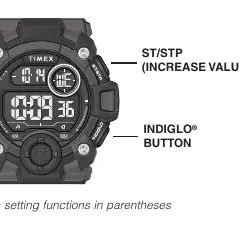
Button functions
- SET: Used to enter setting modes and exit them.
- MODE: Used to cycle through different modes (Time, Stopwatch, Timer, Alarm, Dual Time).
- ST/STP: Used to start/stop functions and increase values during settings.
- INDIGLO: Activates the night-light.
Setting time and date
- From the Time of Day mode, press and hold RESET until the watch beeps and the seconds flash.
- Press ST/STP to set seconds to zero.
- Press MODE to select the field to change (Hours, Minutes, Year, Month, Date).
- Press ST/STP to advance the selected value. Press and hold to increment quickly.
- Press RESET to exit the setting mode.
- To toggle between 12-hour and 24-hour format, press ST/STP while in the time setting mode.
Stopwatch
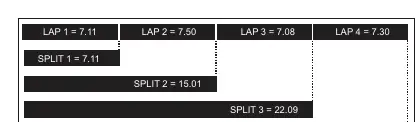
- Press MODE until “SP” appears.
- Press ST/STP to start timing.
- Press RESET to record a split time while the stopwatch continues running in the background.
- Press RESET again to release the display and show the current running time.
- Press ST/STP to pause the timing.
- Press RESET while paused to reset the stopwatch to zero.
Countdown timer
- Press MODE until “TR” appears.
- Press RESET to enter setting mode. The hour digit will flash.
- Press ST/STP to adjust the hours.
- Press MODE to switch to minutes and seconds, using ST/STP to adjust them.
- Press RESET to exit setting mode.
- Press ST/STP to start the countdown.
- When the alert sounds, press any button to silence it.
Alarm
- Press MODE until “AL” appears.
- Press ST/STP to toggle the hourly chime on or off.
- Press INDIGLO to select one of the 5 alarms.
- Press ST/STP to turn the selected alarm on or off.
- Press RESET to set the alarm time. Use ST/STP to adjust hours and MODE to switch to minutes.
- Press RESET to save settings.
Dual time
- Press MODE until “T2” appears.
- Press RESET to enter setting mode.
- Use ST/STP to adjust hours.
- Press MODE to adjust minutes. You can set the same minutes as the primary time or a 30-minute difference.
- Press RESET to exit.
Maintenance and care
Water resistance: The watch is water-resistant only as long as the lens, push buttons, and case remain intact. It is not a diver watch and should not be used for diving. Rinse with fresh water after exposure to salt water.
Battery: Timex recommends having a retailer or jeweler replace the battery. The battery type is indicated on the caseback. Do not dispose of the battery in fire, do not recharge, and keep away from children.
Manufacturer information
Timex Group USA, Inc.
Practical help
Common problems
Watch does not beep for alarm
Ensure the alarm is turned on (check for the alarm icon) and that the alarm time is set correctly.
Stopwatch does not reset
You must pause the stopwatch using the ST/STP button before you can reset it using the RESET button.
Water enters the watch
Ensure you never press any buttons while the watch is submerged in water.
Before use
- Verify the watch is set to the correct time zone (T1).
- Check if the 12/24-hour format is set to your preference.
- Ensure the watch case and buttons are intact before water exposure.
- Test the INDIGLO light to ensure the battery is functioning.
Images and diagrams
- The watch features four buttons: SET (top left), MODE (bottom left), ST/STP (top right), and INDIGLO (bottom right).
Model compatibility
- Not a diver watch; do not use for diving.
- Alarm settings are tied to the primary time zone (T1).

Manual page author
Emily Carter
User documentation editor
Prepares concise manual descriptions and highlights the most useful setup, operation, and maintenance information for readers.