Wearables / Watches
User Manual for Skmei 0817B Watch
Quick guide for the Skmei 0817B watch. Learn how to set the time, date, alarm, use the chronograph, and customize the backlight settings.
Table of contents
Quick Guide from the Manual
The Skmei 0817B watch is operated using four buttons (S1, S2, S3, S4). The watch features a chronograph, alarm, time/date settings, and a multi-color backlight. To navigate between modes, use the S3 button while in normal display mode.
Watch Overview
The watch interface relies on four buttons:
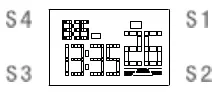
- S1: Used to adjust settings, start/stop the chronograph, and show Month/Date.
- S2: Used to read time, lap, reset, toggle chime, and adjust settings.
- S3: Used to switch modes, save settings, and exit.
- S4: Used to control the backlight.
Modes and Navigation
In normal display mode, press S3 to cycle through the available modes in the following order: Chronograph mode, Alarm setting mode, and Time setting mode.
Chronograph Function
To use the stopwatch:
- In normal display mode, tap S3 once to enter chronograph mode.
- Tap S1 to start.
- Tap S1 to stop.
- While stopped, tap S2 to reset.
- To record a lap time, tap S2 while the chronograph is running.
- Tap S3 to exit the mode.
Alarm Settings
Toggle Alarm ON/OFF: In normal time mode, hold S1 and S2 simultaneously.
Set Alarm:
- In normal time mode, tap S3 twice to enter alarm setting mode (the hours will flash).
- Tap S1 to adjust the hour (pay attention to AM/PM).
- Tap S2 to switch to minutes (the minutes will flash).
- Tap S1 to adjust the minutes.
- Tap S3 to save and exit.
Time and Date Settings
- In normal time mode, tap S3 three times to enter time and date setting mode (seconds will flash).
- Tap S2 to cycle through settings: Minutes, Hours, Date, Month, and Week.
- When the desired field is flashing, tap S1 to adjust the value.
- Note: "H" indicates 24-hour format.
- Tap S3 to save and exit.
Backlight Settings
Hold S4 to cycle through the available backlight colors (blue, green, red, cyan, purple, yellow). Release the button on the desired color to set it as the current backlight color.
Chime Function
To turn the hourly chime ON or OFF, hold S2 and then tap S3 in normal mode. If the week icons are ON, the chime is active.
Manufacturer information
Guangdong SKMEI Watch Manufacturing Co., Ltd.
Practical help
Common problems
Alarm is not sounding
Ensure the alarm is enabled. In normal time mode, hold S1 and S2 to toggle the alarm ON/OFF.
Hourly chime is sounding unexpectedly
Hold S2 and tap S3 in normal mode to disable the hourly chime.
Before use
- Identify buttons S1, S2, S3, and S4 on the watch case.
- Verify the current mode (Normal, Chronograph, Alarm, or Time Setting).
- Check if the watch is set to 12H or 24H format (indicated by 'H').
Images and diagrams
- The diagram illustrates the watch face and the physical location of the four control buttons (S1, S2, S3, S4).

Manual page author
Michael Turner
Technical manual editor
Reviews PDF manuals for structure, safety notes, and practical product details so readers can find the right information quickly.