Lighting / Fixtures
User Manual for SmallRig RF 10C Portable Focusable LED Video Light
Quick guide for the SmallRig RF 10C Portable Focusable LED Video Light. Learn how to operate the multi-functional button, adjust zoom, understand LED indicators, and view technical specifications.
Table of contents
Quick Guide
This manual provides operating instructions for the SmallRig RF 10C Portable Focusable LED Video Light. Ensure the device is charged before first use.
Product Overview
The device features a multi-functional button, a zoom adjustment mechanism, and an LED indicator.
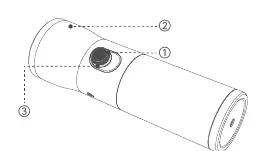
- Multi-functional button: Rotate the button half a round to power on. When the light is on, click once to cycle through colors (Orange, Blue, Cool White, Red). Rotate the button clockwise or counter-clockwise to increase or decrease intensity. The light will flash when the maximum or minimum brightness is reached. Long press the button to power off.
- Zoom adjustment: Pull the structure forward to zoom in and pull it backward to zoom out.
- LED indicator: Displays battery level and charging status. Red flash indicates <5% battery; red solid indicates 5%-20%; green solid indicates 20%-100%. During charging, red flash indicates 0%-20%, green flash indicates 20%-95%, and green solid indicates >95%.
Specifications
- Maximum Power Consumption: 10W
- Battery: 3.7V / 7500mAh / 27.75Wh
- Charging Input: 5V / 2A
- Runtime: Approximately 3 hours at full power
- Dimensions: φ 1.81in × L 6.3in
- Weight: 422g
Warranty and Service
SmallRig products include a warranty starting from the date of payment. Electronic products (excluding V-mount batteries) have a 1-year warranty, while non-electronic products and V-mount batteries have a 2-year warranty. The warranty does not cover damage from improper use, unauthorized modifications, or force majeure. For repairs, contact the online customer service of the platform where the product was purchased or email [email protected].
Manufacturer information
SmallRig
Practical help
Common problems
Light does not turn on
Ensure the battery is charged. Rotate the multi-functional button half a round to power on.
Light flashes during adjustment
The light flashes as a reminder when the brightness reaches the maximum or minimum illuminance level.
Before use
- Charge the device fully using a 5V/2A power source.
- Check the battery level via the LED indicator.
- Familiarize yourself with the multi-functional button controls.
- Ensure the zoom adjustment structure moves freely.
Specs in practice
- Maximum Power Consumption
- 10W
- Battery Capacity
- 7500mAh
- Charging Input
- 5V / 2A
Images and diagrams
- 1. Multi-functional button: Controls power, color, and intensity.
- 2. Zoom adjustment part: Controls focus.
- 3. LED indicator: Shows battery and charging status.
Model compatibility
- Charging requires a 5V/2A power source.

Manual page author
Emily Carter
User documentation editor
Prepares concise manual descriptions and highlights the most useful setup, operation, and maintenance information for readers.