Electronics / Video Lighting
User Manual for SmallRig RF 05B Portable Focusable Flashlight
Quick guide for the SmallRig RF 05B Portable Focusable Flashlight. Learn how to operate lighting modes, install accessories, charge the battery, and understand technical specifications.
Table of contents
Quick guide from the manual
The SmallRig RF 05B is a portable LED video light. Before first use, ensure the battery is charged. The device features multiple lighting modes, including Bi-color Temperature Mode, Lighting Effects Mode, and a Boost Mode. Please note that the light should not be used while charging for extended periods in Boost Mode to prevent overheating. The device includes thermal protection that automatically shuts down the light if the temperature exceeds 100°C.
In the Box
- LED Video Light
- Diffuser
- Snoot
- Storage Bag
- Gobos & Film Slide (10)
- Four-Leaf Barndoor
- Spotlight
- RGB Color Filter (3)
- USB-C Charging Cable
- User Manual
Product Details
The device features the following components:
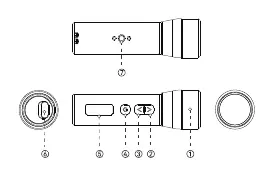
- Lamp Head: The main light output area.
- Increase/Decrease Buttons: Used to adjust brightness, color temperature, and lighting effects.
- Power Button: Long press to turn on/off; short press to cycle through settings.
- Display Screen: Shows current settings, battery level, and mode.
- Charging Port: USB-C port for charging.
- 1/4-20 Threaded Hole: For mounting the light on tripods or other accessories.
Installation
The light supports various accessories for creative lighting:
- Diffuser: Slides onto the lamp head.
- RGB Color Filter: Attaches to the front of the lamp head.
- Spotlight: Mounts onto the lamp head.
- Four-Leaf Barndoor: Attaches to the front to shape the light beam.
Operation
Power On/Off: Long press the power button.
Mode Switching:
- Bi-color Temperature Mode: Default mode after powering on. Use the power button to select parameter (color temperature or brightness) and increase/decrease buttons to adjust.
- Lighting Effects Mode: Simultaneously short press the increase and decrease buttons to enter. Use the power button to cycle through effects, brightness, and frequency.
- Boost Mode: In Bi-color Temperature Mode, simultaneously short press the increase and power buttons to enter. Only color temperature can be adjusted in this mode.
Charging & Battery
The device supports 5V 1A and 5V 3A charging via USB-C. The battery icon flashes while charging. When the battery voltage drops below 3.4V, the empty battery icon flashes, and the screen turns off after 60 seconds.
Technical Specifications
- Output Power: Standard 5W, Boost Mode 8W
- Beam Angle: 17° - 65°
- Color Temperature Range: 1900K - 8000K
- CRI: 96 (Max)
- TLCI: 99 (Max)
- Battery: 3.7V / 2600mAh / 9.62Wh
- Runtime: Standard Mode (100% brightness): 125 minutes; Boost Mode: 23 minutes
Manufacturer information
SmallRig
Practical help
Common problems
Light turns off automatically
The LED temperature has exceeded 100°C. The light will flash 3 times and shut down for thermal protection.
Screen turns off
Battery voltage is below 3.4V. The empty battery icon will flash before the screen turns off after 60 seconds.
Overheating in Boost Mode
Do not use the light while charging for extended periods in Boost Mode, as this may affect product lifespan.
Before use
- Charge the device fully before first use.
- Ensure the USB-C cable is connected properly for charging.
- Check that the battery level is sufficient (indicated by the icon on the display).
Specs in practice
- Standard Power
- 5W output for normal operation.
- Boost Mode Power
- 8W output for maximum brightness.
- Battery Capacity
- 3.7V / 2600mAh / 9.62Wh.
- Color Temperature
- Adjustable range from 1900K (warm) to 8000K (cool).
Images and diagrams
- 2: Increase Button
- 3: Decrease Button
- 4: Power Button
- 5: Display Screen
- 6: Charging Port
Model compatibility
- Supports 5V 1A and 5V 3A charging.

Manual page author
Michael Turner
Technical manual editor
Reviews PDF manuals for structure, safety notes, and practical product details so readers can find the right information quickly.