Electronics / Video Lighting
User Manual for Amaran 100x LED Video Light
Quick guide for the Amaran 100x LED video light. Learn how to install the reflector, adjust brightness and color temperature, use Bluetooth control, and perform firmware updates.
Table of contents
Manual images
Click an image to enlargeQuick guide from the manual
The Amaran 100x is a high-performance LED photography light. Before use, ensure you remove the protective cover from the COB LED. The light is controlled via two main knobs on the back for brightness and color temperature (CCT). For advanced features, including lighting effects, connect the light to the Sidus Link app via Bluetooth.
Safety instructions
- Do not touch the LED light source surface as it can get hot.
- Always remove the protective cover before powering on the light.
- Unplug the light before cleaning or servicing.
- Use only a grounded outlet.
- Do not block ventilation holes during operation.
- Keep the light away from liquids and flammable objects.
Product details and installation
The light features a Bowens Mount for attaching accessories like the included 55° Hyper-Reflector.
Attaching accessories
To attach the protection cover or the reflector, push the lever handle in the direction of the arrow and rotate the accessory into the Bowens Mount. Rotate in the opposite direction to remove.
Setting up the light
Adjust the lamp body to the desired height on your tripod, rotate the tie-down to secure it, and tighten the lock handle to fix the angle.
Operations

Manual control
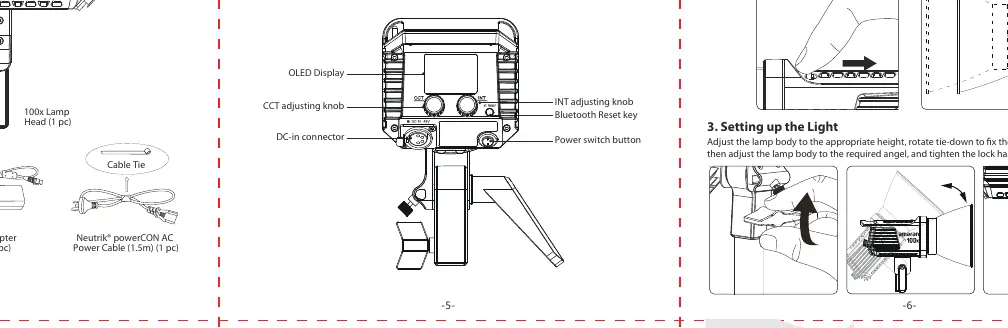
Use the INT adjusting knob to adjust brightness (0-100%). Click the knob to cycle through preset brightness levels (20%, 40%, 60%, 80%, 100%).
Use the CCT adjusting knob to change the color temperature (2700K-6500K). Click the knob to cycle through preset color temperatures (2700K, 3200K, 4300K, 5500K, 6500K).
Wireless control
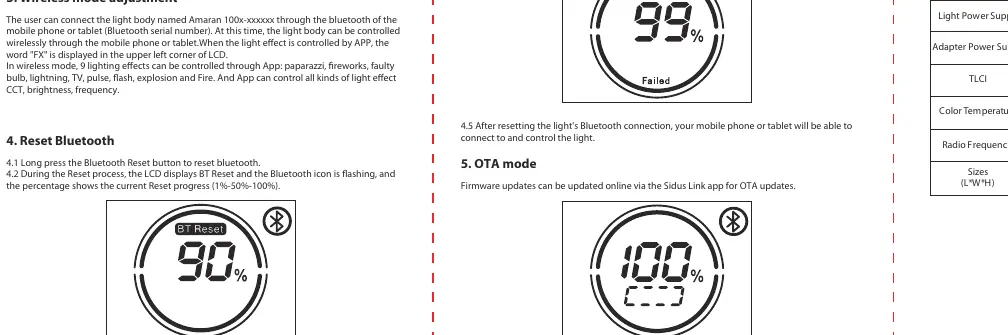
The light can be controlled via the Sidus Link app. To reset the Bluetooth connection, long-press the Bluetooth Reset button. The LCD will display 'BT Reset' and show progress. Once successful, the LCD will display 'Success'.
Specifications
- Power Consumption: 130W maximum
- Color Temperature: 2700K-6500K
- CRI: ≥95
- TLCI: ≥96
- Cooling: Active cooling
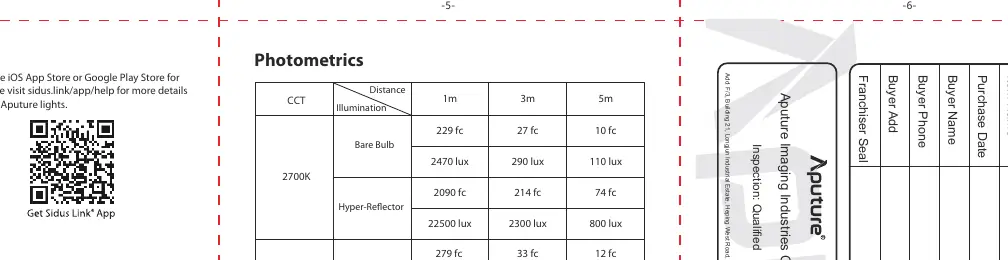
- Bluetooth Range: ≤100m
Manufacturer information
Amaran
Practical help
Common problems
Bluetooth connection failure
Long press the Bluetooth Reset button. The LCD will display 'BT Reset' and progress. If unsuccessful, it will display 'Failure'.
Light does not turn on
Ensure the power cable is firmly connected to the light and the outlet. Check that the outlet is grounded.
Overheating
Ensure ventilation holes are not blocked. Do not operate in enclosed spaces without airflow.
Before use
- Remove the protective cover from the COB LED.
- Ensure the light is securely mounted on a tripod.
- Check that the power cable is connected properly.
- Verify the environment is dry and free of flammable materials.
Specs in practice
- Bowens Mount
- Standard industry mount for attaching various light modifiers like softboxes and reflectors.
Images and diagrams
- The installation diagrams show the lever mechanism for attaching the protection cover and the 55° reflector.
- The control panel diagram identifies the INT and CCT knobs, OLED display, and Bluetooth reset button.
Model compatibility
- Compatible with Bowens Mount lighting accessories.
- Requires Sidus Link app for advanced lighting effects (paparazzi, fireworks, lightning, etc.).

Manual page author
Emily Carter
User documentation editor
Prepares concise manual descriptions and highlights the most useful setup, operation, and maintenance information for readers.