Smart Home / Energy Meters
User Manual for Smappee MID 100A Series Smart Meter
Quick guide for the Smappee MID 100A Series smart meter. Learn how to configure settings, interpret measurements, wire the device for single or three-phase systems, and manage Modbus communication.
Table of contents
Quick guide from the manual
The Smappee MID 100A Series is a DIN rail smart meter designed for single and three-phase electrical systems. To enter the setup mode, press the E button for 3 seconds. The default password is 1000. Use the M and P buttons to navigate menus and change values, and the E button to confirm selections.
Device Overview and Measurements
The device features a display and four buttons for navigation:
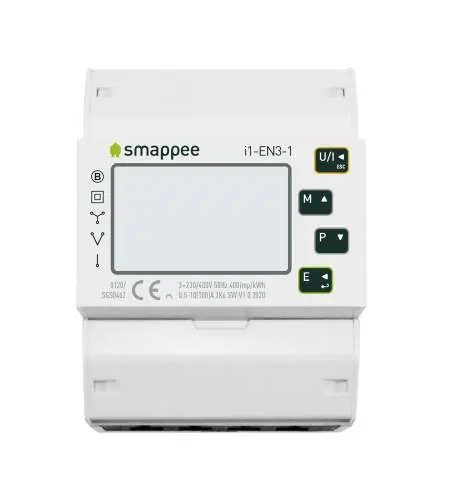
- U/I: Selects Voltage and Current screens. In setup, acts as 'Left' or 'Back'.
- M: Selects Frequency and Power factor screens. In setup, acts as 'Up'.
- P: Selects Power screens. In setup, acts as 'Down'.
- E: Selects Energy screens. In setup, acts as 'Enter' or 'Right'.
The meter measures various parameters including voltage, current, frequency, power (kW/kVa/kVar), and energy (import/export/total). It also supports Maximum Demand measurement over preset periods.
Setup and Configuration
Configuration is password protected. To change settings:
- Press E for 3 seconds to enter setup.
- Enter the password (default 1000) using M and P to change digits and E to confirm.
- Navigate through menu options using M and P.
- Press E to confirm a selection. The SET indicator will appear.
- Press E again to return to a higher menu level.
System Settings
The meter supports different electrical systems. You can configure the supply system (1P2, 3P3, 3P4) and communication parameters (RS485/Modbus RTU) via the setup menu. The backlight duration is also configurable from 0 (always on) to 120 minutes.
Pulse Output
The device provides two pulse outputs for energy monitoring. Pulse output 1 is configurable for energy type (kWh/kVarh) and pulse rate. Pulse output 2 is fixed at 400imp/kWh for active energy.
Technical Specifications
The meter is designed for indoor use with an IP51 rating. It operates in temperatures from -25°C to +55°C and supports altitudes up to 2000m. It is compatible with DIN 43880 rail mounting.
Practical help
Common problems
Display shows 'PASS Err'
An incorrect password was entered. The default password is 1000.
Backlight turns off unexpectedly
The backlight timeout is configurable. If set to 5, it will turn off after 5 minutes of inactivity. Adjust the time interval in the 'Backlit set-up' menu.
Before use
- Verify the electrical system type (1P2, 3P3, or 3P4) before installation.
- Ensure the DIN rail is compatible with DIN 43880 standards.
- Check that the supply voltage is within the 176-276V AC range (phase to neutral).
- Confirm the Modbus address is set correctly if using remote monitoring.
- Ensure the device is not connected to external current transformers (CT), as it is a direct-operated meter.
Images and diagrams
- Wiring diagrams are provided for 1P2, 3P3, and 3P4 configurations.
- The interface for external monitoring is located on the top of the unit.
Model compatibility
- Not for use with external current transformers (CT).
- RS485/Mbus communication is available for remote monitoring via Modbus RTU protocol.

Manual page author
Michael Turner
Technical manual editor
Reviews PDF manuals for structure, safety notes, and practical product details so readers can find the right information quickly.