General / Other Manuals
User Manual for Immax NEO Smart Three-phase meter 07581L
Quick guide for the Immax NEO Smart Three-phase meter 07581L. Includes installation steps, wiring diagrams, app pairing instructions, and safety warnings.
Table of contents
Quick Guide
The Immax NEO Smart Three-phase meter is designed to monitor electricity consumption in your home. Installation must be performed by qualified electrical personnel. Ensure the main power is turned off before starting any installation work. The device requires a 2.4GHz WiFi network for app connectivity.
Device Description
The device consists of the main unit, three current clamps, and an external antenna. It features a reset button for pairing and data management, and an LED indicator to show connection status.
Installation
Safety Warning: Installation and maintenance must only be carried out by qualified electrical personnel. Always turn off all household power before installation.
- Wiring: Connect the AC input cord to an outlet near the electrical box. Use the provided wiring diagrams for 3-phase or 1-phase electricity connections.
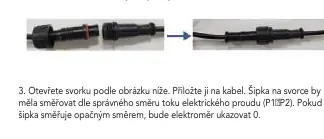
- Clamp Installation: Open the clamp and attach it to the cable. The arrow on the clamp must point in the direction of current flow (P1 to P2). If the arrow points in the opposite direction, the meter will read 0.
- Mounting: Use the mounting bracket as a template to mark and drill holes on the wall. Secure the bracket with screws and attach the meter using the hooks on the bracket.
App Pairing
1. Download the Immax NEO PRO app from the App Store or Google Play and register an account.
2. Ensure WiFi and Bluetooth are enabled on your mobile phone.
3. Put the meter into pairing mode by pressing and holding the reset button for 5 seconds until the red LED starts flashing.
4. Open the app, click the '+' icon to add a new device, and follow the on-screen instructions. Ensure your WiFi network is 2.4GHz.
Operation
- Resetting: Press and hold the reset button for 5 seconds to enter pairing mode.
- Clearing Data: Reset the device twice in succession, with an interval of less than 10 seconds between resets. The indicator will flash red and green three times upon success.
- LED Indicators: A flashing red LED indicates the device is not connected to WiFi. A solid green LED indicates the device is connected.
Maintenance and Safety
Protect the device from contamination and dirt. Clean only with a soft cloth; do not use rough materials, solvents, or aggressive chemicals. Do not disassemble the product. Keep out of reach of children as it contains small parts.
Technical Specifications
- Protocol: WiFi (2400MHz-2483.5MHz)
- Power Supply: 100-240V AC, 50/60Hz
- Current Measurement Range: Up to 80A per phase
- Operating Temperature: -20C to +55C
- Dimensions: 86mm x 86mm x 37mm
- Clamp Diameter: 10mm
Manufacturer information
Immax
Practical help
Common problems
Meter reads 0
Check if the arrow on the clamp points in the direction of current flow (P1 to P2). If it points the opposite way, the reading will be 0.
Device not connecting to WiFi
Ensure your phone is connected to a 2.4GHz WiFi network and that Bluetooth is enabled during the pairing process.
Unable to clear power data
Reset the device twice in succession with an interval of less than 10 seconds between the two resets.
Before use
- Ensure main power is turned off before installation.
- Verify that the installation is performed by qualified electrical personnel.
- Check that the WiFi network is 2.4GHz.
- Ensure the clamp arrow points in the direction of current flow (P1->P2).
- Verify that the clamp is securely closed around the cable.
Specs in practice
- Current measurement range
- Up to 80A per phase.
- Power supply
- 100-240V AC, 50/60Hz.
- Operating temperature
- -20C to +55C.
- WiFi frequency
- 2400MHz-2483.5MHz.
Images and diagrams
- Wiring diagrams illustrate the correct connection for 3-phase and 1-phase electrical systems.
- The clamp installation diagram shows the correct orientation (P1->P2) required for accurate measurement.
Model compatibility
- Requires 2.4GHz WiFi network.
- Compatible with Immax NEO PRO app.

Manual page author
David Miller
Documentation analyst
Organizes user manual content into clear summaries, with attention to model details, product context, and everyday usability.