Home / Security
User Manual for Somogyi Elektronic DB 1002AC/M Wireless Doorbell Set and Night Light
Quick guide for the Somogyi Elektronic DB 1002AC/M wireless doorbell set. Learn how to pair the transmitter, select melodies, operate the night light, and maintain your device.
Table of contents
Manual images
Click an image to enlargeQuick guide from the manual
The Somogyi Elektronic DB 1002AC/M is a wireless doorbell set with a built-in night light. Key features include a 100-meter range in open terrain, 8 selectable melodies, and a self-learning code system to prevent interference. The receiver plugs directly into a 230V socket, while the push button is battery-operated.
Product description
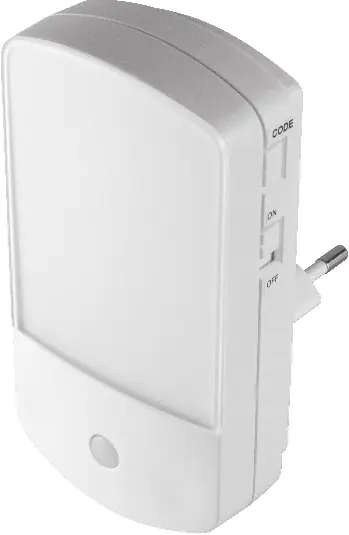
The set consists of a receiver unit and a push button transmitter. The receiver features a night light with an ON/OFF switch and a melody selection button on the side. The push button is IP44 rated, meaning it is protected against splashing water, making it suitable for outdoor use.
Installation and pairing
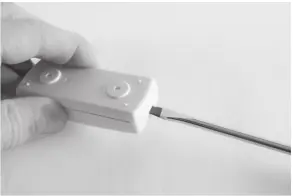
Push button installation: Use a flat-head screwdriver to gently pry open the push button casing. Remove the battery insulation strip to activate the CR2032 battery. Ensure the battery is seated correctly with the positive side facing up.
Pairing the devices: The doorbell uses a self-learning code system. To pair or reset the connection:
- Plug the receiver into a 230V wall socket.
- Press and hold the button on the receiver for a few seconds until you hear an acoustic signal.
- Within 5 seconds, press the push button. The receiver will play a melody to confirm the pairing is successful.
Operation
Melody selection: Press the melody selection button on the side of the receiver to cycle through the 8 available chimes. The selected melody will play once to confirm.
Night light: Use the ON/OFF switch located on the side of the receiver to toggle the night light function. This does not affect the doorbell functionality.
Maintenance and safety
Clean the device only with a soft, dry cloth. Do not use aggressive cleaning agents. The push button is splash-proof, but the receiver must be used indoors only. Keep the battery away from children; if swallowed, seek medical attention immediately. Do not attempt to open the receiver unit.
Manufacturer information
Somogyi Elektronic Kft.
Practical help
Common problems
Doorbell does not ring
Check if the battery in the push button is depleted or installed incorrectly. Ensure the receiver is properly plugged into a live 230V socket.
Interference or false triggering
Electrical appliances or other wireless devices may cause interference. Try re-pairing the devices to generate a new code.
Before use
- Remove the battery insulation strip from the push button.
- Ensure the CR2032 battery is installed with the positive side facing up.
- Plug the receiver into a standard 230V wall socket.
- Verify the push button is within range (up to 100m in open terrain).
Specs in practice
- 256 digital codes
- Self-learning system that prevents interference from other nearby wireless doorbells.
Images and diagrams
- Use a flat-head screwdriver to open the push button housing.
- The receiver side panel contains the melody selection button and the night light ON/OFF switch.
Model compatibility
- Receiver is for indoor use only.
- Push button is suitable for outdoor use (IP44).

Manual page author
Michael Turner
Technical manual editor
Reviews PDF manuals for structure, safety notes, and practical product details so readers can find the right information quickly.