Electronics / Speakers & Soundbars
Somogyi Elektronic TF 10-USB-WH Desktop Fan
Quick guide for the Somogyi Elektronic TF 10-USB-WH desktop fan. Learn how to operate, clean, and safely use your USB-powered fan with this concise manual summary.
Table of contents
Quick guide from the manual
The Somogyi Elektronic TF 10-USB-WH is a compact desktop fan powered via a standard USB connection. It features a 10 cm blade diameter, a protective grid, and an adjustable tilt angle. The device is designed for indoor use only and requires a 5V / 500mA power source.
Product Description
The fan consists of the following main components:
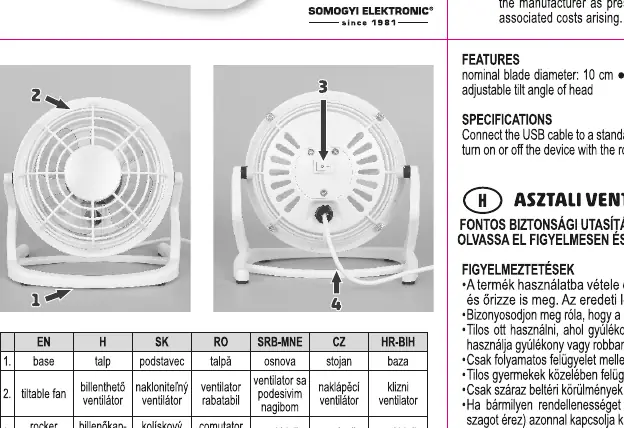
- Base: Provides stability for the unit.
- Tiltable fan head: Allows for adjustment of the airflow direction.
- Rocker switch: Located at the back of the motor, used to turn the fan on and off.
- USB connection cable: Used to power the device.
Operation
To operate the fan, follow these steps:
- Connect the USB cable to a standard 5V USB socket that supports at least 500mA of power.
- Use the rocker switch located on the back of the motor to turn the fan on or off.
Safety Precautions
To ensure safe operation, please adhere to the following guidelines:
- Indoor use only: Do not use the device outdoors.
- Supervision: Operate only under constant supervision. Do not leave the fan running unattended, especially in the presence of children.
- Environment: Do not use the fan in locations where flammable vapors or explosive dust may be present.
- Maintenance: If any irregular operation is detected (e.g., unusual noise or burnt odor), immediately switch off and unplug the device.
- Cleaning: Always power off and unplug the device before cleaning.
- Foreign objects: Ensure no foreign objects or liquids enter the unit through the openings.
Cleaning and Maintenance
Regular maintenance ensures the longevity of the device:
- Always disconnect the USB cable from the power source before cleaning.
- Use a dry cloth to wipe the exterior.
- Do not use aggressive cleaning agents or liquids.
- Ensure the device is completely dry before reconnecting it to power.
Manufacturer information
Somogyi Elektronic Kft.
Practical help
Common problems
Fan does not start
Ensure the USB port provides 5V / 500mA power and the rocker switch is in the ON position.
Unusual noise or burnt odor
Immediately switch off the device and unplug the USB cable from the power source.
Before use
- Verify the USB power source provides 5V / 500mA.
- Place the fan on a stable, flat surface.
- Ensure the area is free of flammable vapors or explosive dust.
- Check that the protective grid is securely in place.
Specs in practice
- Blade diameter
- 10 cm
- Power supply
- 5V / 500mA via USB
Images and diagrams
- 2. Tiltable fan head
- 3. Rocker switch
- 4. USB connection cable
Model compatibility
- Designed for indoor use only.
- Not intended for industrial use.

Manual page author
Michael Turner
Technical manual editor
Reviews PDF manuals for structure, safety notes, and practical product details so readers can find the right information quickly.