Toys / Games
User Guide for Space Attack Game
Comprehensive user guide for the Space Attack retro shooter game. Includes detailed control layouts for keyboard, mouse, and joypad, instructions on ship upgrades, and scoring information for extra lives.
Table of contents
Manual images
Click an image to enlargeQuick guide from the manual
Space Attack is a retro-style shooter game. This guide covers the control schemes for different input devices, the ship upgrade system, and how to earn extra lives during gameplay.
Operation Method
The game supports keyboard, mouse, and joypad inputs. Note that missile functionality is only available starting from stage 2.
Keyboard Controls
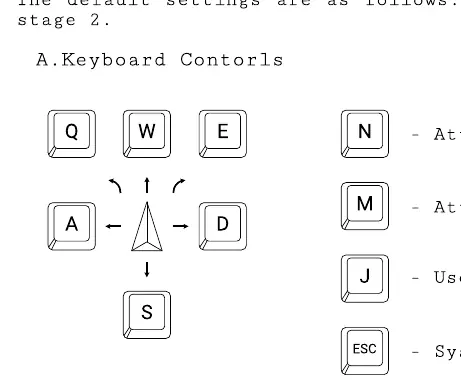
- Movement: W, A, S, D keys.
- Attack with Fire: N key.
- Attack with Missile: M key.
- Use W.M.D.: J key.
- System Menu: ESC key.
Mouse Controls
The mouse is used in conjunction with the keyboard for aiming and firing.
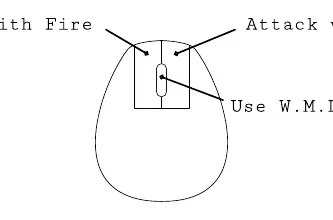
- Attack with Fire: Left mouse button.
- Attack with Missile: Right mouse button.
- Use W.M.D.: Middle mouse button (scroll wheel).
Joypad Controls
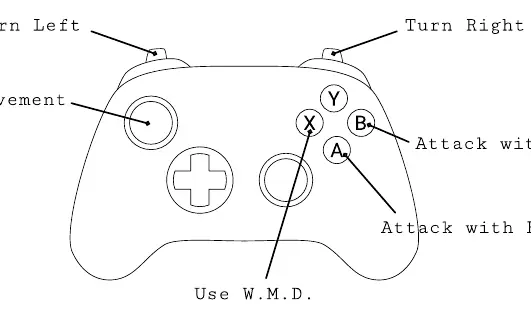
- Movement: Left analog stick.
- Turn Left/Right: Shoulder buttons (L/R).
- Attack with Fire: A button.
- Attack with Missile: B button.
- Use W.M.D.: X button.
Upgrading Attack Ship
As you progress through stages, you can access the upgrade screen. Each upgrade costs 1000 points.
Type of Fire (Arm)
- Non-reacting Super Long Molecule Gun: The most balanced weapon. Upgrades increase bullet speed and damage.
- High Velocity Inelastic Plasma Cannon: Shoots two high-speed bullets forward. Good for pushing enemies away.
- Anti-Molecular Super Gravity Cannon: Fires in three directions. High-powered with piercing capabilities.
Type of Missile (Mine)
- Tactical Fusion Missile: Explodes after a certain distance. Easy to use.
- Guided Tactical Fusion Missile: Requires keeping the targeting radar on the enemy. Powerful, suitable for boss battles.
- Nuclear Fusion Mine: Ejects a mine behind the ship. Defensive weapon.
W.M.D.
Attacks a wide area to break out of difficult situations. Upgrades increase the number of weapons you can carry and the upgrade cost.
Extra Ship
You earn an extra ship when you reach 10,000 points, and one additional ship for every 20,000 points thereafter.
Practical help
Common problems
Cannot use missiles
Missiles are only available starting from stage 2.
Need more lives
Earn an extra ship at 10,000 points, and every 20,000 points thereafter.
Before use
- Ensure your controller or keyboard is connected.
- Check the control layout for your preferred input method.
- Understand that missile functionality unlocks at stage 2.
Specs in practice
- Upgrade Cost
- 1000 points are required for each ship upgrade.
Images and diagrams
- Keyboard layout shows WASD for movement and specific keys for attacks.
- Joypad layout maps movement to the left stick and attacks to the face buttons.
Model compatibility
- Supports keyboard, mouse, and joypad controls.

Manual page author
Emily Carter
User documentation editor
Prepares concise manual descriptions and highlights the most useful setup, operation, and maintenance information for readers.