Music / Instruments
Strich SPT-10 Wireless Music Pedal
Quick setup guide for the Strich SPT-10 Wireless Music Pedal. Learn how to connect via Bluetooth, understand control modes, manage battery charging, and troubleshoot connectivity.
Table of contents
Quick guide from the manual
The Strich SPT-10 is a wireless music pedal designed for page turning on PCs, laptops, iPhones, iPads, iPods, and Android devices. To begin, ensure the device is fully charged using the provided USB cable. Turn the power switch to the ON position to activate the pedal. The device will automatically enter power-saving mode after 25 minutes of inactivity when connected, or 5 minutes when disconnected. Press any pedal to wake it up.
Charging the device
To charge the pedal, turn it off first. Connect it to a power source using the provided USB cable.
- Charging: The power indicator light is red.
- Fully Charged: The power indicator light is green.
- Charging Time (5V power): Approximately 3 hours.
- Charging Time (PC USB): 6 to 8 hours (may be longer if the PC battery is low).
Important: Do not wipe the device with a wet cloth while it is charging.
Control Models
The pedal features five different control models to suit various applications. Because different apps respond to different control models, you may need to test which model works best with your specific software.
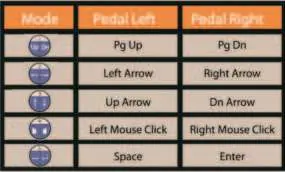
- Mode 1: Pedal Left: Pg Up | Pedal Right: Pg Dn
- Mode 2: Pedal Left: Left Arrow | Pedal Right: Right Arrow
- Mode 3: Pedal Left: Up Arrow | Pedal Right: Dn Arrow
- Mode 4: Pedal Left: Left Mouse Click | Pedal Right: Right Mouse Click
- Mode 5: Pedal Left: Space | Pedal Right: Enter
Indicator Lights
The power indicator light provides feedback on battery status and connection:
- Green: Battery above 60%
- Blue: Battery above 30%
- Red: Battery above 20%
- Connecting: R-G-B light twinkles alternately (200ms per color).
- Connected: Low frequency circle flash (500ms on, 1500ms off).
- Beyond Range: Circle flash (600ms on, 600ms off).
- Loss of Connection: Low frequency circle flash (200ms on, 200ms off).
Maintenance
To keep the device in good condition:
- Always turn off the device before charging.
- Do not use wet cloths for cleaning while the device is charging.
- Clean the device using a clean, soft wiper.
Practical help
Common problems
Device is disconnected or out of range
The device will reconnect automatically once it is back within the receiving distance.
App does not respond to pedal presses
Different apps respond to different control models. Try switching to a different control model to find the one compatible with your app.
Before use
- Charge the device fully before using it outdoors.
- Turn off the device before connecting it to a charger.
- Ensure you are using the provided USB cable.
- Verify your device (PC, Android, iOS) has Bluetooth enabled.
Specs in practice
- Operating Distance
- Up to 10 meters (33 feet).
- Operating Frequency
- 2402-2480MHz.
Images and diagrams
- The middle panel contains the Power switch, Repeat switch, and the Power indicator light.
- There are two foot pedals, one on each side of the middle panel.
- The Repeat switch, when ON, allows for continuous page switching when the pedal is long-pressed.
Model compatibility
- Compatible with PC, laptop, iPhone, iPad, iPod, and Android devices.
- Software compatibility depends on third-party apps; functionality may change after app updates.

Manual page author
Emily Carter
User documentation editor
Prepares concise manual descriptions and highlights the most useful setup, operation, and maintenance information for readers.