Power / Batteries Chargers
User Manual for Electro-Harmonix 720 Stereo Looper Pedal
Quick guide for the Electro-Harmonix 720 Stereo Looper. Learn how to record, overdub, manage loops, use effects, and configure settings.
Table of contents
Quick guide from the manual
The Electro-Harmonix 720 Stereo Looper provides 12 minutes of high-quality, uncompressed stereo recording time (24-bit/44.1kHz) and the ability to store 10 independent loops. The device features reverse and half-speed effects, adjustable fadeout times, and a programmable second footswitch. It can be powered by an AC adapter or a 9V battery.
Controls and Indicators
LEVEL Knob: Controls the output level of the loop being played. The dry signal remains at unity gain and analog throughout the unit.
LOOP Footswitch: Used to record, overdub, playback, stop, and undo/redo loops.
STOP/FX Footswitch: Can be set to either STOP mode or FX mode. Press and hold the PUSH: MODE button for 2 seconds to toggle between these modes. A dot appears on the display next to the STOP label when in STOP mode.
LOOP Knob and PUSH: MODE Button: The knob is a rotary encoder used to select modes (L=Loop Select, p=Loop Progress, F=Fadeout Time) and adjust values (0-9). Press the MODE button to cycle through modes and select them.
Recording and Playback
Recording a Loop: Select an empty bank and press the LOOP footswitch once. The REC LED will light solid. Press the LOOP footswitch again to stop recording; the PLAY LED will turn on and the loop will begin playing.
Recording an Overdub: While a loop is playing, press the LOOP footswitch once. The REC LED will turn on. Press the LOOP footswitch again to stop overdubbing. The loop will continue to play with the overdubbed audio.
Stopping Playback: Press the LOOP footswitch twice quickly, or press the STOP footswitch once.
Loop Management
Erasing a Loop: Stop playback first. Press and hold the STOP (FX) footswitch for 2 seconds. The MEM LED will blink four times to indicate the loop is erased.
Loop Select Mode (L): Use the LOOP knob to select banks 0-9.
Loop Progress Mode (p): Displays the loop's progress. For loops under 10 seconds, it counts in seconds; for longer loops, it counts in tenths.
Fadeout Mode (F): Allows you to set a fadeout time (0-9). A value of 0 disables fadeout. Other values correspond to specific times ranging from 1 to 60 seconds.
Effects and Advanced Settings
Reverse and 1/2 Speed: Press the respective buttons to enable these effects. They can be used at any time during playback or overdubbing.
Undo-Redo: During playback, press and hold the LOOP footswitch for 2 seconds to undo the last overdub. Repeat the action to redo it.
Looping Order: You can initialize different workflows (REC/PLAY/DUB or REC/DUB/PLAY) by unplugging the power, then plugging it back in while holding the REVERSE or 1/2 SPEED button respectively.
Factory Restore: Unplug the power, then plug it back in while holding the LOOP footswitch for three seconds until the REC, PLAY, and MEM LEDs flash.
Connections and Power
Inputs/Outputs: The unit features 1/4" Left (Mono) and Right inputs and outputs. Use the MONO/L input for mono signals. The MONO/L output jack acts as a power switch when using a battery; disconnect the cable when not in use to save battery life.
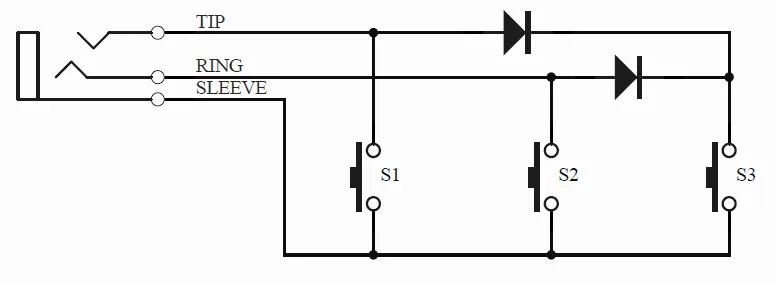
External Footswitch: The FC Jack (1/4" TRS) supports external 3-button controllers (e.g., Digitech FS3X) for bank up/down and undo/redo functions.
Power: Requires 9VDC, 75mA (max) with a center-negative plug.
Practical help
Common problems
MEM LED blinks twice when attempting to record
The loop memory is full. Select a bank with recorded memory and erase it to free up space.
Loop not saved after power loss
Any loop or overdub being recorded at the time of power loss will not be saved.
Fadeout not working
Ensure the Fadeout value is set to something other than '0' in Fadeout Mode.
Before use
- Ensure you are using a 9VDC power supply with a center-negative plug (75mA max).
- If using a battery, disconnect the cable from the MONO/L OUTPUT jack when not in use to save power.
- Check that your input signal level does not exceed +6 dBu.
- If using an external footswitch, ensure it is a compatible 3-button TRS controller.
Specs in practice
- Loop Recording Time
- 12 minutes total across 10 independent loops.
- Audio Quality
- 24-bit A/D/A conversion with 44.1kHz sample rate.
- Input Impedance
- 1MΩ for both Left and Right inputs.
- Power Requirement
- 9VDC, 75mA typical draw, center-negative plug.
Images and diagrams
- The FC Jack circuit diagram shows how to wire a 3-button foot controller: TIP/S1 for Undo-Redo, RING/S2 for Bank Down, and TIP+RING/S3 for Bank Up.
Model compatibility
- Compatible with Boss and Ibanez style AC adapters.
- Recommended external footswitch: Digitech FS3X.

Manual page author
Emily Carter
User documentation editor
Prepares concise manual descriptions and highlights the most useful setup, operation, and maintenance information for readers.