Lighting / Fixtures
Sunco 4" LED Selectable Slim Downlight User Manual
Quick guide for the Sunco 4" LED Selectable Slim Downlight. Includes installation steps, wiring instructions, CCT color selection, troubleshooting, and technical specifications.
Table of contents
Manual images
Click an image to enlargeQuick guide from the manual
This document provides installation and operation instructions for the Sunco 4" LED Selectable Slim Downlight. The fixture features a selectable color temperature (CCT) switch and is designed for damp locations. Professional installation is recommended.
What's in the box
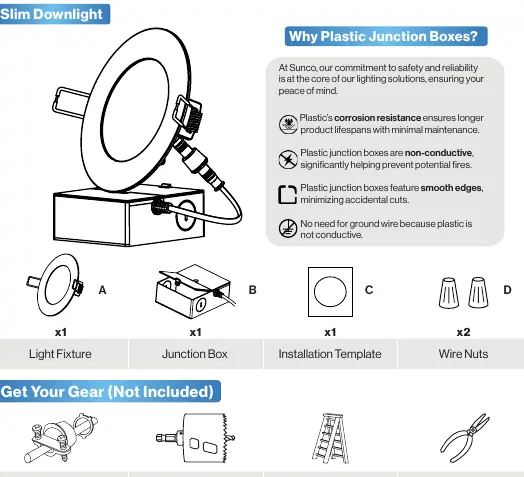
- Light fixture
- Junction box
- Installation template
- Wire nuts
Safety Information
- Turn off the circuit breaker before installation.
- Suitable for damp locations (-4°F to 104°F). Not for use where directly exposed to water.
- Not compatible with 3rd party sensors, photo controls, occupancy sensors, or timing devices.
- Proper grounding is required.
Installation Guide
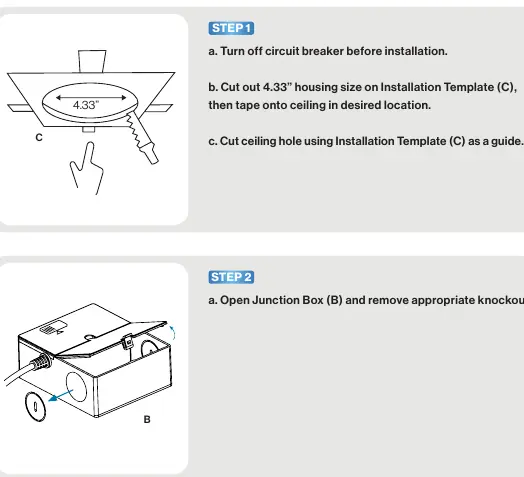
- Prepare the ceiling: Use the provided installation template to cut a 4.33" hole in the ceiling.
- Prepare the junction box: Open the junction box and remove the appropriate knockout.
- Wiring: Thread the wire clamp through the knockout, secure wires, and connect the luminaire and junction wires using wire nuts. Connect Black to Black (Live) and White to White (Neutral). No ground wire is required.
- Select CCT: Slide the CCT switch on the junction box to select the desired color temperature.
- Mounting: Attach the fixture to the junction box using the connector and tighten by hand.
- Final installation: Insert the junction box through the ceiling hole. Push up the spring clips and insert the fixture into the ceiling.
- Test: Turn on the circuit breaker and test the light.
Troubleshooting
- Light isn't turning on: Double-check if the fixture is properly connected and the circuit breaker hasn't been tripped.
- Light flickering: Check that fixture wiring connections are secure and verify dimmer compatibility.
- Buzzing: Look for nearby interference (televisions, radios, computers) or verify dimmer switch compatibility.
Specifications
- Voltage: 120 V
- Wattage: 10 W
- Lumens: 650 lm
- CCT: 2700K - 6000K (Selectable)
- Average Lifetime: 50,000 Hours
- Moisture Rating: Damp Rated
- Warranty: 7 Years
Practical help
Common problems
Light isn't turning on
Double check if fixture is properly connected and circuit breaker hasn't been tripped.
Light flickering
Check that fixture wiring connections are secure and verify dimmer compatibility.
Fixture buzzing
Look for nearby interferences like televisions or radios, or verify dimmer switch compatibility.
Before use
- Turn off circuit breaker
- Use template to cut 4.33 inch hole
- Verify dimmer compatibility
- Ensure damp location suitability
- Check for shipping damage
Images and diagrams
- Step-by-step installation diagrams provided in the manual.
- Wiring diagram shows connection of Black to Black and White to White wires.
Model compatibility
- Not compatible with 3rd party sensors.
- Not compatible with photo controls.
- Not compatible with occupancy sensors.
- Not compatible with timing devices.

Manual page author
Emily Carter
User documentation editor
Prepares concise manual descriptions and highlights the most useful setup, operation, and maintenance information for readers.