Home / Security
User Manual for Sygonix Outdoor PTZ Wi-Fi Camera
Quick guide for the Sygonix Outdoor PTZ Wi-Fi Camera. Includes installation steps, app pairing instructions, technical specifications, and safety guidelines.
Table of contents
Quick guide from the manual
This document provides essential instructions for the Sygonix Outdoor PTZ Wi-Fi Camera. The camera is designed for outdoor use (IP65 rated) and connects via Wi-Fi or LAN. It features motion detection, 2-way audio, and night vision capabilities. Use the Smart Life - Smart Living app for remote access and control.
Safety Instructions
- General: The device is not a toy. Keep away from children and pets. Protect from extreme temperatures, direct sunlight, and mechanical stress.
- Power: Use only the supplied power adapter. Ensure the mains outlet is easily accessible. Disconnect during storms.
- Ingress Protection: The camera is IP65 rated. Ensure the power cable is connected in a weatherproof box or routed indoors via a weatherproof inlet. Keep the compartment cover properly sealed.
- Mounting: Check for concealed wires or pipes before drilling.
Installation
Choosing a location
The camera's placement affects the recording and motion detection angles. Ensure the device is within range of your network access point (Wi-Fi or max 100m for LAN). Avoid placing the camera behind glass to prevent glare from infrared LEDs.
Mounting
- Use the holes on the mounting plate as a template to mark drill points.
- Insert plastic dowels if necessary.
- Fix the mount to the wall using the supplied screws.
- Screw the device onto the mount.
- Ensure the camera is securely attached before letting go.
Getting Ready for Operation
Remove the protective film from the camera lens before use. To insert a microSD card, open the compartment cover, insert the card until it clicks, and ensure the rubber gasket is properly seated when replacing the cover.
Operation and Pairing
The camera powers on automatically when connected. If not paired, it will beep at regular intervals. To pair, use the Smart Life - Smart Living app. The connection pathway is: Add device -> Video Surveillance -> Smart Camera. If the camera malfunctions or needs re-pairing, press and hold the Reset button for 4-5 seconds until you hear a beep.
Care and Cleaning
Disconnect from power before cleaning. Use a dry, fibre-free cloth. Do not use aggressive cleaning agents or chemical solutions.
Technical Specifications
- Resolution: 1920 x 1080p (Full HD)
- Power Input: 5V/DC, 1A
- Ingress Protection: IP65
- Storage: microSD card (Class 10, max 128 GB, FAT32/exFAT)
- Wireless: IEEE 802.11 b/g/n, 2.4 GHz
- Operating Temperature: -20 to +40 °C
Manufacturer information
Sygonix GmbH
Practical help
Common problems
Camera not pairing with app
Ensure your phone is connected to a 2.4 GHz Wi-Fi network and that you have the correct router password.
No video clips saved
Check if a microSD card is inserted and that it is not full.
Image overexposed
Avoid placing the camera behind glass, as infrared LED glare can cause overexposure.
Before use
- Remove the protective film from the camera lens.
- Format the microSD card to FAT32 or exFAT.
- Ensure a 2.4 GHz Wi-Fi network is available.
- Check for concealed wires or pipes before drilling.
- Ensure the compartment cover is properly sealed with the rubber gasket.
Images and diagrams
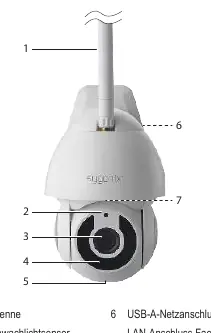
- 2: Low light sensor
- 5: Microphone
- 6: USB-A power socket / LAN socket
- 7: Compartment (microSD slot/reset button)
Model compatibility
- Compatible with 2.4 GHz Wi-Fi networks only.
- Supports Android 4.2 or higher and iOS 9.0 or higher.

Manual page author
Michael Turner
Technical manual editor
Reviews PDF manuals for structure, safety notes, and practical product details so readers can find the right information quickly.