Electronics / Televisions
Sylvox 15.6-inch Portable TV User Manual
Quick guide for the Sylvox 15.6-inch Portable TV. Learn how to set up your TV, connect to Wi-Fi, pair the remote, troubleshoot common issues, and understand safety instructions.
Table of contents
Manual images
Click an image to enlargeQuick guide from the manual
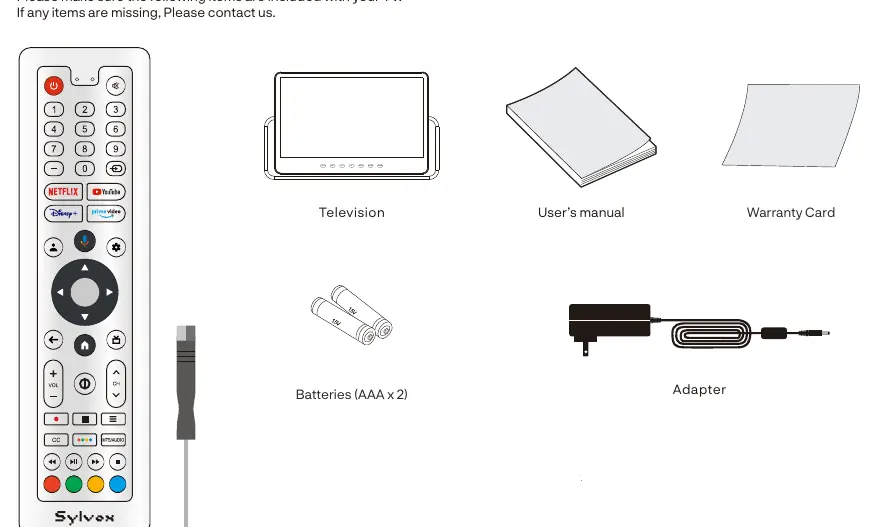
This manual provides instructions for the Sylvox 15.6-inch Portable TV. Before using the device, ensure you have all included accessories: remote control, screwdriver, power adapter, and batteries. The TV is intended for outdoor and general use. Always ensure the ventilation slots are clear to prevent overheating. If moving the TV from a cool area to a warmer one, wait at least one hour before plugging it in to avoid condensation damage.
Overview
The TV features a speaker, remote control sensor, and a battery charging indicator light on the front. The rear panel includes a USB input, RF input for antenna/cable, and a DC 12V input. Buttons on the unit allow for power control, source selection, volume adjustment, and channel changing.
Remote Control
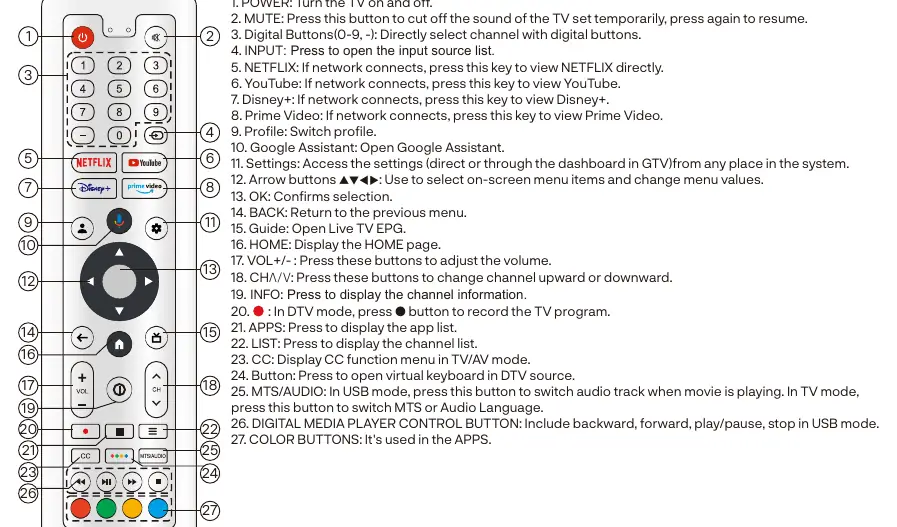
The remote control provides full access to TV functions, including power, volume, channel selection, and direct access to streaming services like Netflix, YouTube, Disney+, and Prime Video. It also features a Google Assistant button, settings access, and media playback controls for USB mode.
Installation
Installing Batteries: Use the included screwdriver to remove the four screws on the battery cover. Insert two 1.5V AAA batteries, ensuring correct polarity. Secure the cover back with the screws.
Antenna Connection: The TV has a 75ohm antenna input. If using a 300ohm parallel flat feeder cable, a 300ohm/75ohm converter is required.
TV Operation
Upon initial power-on, follow the on-screen wizard to pair the remote, select the system language, connect to Wi-Fi, and set up your Google TV account. You can manage settings, privacy, apps, and accessibility features through the main menu. The TV supports Bluetooth device pairing for headphones or game controllers via the 'Remotes & Accessories' menu.
Troubleshooting
If you encounter issues, check the following:
- No power: Ensure the power cord is plugged in and the outlet works. Unplug and restart after 60 seconds.
- No picture: Check antenna connections and tune to another station.
- No sound: Increase volume, check mute status, and verify sound settings.
- Remote not responding: Check batteries, clean the remote lens, and ensure you are within 8 meters of the TV.
- Picture breaking up: Keep the TV away from noisy electrical sources and check antenna connections.
Warranty
Sylvox offers a 12-month free warranty. For assistance, contact support via email at [email protected] or visit www.sylvoxtv.com. The warranty does not cover damage from improper use, unauthorized repairs, or external factors like lightning strikes.
Official resources from the manual
Practical help
Common problems
No power
Check if the power cord is plugged in and the outlet works. Unplug the power cord, wait 60 seconds, and restart the TV.
No picture
Check antenna connection and ensure you are tuned to a valid station. Adjust contrast and brightness settings.
Good picture but no sound
Increase volume, check if Mute is on, and verify sound settings. Ensure no headphone jack is connected.
No response to remote control
Replace batteries, clean the remote lens, and ensure you are within 8 meters of the TV with a clear path.
Picture is breaking up
Keep the TV away from noisy electrical sources (e.g., hair dryers, welders) and check antenna connections.
Before use
- Verify all accessories are included: Remote, Screwdriver, Adapter, Batteries, Warranty Card.
- Install two 1.5V AAA batteries into the remote control.
- Connect the TV to a power supply using the provided adapter.
- Connect an antenna or cable if you intend to watch broadcast TV.
- Place the TV on a stable, flat surface.
Specs in practice
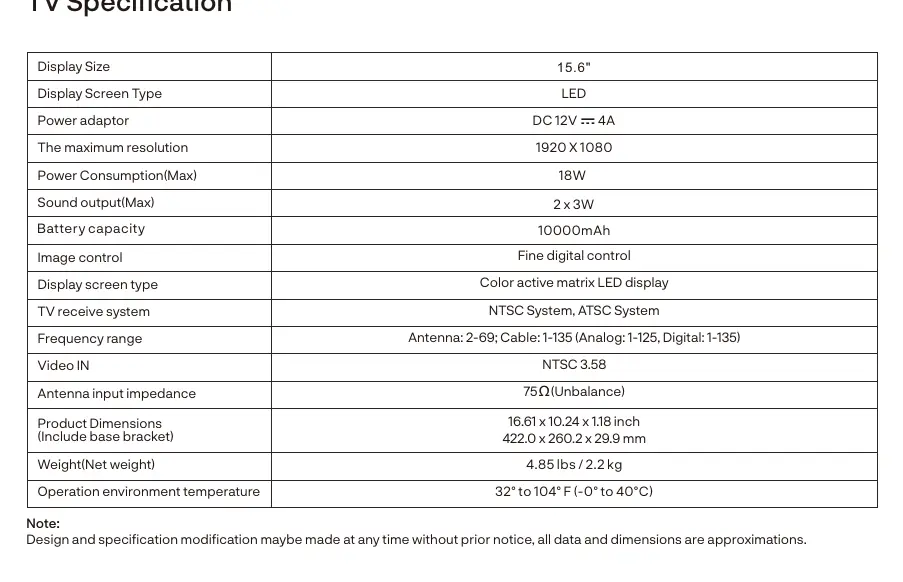
- Display Size
- 15.6-inch LED screen.
- Power Adaptor
- DC 12V 4A.
- Battery Capacity
- 10000mAh (internal battery).
Images and diagrams
- Remote control layout showing power, volume, channel, and app buttons.
- TV rear panel showing USB, RF, and DC 12V ports.
- Battery installation steps using the provided screwdriver.
- Antenna connection diagram for 75ohm and 300ohm cables.
Model compatibility
- USB playback supports FAT32 format only.
- Supports Bluetooth devices like headphones and game controllers.
- Compatible with Google TV features and apps.
- CEC feature allows operation of linked brand devices.

Manual page author
David Miller
Documentation analyst
Organizes user manual content into clear summaries, with attention to model details, product context, and everyday usability.