Electronics / Televisions
User Manual for Sylvox 120Hz Waterproof Outdoor TV
Quick guide for the Sylvox 120Hz Waterproof Outdoor TV. Includes installation steps, remote control functions, connection diagrams, and troubleshooting tips.
Table of contents
Manual images
Click an image to enlargeQuick guide from the manual
This manual provides essential instructions for the setup and operation of the Sylvox Waterproof Outdoor TV. Key safety precautions include ensuring the TV is installed in a well-ventilated area, avoiding direct sunlight, and not enclosing the unit in a sealed box or embedding it in a wall. Always disconnect the TV during extreme weather or long periods of inactivity.
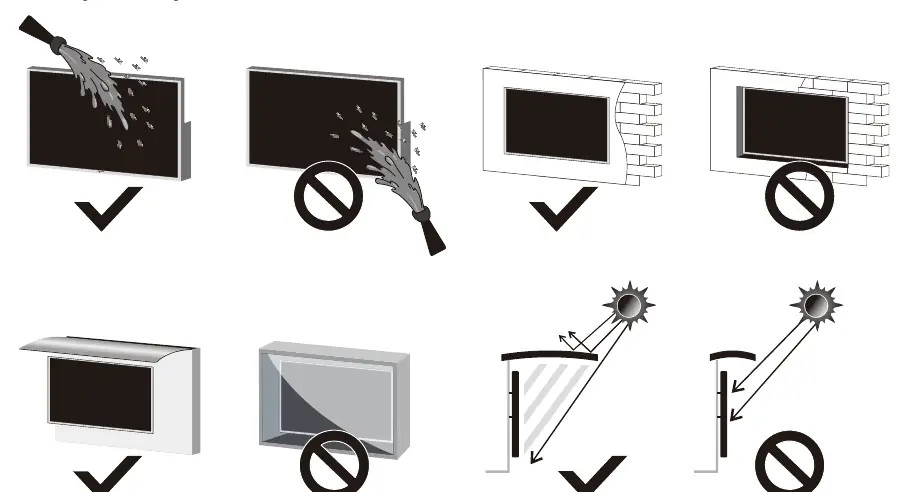
Installation
The TV is suitable for outdoor use. Mounting brackets are not supplied with the TV. Ensure the mounting surface is strong enough to support the weight of the screen. It is advised that two people perform the installation.
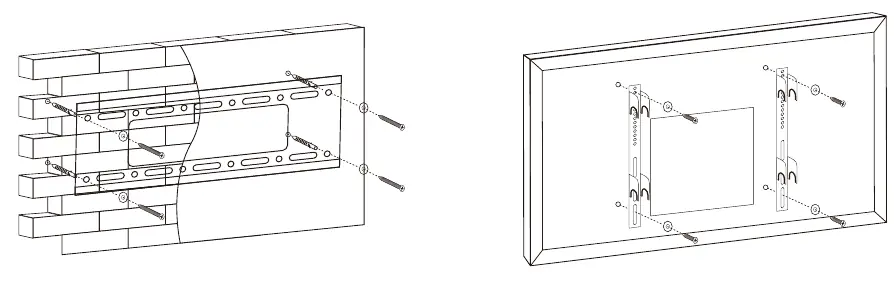
- Step 1: Fix the horizontal bracket to the wall using screws.
- Step 2: Fix the vertical brackets to the back of the TV using M8 screws.
- Step 3: Attach the TV with brackets to the wall-mounted horizontal bracket.
Overview and Connections
To access the connection ports, remove the waterproof panel on the back of the TV. Available ports include:
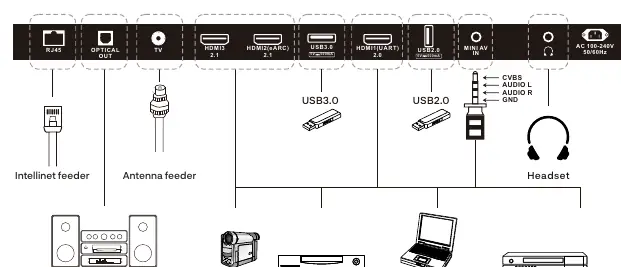
- RJ45: Ethernet connection.
- OPTICAL OUT: Digital audio output.
- TV: External antenna input.
- HDMI 1/2/3: HDMI signal input.
- USB 3.0/2.0: USB input.
- MINI AV: AV signal input.
- EARPHONE OUT: Headphone connection.
Remote Control
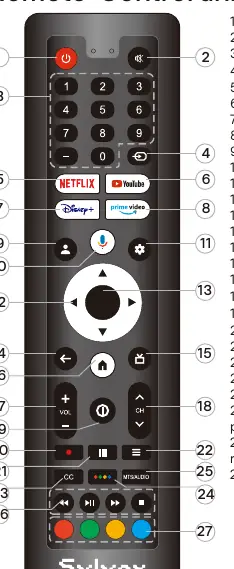
The remote control includes dedicated buttons for power, volume, channel selection, and direct access to streaming services like Netflix, YouTube, Disney+, and Prime Video. It also features a Google Assistant button and color-coded buttons for app navigation.
Initial Setup
Upon powering on the TV, follow the on-screen wizard to pair the Bluetooth remote, select the system language, and configure Google TV or Basic TV settings. You can connect to Wi-Fi, set your location, time zone, and perform channel installation.
Troubleshooting
If you encounter issues, check the following:
- No power: Check the power cord and outlet.
- No picture: Check antenna connection or tune to another station.
- No sound: Increase volume, check mute status, or verify sound settings.
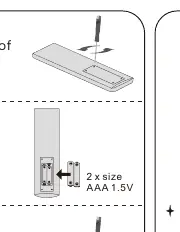
- Remote unresponsive: Replace batteries and ensure the remote is within 8 meters of the TV.
- Picture breaking up: Keep the TV away from noisy electrical sources and check antenna connections.
Specifications
The TV is available in 55", 65", and 75" sizes, all featuring a 3840 x 2160 resolution, 16:9 aspect ratio, and an operating temperature range of -30°C to 50°C (-22°F to 122°F).
Warranty
Sylvox offers a 12-month free warranty. For assistance, contact support at [email protected] or visit www.sylvoxtv.com.
Official resources from the manual
Practical help
Common problems
No power
Check that the power cord is plugged in and the outlet works. Unplug for 60 seconds and restart.
No picture
Check antenna connection, tune to another station, or adjust contrast and brightness settings.
Good picture but no sound
Increase volume, check mute mode, verify sound settings, and ensure no headphones are connected.
No response to remote control
Replace batteries, clean the remote lens, and ensure you are within 8 meters of the TV.
Picture is breaking up
Keep the TV away from noisy electrical sources (cars, hair dryers, welders) and check antenna connections.
Before use
- Ensure the mounting surface is strong enough to hold the TV.
- Use two people for installation.
- Check that all accessories (remote, batteries, screws) are included.
- Remove the waterproof panel on the back to access ports.
- Pair the remote control with the TV during initial setup.
Specs in practice
- Operating Temperature
- -30°C to 50°C (-22°F to 122°F), suitable for outdoor environments.
- Audio Output
- L/R 12W x 2 speakers.
- Power Supply
- AC 100-240V 50/60Hz.
Images and diagrams
- Wall mounting: Shows horizontal bracket to wall, vertical bracket to TV, and attaching TV to bracket.
- Connection ports: Shows layout of RJ45, Optical, HDMI, USB, and AV ports.
- Remote control: Numbered diagram identifying all buttons.
Model compatibility
- Wall mount: Suitable for 43"–75" Outdoor TVs.
- VESA Standard: 400 x 400 mm for 55", 65", and 75" models.

Manual page author
David Miller
Documentation analyst
Organizes user manual content into clear summaries, with attention to model details, product context, and everyday usability.