Electronics / Data Center Infrastructure
User Manual for 19-inch Rack Mount Outlet (Slim Type)
Quick guide for the 19-inch Rack Mount Outlet (Slim Type). Includes installation instructions, wiring diagrams, usage procedures, safety warnings, and technical specifications.
Table of contents
Manual images
Click an image to enlargeImportant Information
This manual provides instructions for the 19-inch Rack Mount Outlet (Slim Type). This device is designed for installation in 19-inch racks and features an anti-pullout mechanism, LED indicator, and a durable aluminum alloy body. The total load must not exceed 15A at 125V.
Safety Precautions
- Electrical Safety: Do not exceed the rated 15A total load. Ensure the device is properly grounded.
- Environment: Do not install in locations with water, high humidity, high temperatures, dust, or corrosive gases (ammonia, sulfur).
- Handling: Do not disassemble or modify the unit. Do not touch with wet hands.
- Cabling: Do not bend or pull the power cable excessively.
Installation
The unit is designed for 19-inch rack mounting. Use M5 or M4 screws for secure attachment. Ensure the rack structure can support the weight and force applied during plug insertion and removal.
Wiring Instructions
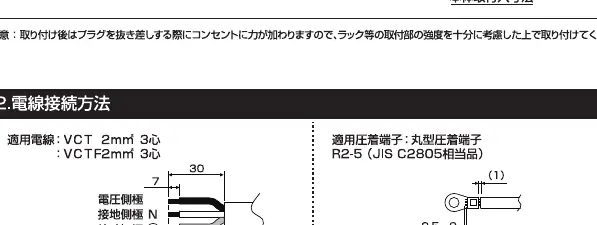
- Remove the terminal cover by loosening the screws.
- Loosen the cord clamp screws.
- Use VCT 2mm² (3-core) cable and R2-5 crimp terminals.
- Connect wires to the appropriate terminals.
- Tighten terminal screws to a torque of 1.8–2.0 N·m.
- Reinstall the cord clamp and terminal cover securely.
Usage
The outlet features a locking mechanism to prevent accidental disconnection:
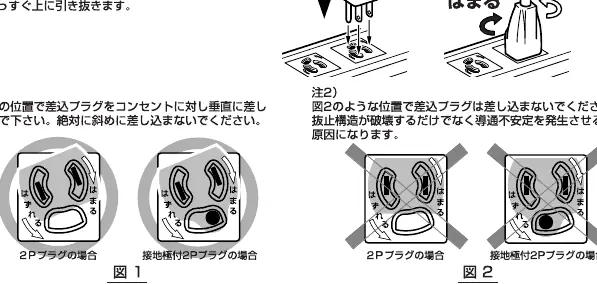
- To Insert: Insert the plug into the outlet and rotate it to the 'Lock' (Hameru) position.
- To Remove: Rotate the plug to the 'Unlock' (Hazureru) position, then pull straight out.
- Warning: Do not insert the plug at an angle or force it, as this may damage the internal structure.
Technical Specifications
- Rating: 15A 125V
- Terminal Screws: M5 x P0.8
- Compatible Cable: VCT 2mm² (3-core)
- Crimp Terminal: R2-5 (JIS C2805 equivalent)
- Operating Temperature: -5°C to 40°C (24-hour average must not exceed 35°C)
- Operating Humidity: Below 85% (no freezing or condensation)
- Altitude: Below 2,000m
Practical help
Common problems
Plug pulls out easily
Ensure the plug is fully inserted and rotated to the 'Lock' position as indicated in the usage diagram.
Overheating or fire risk
Verify that the total load does not exceed 15A. Ensure terminal screws are tightened to the specified torque of 1.8–2.0 N·m.
Before use
- Verify total electrical load is 15A or less
- Confirm installation environment is free from water, dust, and corrosive gases
- Use VCT 2mm² (3-core) cable
- Use R2-5 crimp terminals for wiring
- Tighten terminal screws to 1.8–2.0 N·m
Specs in practice
- VCT 2mm² (3-core)
- Required cable specification for safe power transmission.
Images and diagrams
- Wiring diagram illustrates the correct stripping length for cables and the installation of the cord clamp.
- Usage diagram shows the rotation mechanism required to lock and unlock plugs from the outlet.
Model compatibility
- Designed specifically for 19-inch rack mounting.
- Compatible with standard 2-pole grounding plugs.

Manual page author
Michael Turner
Technical manual editor
Reviews PDF manuals for structure, safety notes, and practical product details so readers can find the right information quickly.