Electronics / Data Center Infrastructure
Cabling Solutions Guide for Arista 100G & 200G Transceivers
A comprehensive design and configuration guide for CommScope SYSTIMAX Propel cabling solutions compatible with Arista 100G and 200G fiber optic transceivers, including connection diagrams, breakout options, and panel configurations.
Table of contents
Manual images
Click an image to enlargeQuick guide from the manual
This document serves as a design and configuration guide for implementing CommScope's SYSTIMAX Propel cabling solutions with Arista 100G and 200G fiber optic transceivers. It provides reference diagrams and options for application scenarios using MPO-8 and MPO-16 based trunk cabling or direct connect equipment cords.
Arista 100G/200G transceiver models
The guide includes a comprehensive table (Table 1) listing supported Arista transceivers. Before designing your cabling, identify your specific transceiver part number to determine the required connector type (e.g., MPO-12 UPC, LC-Duplex, CS) and reach capabilities for OM3, OM4, or OS2 fiber types.
Cabling system design
The Propel system offers flexible connectivity options based on your transceiver and bandwidth requirements:
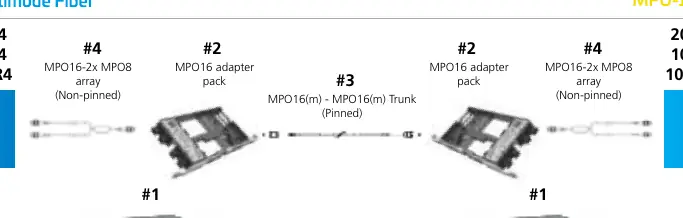
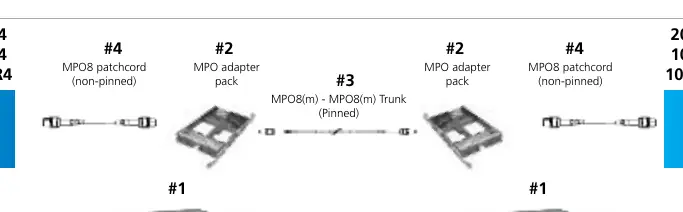
- MPO-8 Based: Suitable for applications requiring 8-fiber connectivity.
- MPO-16 Based: Designed for higher density 16-fiber connectivity.
- Direct Connections: For simple point-to-point links using equipment cords.
- Trunk Cabling: Reference diagrams are provided for MPO-8 and MPO-16 trunk configurations, detailing the use of adapter packs and patch cords.
Breakout options
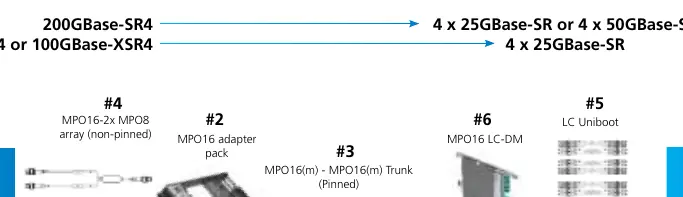
For scenarios requiring port breakout (e.g., splitting a 100G/200G port into multiple 25G or 50G connections), refer to the breakout options section. This section details the supported breakout modes and necessary configurations, including forward error correction (FEC) requirements for link-up.
Panel selection and capacity
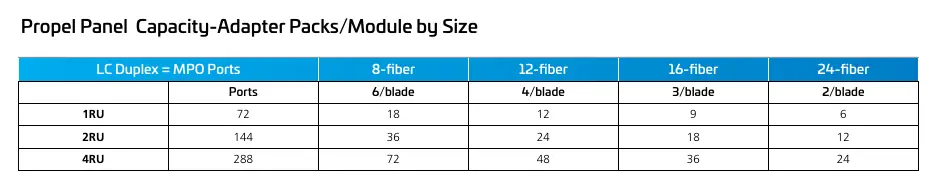
The guide provides a panel index to help you select the appropriate Propel sliding panel (1RU, 2RU, or 4RU). Use the capacity charts to determine the number of ports supported per blade based on the fiber count (8, 12, 16, or 24-fiber) of your adapter packs or modules.
Manufacturer information
CommScope Holding Company, Inc.
Practical help
Common problems
Link-up failure during breakout configuration
Ensure that the same forward error correction (FEC) mode is configured on both ends of the connection.
Incorrect cabling density
Verify if your application requires MPO-8 or MPO-16 based cabling and select the corresponding Propel modules and trunk cables.
Before use
- Identify the specific Arista transceiver model (e.g., QSFP-100G-SR4).
- Determine if the application requires direct connection or the Propel cabling system.
- Check the required fiber type (OM4, OM5, or OS2) and connector type.
- Select the appropriate Propel panel size (1RU, 2RU, or 4RU) based on port density requirements.
- Confirm if MPO-8 or MPO-16 trunk cabling is required for your infrastructure.
Specs in practice
- MPO-8 / MPO-16
- Refers to the fiber count and connector type used in the trunk cabling system.
Images and diagrams
- The guide provides reference diagrams for MPO-8 and MPO-16 based trunk cabling, illustrating the path from the transceiver through the patch panel to the destination.
- Breakout diagrams illustrate how to split high-speed ports into multiple lower-speed connections.
Model compatibility
- Arista does not provide 100G-SR2 QSFPs, SFP-DDs, or DSFPs; third-party optics may be required for specific breakout modes.
- MPO-12 applications use 8 fibers and can be run on MPO-8 and MPO-16 infrastructure.

Manual page author
Michael Turner
Technical manual editor
Reviews PDF manuals for structure, safety notes, and practical product details so readers can find the right information quickly.