Music / Instruments
User Guide for TC Electronic Flashback 2 X4 Delay Pedal
Quick start guide for the TC Electronic Flashback 2 X4 Delay pedal. Learn about controls, MASH functionality, connections, and technical specifications.
Table of contents
Manual images
Jump to the sectionQuick guide from the manual
The TC Electronic Flashback 2 X4 Delay is a professional-grade delay pedal. This guide provides the essential steps to connect, configure, and operate the device. Key features include multiple delay types, TonePrint support, looper functionality, and the MASH expression control system. Ensure you use a 9V DC, center negative, 300 mA power supply for proper operation.
Controls and Operation
The top panel features several knobs and switches to shape your sound:
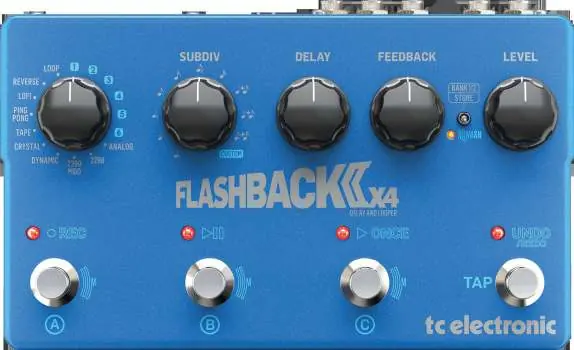
- Delay Type: Selects the delay type, TonePrint 1-6, or the looper mode.
- SUBDIV: Sets the rhythmic subdivision of the beat or custom settings.
- DELAY: Adjusts the delay time.
- FEEDBACK: Determines the number of delay repeats.
- BANK/STORE: Toggle between presets 1-3 or 4-6 by pressing up. Press down to store current settings to the selected preset.
- LEVEL: Adjusts the volume of the delay repeats.
- MASH LED: Indicates the intensity of the MASH functionality.
- Footswitches: Used to select presets 1-3 or 4-6. Press and hold to engage MASH to control selected parameters.
- TAP: Tap in rhythm to set the delay tempo. In looper mode, this performs undo/redo functions.
Connections
The rear panel contains all necessary input and output connections:
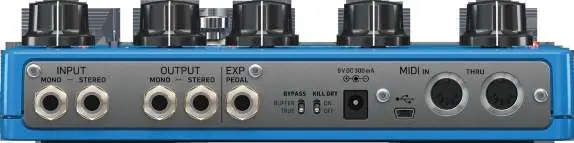
- INPUT: Connect your guitar using a standard 1/4 inch instrument cable. For stereo signals, connect the left channel to Mono and the right channel to Stereo.
- OUTPUT: Connect to the next pedal or amplifier using a 1/4 inch instrument cable. For stereo, send the left signal from the Mono jack and the right from the Stereo jack.
- EXP: Connect an optional expression pedal to control parameters like delay time or feedback.
- BYPASS: Switch between True Bypass or Buffered Bypass operation.
- KILL DRY: Engage to remove the direct signal, sending only the delay signal to the outputs.
- POWER: Connect a 9V DC, center negative, 300 mA power supply.
- USB: Connect to a computer for firmware updates and TonePrint editing.
- MIDI: Connect standard 5-pin DIN cables to control preset changes, MASH, and potentiometer values.
MASH Functionality
The MASH feature allows for real-time expression control. By pressing and holding a footswitch, you can manipulate parameters such as delay time or feedback level dynamically while playing. The MASH LED provides visual feedback on the intensity of this effect.
Specifications
Technical details for the Flashback 2 X4 Delay:
- Inputs/Outputs: 2 x 1/4 inch TS, unbalanced.
- Input Impedance: ≥1 MΩ.
- Output Impedance: 100 Ω.
- Expression Pedal Input: 1/4 inch TRS connector.
- Power Requirements: 9V DC, center negative, ≥300 mA.
- Dimensions: 56 x 235 x 145 mm.
- Weight: 1.3 kg.
- Operating Temperature: Up to 45°C.
Manufacturer information
TC Electronic
Practical help
Common problems
No sound output
Check that the power supply is 9V DC, center negative, and at least 300 mA. Ensure the Kill Dry switch is not engaged if you require a direct signal.
MASH functionality not working
Ensure you are pressing and holding the footswitch firmly. Verify that the parameter is correctly assigned.
Stereo signal issues
Ensure the left channel is connected to the Mono jack and the right channel is connected to the Stereo jack.
Before use
- Verify power supply is 9V DC, center negative, ≥300 mA.
- Use standard 1/4 inch instrument cables.
- Set the Bypass switch (True or Buffered) according to your signal chain requirements.
- If using an expression pedal, ensure it is connected to the EXP jack via a 1/4 inch TRS cable.
Specs in practice
- Input Impedance (≥1 MΩ)
- Standard high impedance input suitable for guitar pickups to prevent signal loss.
Images and diagrams
- Top panel: Contains knobs for Delay Type, Subdiv, Delay, Feedback, Level, and the Bank/Store switch.
- Footswitches: Three switches for preset selection and MASH control.
- Rear panel: Houses Input/Output jacks, EXP pedal input, Bypass/Kill Dry switches, Power input, USB port, and MIDI In/Thru ports.
Model compatibility
- Compatible with standard 1/4 inch instrument cables.
- Supports expression pedals via 1/4 inch TRS connector.
- MIDI control via standard 5-pin DIN cables.
- USB connectivity for firmware updates and TonePrint editing.

Manual page author
David Miller
Documentation analyst
Organizes user manual content into clear summaries, with attention to model details, product context, and everyday usability.