Electronics / Audio
User Manual for TC Electronic MIMIQ DOUBLER Guitar Pedal
Comprehensive user guide for the TC Electronic MIMIQ DOUBLER. Learn how to set up, adjust doubling effects, configure signal chain, update firmware, and switch bypass modes.
Table of contents
Manual images
Jump to the sectionQuick guide from the manual
The MIMIQ DOUBLER is a guitar pedal designed to add studio-grade doubling effects to your signal. To get started, connect a 9V DC power supply (center negative, >100mA) to the power input. Connect your guitar to the mono input on the right side and your amplifier to the output on the left side using 1/4" TS cables. Use the Dubs switch to select the number of additional layers (1, 2, or 3) and adjust the Tightness, Effect, and Dry knobs to shape your sound.
Device description
The MIMIQ DOUBLER captures random nuances in time, attack, and pitch to simulate real studio-grade doubling. It allows you to add up to three additional guitar tracks to your signal, providing everything from subtle riff-fattening to ultra-realistic multi-tracked guitar lines.
Setup and connections
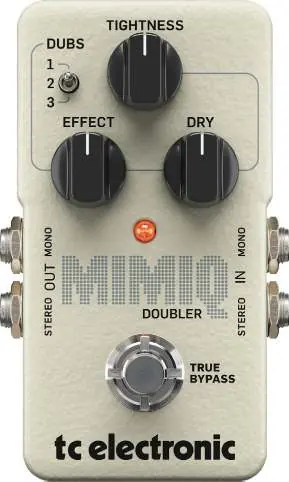
- Power: Connect a 9V DC power supply (standard 5.5/2.1 mm plug, center negative). The pedal requires 100 mA or more. If no power supply is available, a battery can be used.
- Audio Input: Connect your guitar to the mono input on the right side using a standard 1/4" instrument cable. The pedal also accepts stereo signals using a pair of 1/4" TS cables.
- Audio Output: Connect the output on the left side to your amplifier or next device in the signal chain.
- USB: Use the Mini-B USB port to connect to a computer for firmware updates.
Controls
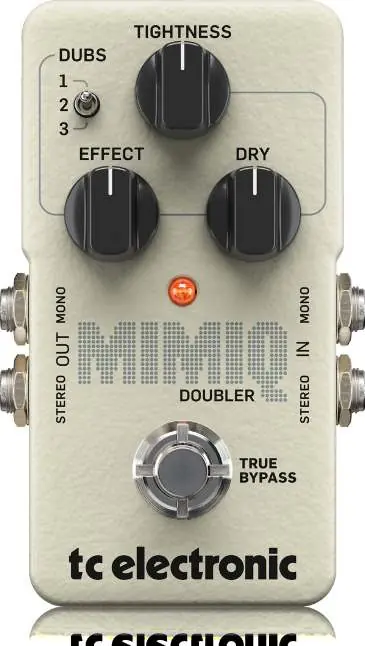
- Dubs: Selects the number of additional guitar layers (1, 2, or 3) to mix with your original signal.
- Tightness: Adjusts the variation in the extra layers. Turning clockwise makes the layers looser (variations in time, pick attack, and pitch).
- Effect: Adjusts the level of the overdubs.
- Dry: Adjusts the level of the input signal sent to the outputs.
- Footswitch: Taps to turn the effect on or off.
Signal chain placement
The pedal can be used in several configurations:
- Before the amp's input: Generally preferred for live use or recording a real guitar amp. Place the MIMIQ after any overdrive/distortion pedals for optimum control.
- In the amp's FX loop: Effective when using the amp's built-in overdrive, ensuring a single overdriven sound enters the pedal.
- Straight to recording interface/DAW: Connect your guitar to the pedal and then to your interface to hear the layered effect in a fully layered context.
Bypass mode
The pedal features two bypass modes:
- True Bypass: The default mode, providing no coloration of tone when the pedal is off. Ideal for setups with a few pedals and relatively short cables.
- Buffered Bypass: Recommended if you use long cables between your guitar and the first pedal, or between your board and the amp, or if you use many pedals on your board.
To switch modes, disconnect the pedal, unscrew the back plate, and use the internal DIP switch located in the upper left corner.
Maintenance
- Firmware Update: Connect the pedal to a computer via USB. Press and hold the footswitch while inserting the power supply. The LED will turn green when ready. Use the firmware updater software on your computer to complete the process.
- Battery Change: Unscrew the thumb-screw on the back, detach the plate, and replace the battery, ensuring correct polarity.
Specifications
- Bypass mode: True Bypass (Buffered Bypass optional)
- Input/Output connectors: 2 x 1/4" TS, unbalanced, mono
- Input impedance: 1 MΩ
- Output impedance: 100 Ω
- Power input: Standard 9 V DC, centre negative, >300 mA
- Dimensions: 93 x 48 x 48 mm
Manufacturer information
TC Electronic
Practical help
Common problems
Excessive hum or noise
Use a power supply with isolated outputs.
Output signal level is inconsistent when switching the pedal on/off
Adjust the Effect and Dry knobs to balance the levels. Turning both up high can provide a boost when the pedal is engaged.
Pedal not recognized for firmware update
Ensure you are holding the footswitch while inserting the power supply, and the LED turns green.
Before use
- Ensure you have a 9V DC power supply (center negative, >100mA).
- Use 1/4" TS instrument cables for connections.
- Decide on signal chain placement (before amp, FX loop, or direct to interface).
- If using a battery, ensure it is installed with correct polarity.
Specs in practice
- Input Impedance
- 1 MΩ, standard for guitar instruments.
Images and diagrams
- The pedal features a 3-way toggle switch for Dubs (1, 2, 3).
- Three main knobs control Tightness, Effect, and Dry levels.
- Stereo inputs and outputs are located on the sides of the pedal.
Model compatibility
- Compatible with mono or stereo setups.
- Requires 9V DC power (not included).
- Firmware updates require a computer with a standard USB interface.

Manual page author
Emily Carter
User documentation editor
Prepares concise manual descriptions and highlights the most useful setup, operation, and maintenance information for readers.