Music / Instruments
Installation Guide for Behringer PRO VSmini Spectral Sound Pack
Step-by-step installation guide for transferring the Spectral Sound Pack to your Behringer PRO VSmini synthesizer. Includes setup instructions, SysEx transfer procedures, and troubleshooting tips.
Table of contents
Manual images
Jump to the sectionQuick guide from the manual
This document provides instructions for transferring the Spectral Sound Pack to the Behringer PRO VSmini synthesizer. The process requires a computer, a stable USB connection, and SysEx librarian software. Important: Always back up your existing patches before starting the transfer, as this process will overwrite existing programs in the target memory locations.

Preparation
Before beginning the installation, ensure you have the following:
- A computer with a stable USB connection.
- SysEx librarian software installed (e.g., 'SysEx Librarian' for Macintosh or 'MIDIOX' for Windows).
- The sysex file: limbic_bits_Behringer PROVS-mini_spectral-sound-pack.
Installation procedure
- Connect your PRO-VSmini to the computer using a USB cable.
- Open your SysEx librarian software and load the sound pack file.
- On the PRO-VSmini, press the Func button.
- Hit key 1 MENU several times until the display shows SysEx Receive Listening. This enables the synth to receive data via USB.
- Configure your SysEx librarian software to send the data by selecting the PRO-VSmini USB connection.
- Transmit the programs. A successful message should appear on the synth display immediately.
- Press Func again to exit and begin using the new sounds.
Troubleshooting
If the transfer fails or errors occur, try the following steps:
- Use a direct USB connection to your computer instead of a USB hub.
- Try using a different USB cable.
- Use a 5-pin MIDI interface instead of a USB connection.
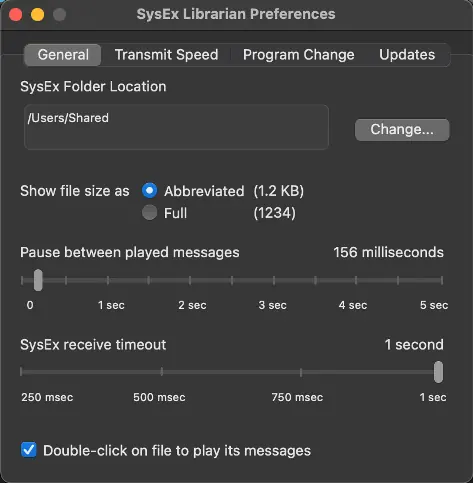
- Adjust the transfer speed in your SysEx software and experiment with the transmit buffer size. A buffer size of 256 is recommended as a starting point.
License conditions
The sounds and samples provided are licensed, not sold, by Limbic Bits. The license is for a single user, is non-transferable, and forbids resale, rental, or distribution of the sounds in isolation or within competitive products. Using this product constitutes acceptance of these terms.
Contact
For support or inquiries, contact Limbic Bits via email at [email protected] or visit their website at https://www.limbicbits.com.
Official resources from the manual
Manufacturer information
Behringer
Practical help
Common problems
Transfer fails or errors occur
Use a direct USB connection instead of a USB hub, try a different USB cable, or use a 5-pin MIDI interface.
Data transfer issues
Slow down the transfer speed in your SysEx software and adjust the transmit buffer size (256 is recommended).
Before use
- Back up your existing patches on the synthesizer.
- Install SysEx librarian software (e.g., SysEx Librarian or MIDIOX).
- Ensure you have the correct sysex file loaded.
- Connect the synthesizer directly to the computer via USB.
Specs in practice
- Transmit buffer size
- A setting in the SysEx software that controls data flow; 256 is recommended for stable transfers.
Images and diagrams
- The SysEx Librarian preferences allow you to configure the transmit speed and buffer size to ensure successful data transfer to the PRO-VSmini.
Model compatibility
- Requires a computer with USB connectivity.
- Requires third-party SysEx librarian software.

Manual page author
Michael Turner
Technical manual editor
Reviews PDF manuals for structure, safety notes, and practical product details so readers can find the right information quickly.