Music / Guitar Effects
User Guide for TC Electronic VIBRACLONE ROTARY Rotating Speaker Emulator
Quick start guide for the TC Electronic VIBRACLONE ROTARY. Learn how to connect your guitar, adjust speed and drive settings, replace the battery, and understand technical specifications.
Quick answers from the manual
Quick answer
- Connect your guitar to the INPUT jack and your amplifier to the OUTPUT jack. Power the unit with a 9V DC adapter or internal 9V battery. Use the Footswitch to engage the effect and the Chorale/Tremolo switch to toggle between slow and fast rotation speeds. p. 1
Key actions
- Toggle Chorale/Tremolo switch while playing to gradually change rotation speed. p. 1
First start
- Connect power, plug in guitar and amplifier, and press the footswitch to engage. p. 1
Show 3 more answers Show less
Maintenance and reset
- Battery replacement is required when the unit fails to power on. p. 2
Technical specifications
| Parameter | Value | Meaning | Pages |
|---|---|---|---|
| Power input | 9V DC | Standard 9V DC, center negative, >100 mA | p. 2 |
| Current consumption | 90 mA | Power draw of the pedal | p. 2 |
Where to find it in the PDF
- Controls and Quick Start p. 1
- Specifications and Battery Replacement p. 2
Table of contents
Manual images
Click an image to enlargeQuick Start Guide
The TC Electronic VIBRACLONE ROTARY is a rotating speaker emulator designed for classic rock tones. To begin, connect your guitar to the INPUT jack and your amplifier to the OUTPUT jack using standard 1/4" cables. Power the unit using a 9V DC power supply (not included) or an internal 9V battery.
Controls
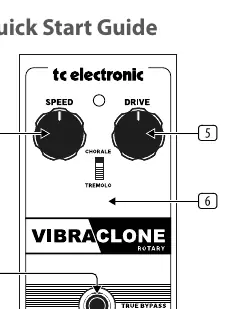
- Input/Output jacks: Connect your guitar to the INPUT jack and your amplifier to the OUTPUT jack.
- 9V DC: Connect a 9V power supply (center negative).
- Footswitch: Engages or disengages the effect. The LED lights up when the pedal is active. The pedal operates in true bypass when disengaged.
- SPEED: Adjusts the speed of the rotation.
- DRIVE: Adjusts the amount of saturation and drive.
- CHORALE/TREMOLO: Selects the speed range. Chorale is slow, and Tremolo is faster. This switch can be moved back and forth while playing to cause the rotation to gradually speed up or slow down.
Battery Replacement
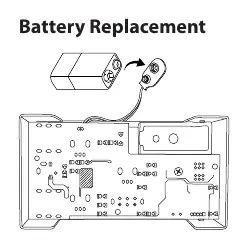
The unit supports an internal 9V battery. Refer to the battery replacement diagram in the manual to access the compartment. Ensure the unit is disconnected from power sources before performing maintenance.
Technical Specifications
- Input/Output: 1/4" TS, unbalanced.
- Impedance: 470 kΩ (Input), 1 kΩ (Output).
- Power Input: Standard 9V DC, center negative, >100 mA.
- Current Consumption: 90 mA.
- Dimensions (H x W x D): 58 x 74 x 132 mm (2.3 x 2.9 x 5.2").
- Weight: 0.5 kg (1.1 lbs).
Manufacturer information
TC Electronic
Practical help
Common problems
No sound output
Check that the 9V power supply is connected and active, or that the battery is charged. Ensure 1/4" cables are securely connected to both the guitar and the amplifier.
LED does not light up
Verify the power source (9V DC adapter or battery) is functioning correctly.
Before use
- Ensure you have a 9V DC power supply (center negative) or a fresh 9V battery.
- Have two 1/4" instrument cables ready.
- Verify your amplifier is turned on and volume is set to a safe level before engaging the pedal.
Show more Show less
Specs in practice
- 9V DC, center negative
- The power supply must be 9 Volts DC with the center pin of the connector being negative polarity.
- 470 kΩ Input Impedance
- Standard impedance for guitar pickups to ensure proper signal transfer.
Images and diagrams
- The control layout shows the placement of the Speed and Drive knobs, the Chorale/Tremolo toggle, and the Footswitch.
- The battery replacement diagram illustrates how to open the pedal housing to insert or change the 9V battery.
Model compatibility
- Requires 9V DC power supply (not included).
- Uses standard 1/4" TS unbalanced cables.

Manual page author
David Miller
Documentation analyst