Music / Vocal Effects
User Manual for TC Helicon VoiceTone D1 Doubling and Detune Pedal
Quick start guide and user manual for the TC Helicon VoiceTone D1 doubling and detune pedal. Learn how to connect your microphone, adjust doubling styles, control input levels, and use the effect footswitch.
Table of contents
Manual images
Click an image to enlargeQuick Start Guide
The TC Helicon VoiceTone D1 is a vocal doubling and detune pedal designed to enhance your vocal performance. This guide provides the essential information to set up and operate your device effectively.
Controls and Connections
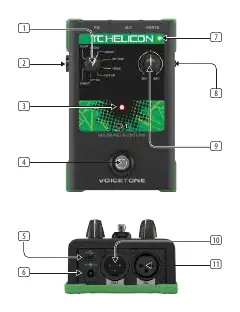
- 1. Doubling Style Selector: Choose between eight different styles of vocal doubling.
- 2. Mic Input Level Control: Adjusts the gain of the microphone input.
- 3. Effect Active LED: Indicates when the effect is engaged.
- 4. Effect On/Off Footswitch: Toggles the doubling effect on or off.
- 5. USB: Port for firmware updates using a mini-USB cable.
- 6. Power: Connect the included 12 V / >= 400 mA power supply.
- 7. Input Level LED: Green indicates signal presence; Red indicates clipping (signal too loud).
- 8. Mic Control: Use with the optional MP-75 microphone (button in = on).
- 9. Dry/Wet Mix Control: Adjusts the balance between the original "dry" signal and the effected "wet" signal.
- 10. Out: Connect to a mixer or powered speaker.
- 11. Mic: Input for your microphone.
Setup and Operation
To set up your VoiceTone D1, connect your microphone to the Mic input (11) and connect the Out (10) to your mixer or powered speaker. Connect the included 12V power supply to the Power input (6). Use the Mic Input Level Control (2) to set the gain; ensure the Input Level LED (7) stays green and does not turn red, which indicates clipping. Use the Doubling Style Selector (1) to choose your desired effect and the Dry/Wet Mix Control (9) to blend the effect with your voice.
Safety Instructions
Always use the specified power supply. Do not expose the device to rain or moisture. Do not remove the top cover or rear section, as there are no user-serviceable parts inside. Refer all servicing to qualified personnel.
Practical help
Common problems
No sound output
Check that the power supply is connected, the microphone is plugged into the Mic input, and the Out is connected to a mixer or speaker.
Signal clipping (distortion)
Reduce the Mic Input Level Control until the Input Level LED remains green and does not turn red.
Effect not audible
Ensure the Effect Active LED is on and adjust the Dry/Wet Mix Control to increase the amount of effected signal.
Before use
- Ensure you have a 12V / >= 400 mA power supply.
- Connect your microphone to the Mic input.
- Connect the Out to a mixer or powered speaker.
- Verify the power supply is connected to a mains outlet.
Specs in practice
- Input Level LED
- Green indicates signal presence; Red indicates clipping (signal is too loud).
Images and diagrams
- 1: Doubling Style Selector - Selects from 8 doubling styles.
- 4: Effect On/Off Footswitch - Engages or bypasses the effect.
- 6: Power Input - Connects the 12V power supply.
- 10: Out - Output for mixer or powered speaker.
- 11: Mic - Microphone input.
Model compatibility
- Compatible with MP-75 microphone for Mic Control feature.
- Requires 12V / >= 400 mA power supply.
- Suitable for use in tropical and moderate climates up to 45°C.

Manual page author
Emily Carter
User documentation editor
Prepares concise manual descriptions and highlights the most useful setup, operation, and maintenance information for readers.