Home Appliances / Air Fryers
User Guide for Tefal 2in1 Air Fry and Grill Oven 1520013086-QSG
Quick start guide for the Tefal 2in1 Air Fry and Grill Oven. Learn how to use the digital touchscreen, sync cooking programs, and use the grill function with this comprehensive guide.
Table of contents
Manual images
Click an image to enlargeQuick Start Guide
This guide provides essential instructions for operating the Tefal 2in1 Air Fry and Grill Oven. It covers the use of the digital touchscreen, the Sync mode for dual-food cooking, and the grill function.
Device Overview
The appliance features a digital touchscreen interface and includes specific accessories for cooking:
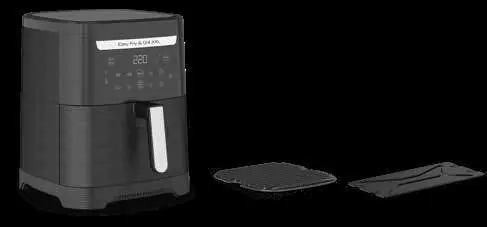
- Die-cast grill grid: Used for grilling meat and vegetables.
- Divider: Used to separate the cooking area when using Sync mode.
Digital Touchscreen
The control panel allows you to select from various pre-programmed settings:
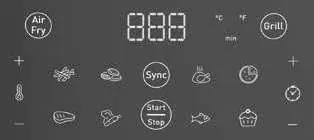
- Programs: Fries, Nuggets, Roasted chicken, Pizza, Meat, Vegetables, Fish, Dessert.
- Manual Functions: Air Fry and Grill.
- Controls: Temperature adjustment, Timer, and Sync mode.
Using Sync Mode
Sync mode allows you to cook two different foods so they are ready at the same time. Follow these steps:
- Click on the Sync mode button.
- Select your first food program.
- Select your second food program.
- The appliance will calculate the cooking times.
- When the appliance beeps and the screen displays Add, add the food item indicated by the flashing pictogram.
- Start cooking.
Grill Function
To use the grill function effectively:
- Ensure the die-cast grill grid is properly inserted.
- For optimal grill marks, turn the meat halfway through the cooking time.
- The grill function is ideal for searing and achieving a grilled texture.
Settings and Adjustments
You can toggle between Celsius (°C) and Fahrenheit (°F) temperature modes by pressing the plus (+) and minus (-) buttons on the temperature control simultaneously.
Cooking Recommendations
Refer to the cooking table in the manual for recommended weights, times, and temperatures for various food types. Always ensure the appliance is placed on a stable, heat-resistant surface before use.
Manufacturer information
Tefal
Practical help
Common problems
Food items are not ready at the same time when using Sync mode.
Ensure you follow the 'Add' prompt on the screen. The appliance will beep and flash the pictogram of the food that needs to be added first.
Grill marks are not visible or optimal.
Turn the meat halfway through the cooking time to ensure even marking.
Before use
- Ensure the die-cast grill grid is inserted correctly.
- Check if the divider is required for your specific cooking setup.
- Verify the appliance is placed on a stable, heat-resistant surface.
- Check that the touchscreen is clean and responsive.
Specs in practice
- Grill Function
- A high-heat setting designed for searing and creating grill marks on food.
Images and diagrams
- The touchscreen interface includes icons for specific food programs (Fries, Nuggets, Chicken, etc.) and manual controls for Temperature and Timer.
- The Sync button is located centrally on the control panel.
Model compatibility
- The appliance supports both Celsius (°C) and Fahrenheit (°F) temperature modes.

Manual page author
Michael Turner
Technical manual editor
Reviews PDF manuals for structure, safety notes, and practical product details so readers can find the right information quickly.