Wearables / Fitness Trackers
Tekkiwear 115 Plus Smart Bracelet User Guide
Quick guide for the Tekkiwear 115 Plus Smart Bracelet. Learn how to pair with the Lefun Health app, operate modes, monitor health metrics, and troubleshoot connection issues.
Table of contents
Quick Start Guide
To begin using your Tekkiwear 115 Plus Smart Bracelet, ensure the device is fully charged using the provided charging clip. Before initial use, verify that your smartphone meets the system requirements: Android 4.4 or above, or iOS 8.0 or above, with Bluetooth 4.0 support. Download the Lefun Health app from your app store to manage the device and sync data.
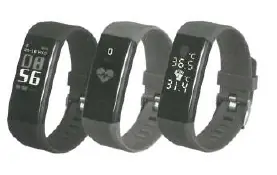
Operating the Bracelet
The bracelet is operated using a single button. Pressing the button cycles through the following interface modes in order:
- Time mode (displays time, battery, and date)
- Pedometer mode
- Calories mode
- Heart rate mode
- Blood pressure mode
- Sleep mode
Health and Activity Monitoring
The device offers several automated and manual monitoring features:
- Sports Record: Automatically records the number of steps.
- Heart Rate Monitor: Automatically measures heart rate. You can also trigger a manual measurement via the app.
- Blood Pressure Monitor: Automatically measures blood pressure. For best results, ensure the device is close to the skin and avoid movement during the 150-second measurement period.
- Sleep Monitoring: Automatically recognizes and analyzes deep and light sleep progress.
- Temperature Monitoring: When switched to this interface, measurements start automatically and sync to the app.
- Reminders: The device can vibrate for call and message reminders when configured in the app.
Troubleshooting
If you encounter issues with your device, try the following steps:
- Pairing issues: Ensure Bluetooth is ON, the phone meets system requirements, and the device is within 0.5m of the phone.
- Connection issues: If the app cannot connect, try rebooting the Bluetooth or the smartphone.
- Data display issues: Ensure the battery is charged and Bluetooth is active.
- Incorrect time: If the time is wrong, charge the device and reconnect it to the app to sync.
Specifications
- Screen size: 0.96 inch
- Bluetooth: BT 4.0
- Battery: 80mAh Polymer lithium battery
- Waterproof rating: IP67
- Material: Silica gel and Plastic
Practical help
Common problems
Cannot find device when pairing
Ensure Bluetooth is ON, your phone is Android 4.4+/iOS 8.0+ or above, and the device is within 0.5m of the phone.
Cannot connect with app
Reboot the Bluetooth on your phone or restart the smartphone.
No data displayed
Ensure the battery is charged and the Bluetooth connection is active.
Incorrect time displayed
Charge the device and reconnect it to the app to re-sync the time.
Before use
- Charge the device fully using the charging clip.
- Verify smartphone compatibility (Android 4.4+ or iOS 8.0+).
- Download the 'Lefun Health' app.
- Enable Bluetooth on your smartphone.
Model compatibility
- Requires Android 4.4 or above
- Requires iOS 8.0 or above
- Requires Bluetooth 4.0

Manual page author
Michael Turner
Technical manual editor
Reviews PDF manuals for structure, safety notes, and practical product details so readers can find the right information quickly.