Sports / Fitness
User Manual for Crivit 1-LD3292 Heart Rate Watch
Quick guide and user manual for the Crivit 1-LD3292 heart rate watch. Includes setup instructions, chest belt installation, calibration steps, and troubleshooting tips.
Table of contents
Manual images
Click an image to enlargeQuick guide from the manual
This guide provides essential information for the Crivit 1-LD3292 heart rate watch. Before first use, remove the protective film from the display. The device requires a CR2032 battery for the chest belt. For accurate heart rate and calorie tracking, ensure the chest belt is positioned correctly and personal data (age, weight, height) is set in the watch settings.
Setup and Installation
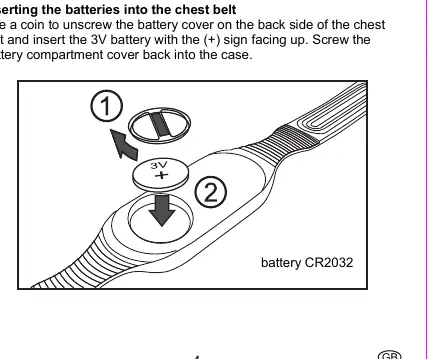
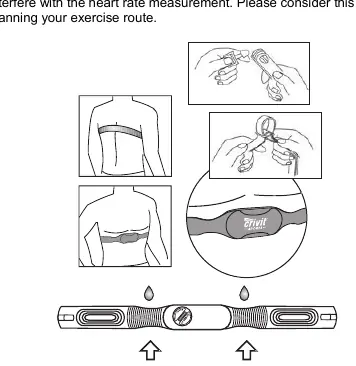
Chest Belt: Use a coin to unscrew the battery cover on the back of the chest belt. Insert the 3V CR2032 battery with the (+) sign facing up. Moisten the contact areas with water or ECG gel before wearing. Position the belt snugly directly below the chest muscles.
Watch Setup: Press MODE, SEL, or SET to wake the device. Select language (English/German) and units (KM-KG or Miles/pounds) using SEL and confirm with SET. The watch can be reset by holding SET and SEL simultaneously.
Operation and Modes
Press MODE to cycle through the four main modes: Time, Stop watch, Heart rate, and Pedometer. Use SEL to access subfeatures within each mode.
- Time Mode: Set time, date, alarm, and second time zone.
- Heart Rate Mode: Requires the chest belt. Displays heart rate, target zone, and training time.
- Pedometer Mode: Tracks steps, distance, and speed. Requires calibration for accuracy.
Calibration
Calibration is essential for accurate pedometer readings. You must calibrate for both walking and running. If you only walk, calibrate running as "fast walking". During calibration, the watch records your movement profile. Wear the watch on the same wrist during calibration and training.
Troubleshooting
If distance measurements are imprecise, recalibrate the step counter. If the heart rate is not displayed, ensure the chest belt is positioned correctly, skin is not too dry, and there is no electromagnetic interference (keep within 60cm of the watch). If the display is unreadable, replace the watch battery.
Technical Specifications
The watch and chest belt operate between 0-50°C. The chest belt transmits at 110 kHz. The watch is water-resistant up to 3 bar.
Manufacturer information
Crivit
Practical help
Common problems
Distance measurements are imprecise
Recalibrate the step counter for both walking and running. Ensure you move evenly during calibration.
Heart rate is not shown or is incorrect
Check chest belt position, moisten contact areas, ensure distance to watch is under 60cm, and avoid electromagnetic interference.
Display is unreadable or light does not work
Replace the watch batteries.
Before use
- Remove protective film from the display.
- Install a CR2032 battery in the chest belt.
- Moisten chest belt contact areas with water or ECG gel.
- Set personal data (age, weight, height) in the watch settings.
- Calibrate the pedometer for both walking and running.
Specs in practice
- Operating temperature
- 0-50°C for both watch and chest belt.
- Chest belt frequency
- 110 kHz transmission frequency.
- Water resistance
- Up to 3 bar (DIN 8310).
Images and diagrams
- Chest belt battery installation: Use a coin to unscrew the cover.
- Chest belt positioning: Place directly below chest muscles.
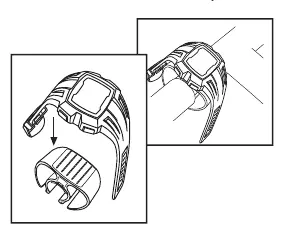
- Bicycle holder: Attaches the watch to the handlebar.
Model compatibility
- Chest belt must be within 60cm of the watch.
- Other heart rate devices within 2m may cause interference.
- Wireless bicycle computers may cause interference.

Manual page author
David Miller
Documentation analyst
Organizes user manual content into clear summaries, with attention to model details, product context, and everyday usability.