Wearables / Smartwatches
User Manual for Timex Digital Activity Tracker 09L095000-05
Quick guide for the Timex Digital Activity Tracker 09L095000-05. Learn how to set time, date, alarms, use the stopwatch, track steps, and replace the battery.
Table of contents
Quick Guide
This manual provides instructions for the Timex Digital Activity Tracker. Key features include step counting, stopwatch, alarms, and Indiglo backlight. The device is water-resistant to 3ATM. Please note the battery safety warning: this product contains a button cell battery that poses an ingestion hazard. Keep away from children.
Device Overview
The watch features four pushers (buttons) used for navigation and settings:
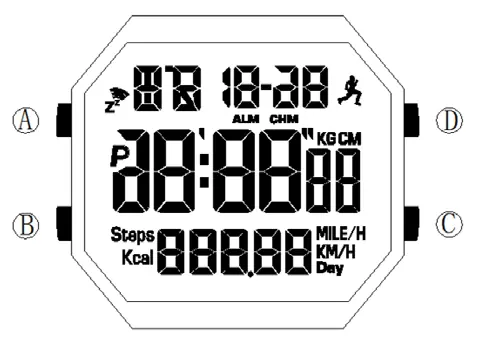
- Pusher A: Short press for backlight. Long press (3 seconds) to enter setting states.
- Pusher B: Switch between modes. In setting state, selects the value to adjust. Long press (3 seconds) in Normal Time Mode to delete motion data.
- Pusher C: In Normal Time Mode, long press (3 seconds) to toggle step counting on/off.
- Pusher D: In Stopwatch Mode, start/pause. In setting state, adjusts values upward.
Features
- 17-digit LCD display (time, date, step data).
- 12/24 hour format.
- Automatic calendar (2000-2099).
- Step counting with 7-day history.
- 2 Alarms and hourly chime.
- Stopwatch (max 23h 59m 59s).
- Indiglo backlight.
- Water resistant 3ATM.
Operating Modes
Press Pusher B to toggle between the three main modes:
- Normal Time Mode: Displays time and date.
- Alarm Mode: Manage alarms and hourly chime.
- Stopwatch Mode: Measure elapsed time.
Step Counting
To enable or disable step counting, long press Pusher C for 3 seconds in Normal Time Mode. When enabled, the watch tracks steps, calories, and distance. Note that you must walk at least 15 steps for the count to update. If the watch is inactive for more than 3 minutes, it enters power-saving mode. You can view history by pressing Pusher D in Normal Time Mode, then using Pusher C to cycle through the last 7 days.
Time and Profile Settings
To set the time, date, and user profile:
- Press and hold Pusher A for 3 seconds.
- The 24H/12H setting will flash. Use Pusher D to toggle and Pusher B to advance.
- Follow the sequence: 12H/24H, Seconds, Minutes, Hours, Year, Month, Day, Mile/Km, Height, Weight.
- Press Pusher A or wait 60 seconds to confirm and exit.
Alarm and Snooze
In Alarm Mode, use Pusher C to switch between Alarm 1 and Alarm 2. Use Pusher D to toggle between Alarm/Chime states. To set the alarm time, hold Pusher A for 3 seconds. Adjust minutes and hours using Pusher D. The snooze function activates automatically during an alarm; it will ring again after 5 minutes, repeating up to five times.
Stopwatch
In Stopwatch Mode, press Pusher D to start/stop. Press Pusher C to reset to zero. To use split timing, press Pusher C while the stopwatch is running to enter the segmented timing state (menu changes from ST to SP).
Battery Replacement
If the display dims or goes blank, replace the battery with a CR2032 or equivalent. Ensure the battery compartment is securely closed after replacement.
Manufacturer information
Timex Group USA, Inc.
Practical help
Common problems
Display is dim or blank
Replace the battery with a CR2032 or equivalent.
Step count is not updating
You must walk at least 15 steps for the count to update on the display.
Watch enters power saving mode
This happens if the watch is inactive for more than 3 minutes.
Before use
- Ensure the battery is installed correctly.
- Set the time and date using the setting mode.
- Configure your user profile (Height, Weight, Mile/Km) for accurate tracking.
- Check if the step counting function is enabled.
Specs in practice
- Water Resistant 3ATM
- Suitable for daily use, splashes, and rain, but not for swimming or diving.
Images and diagrams
- Pusher A: Backlight and Settings entry.
- Pusher B: Mode switching and value selection.
- Pusher C: Step count toggle and Stopwatch reset.
- Pusher D: Stopwatch control and value adjustment.
Model compatibility
- Battery: CR2032 or equivalent.

Manual page author
Emily Carter
User documentation editor
Prepares concise manual descriptions and highlights the most useful setup, operation, and maintenance information for readers.