Automotive / Security Systems
User Manual for Teltonika TAT100 2G Asset Tracker
Quick start guide for the Teltonika TAT100 2G Asset Tracker. Learn how to install the SIM card, configure the device via USB or SMS, and understand LED indicators and technical specifications.
Table of contents
Manual images
Click an image to enlargeQuick guide from the manual
This document provides essential instructions for setting up and configuring the Teltonika TAT100 2G Asset Tracker. It covers hardware installation, software configuration, and basic troubleshooting.
Device Setup
To prepare the device for use:
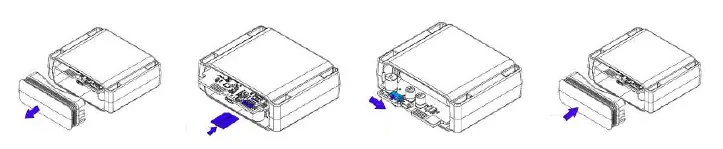
- Cover Removal: Remove the device cover to access internal components.
- SIM Card Insertion: Insert a Micro-SIM card into the slot. Ensure the cut-off corner is pointing forward. The PIN request must be disabled on the SIM card.
- Power On: Flip the internal switch to the ON position.
- Reassembly: Reattach the cover securely after configuration.
Configuration
The device can be configured using the Teltonika Configurator software on a Windows PC or via SMS commands.
PC Configuration
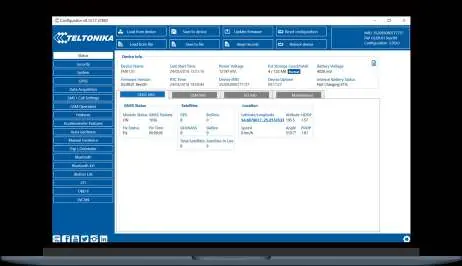
Connect the device to a computer using a Micro-USB cable. You may need to install the Teltonika COM port drivers. The Configurator software requires Microsoft .NET Framework 4.6.2. Use the software to load/save configurations, update firmware, and monitor device status.
SMS Configuration
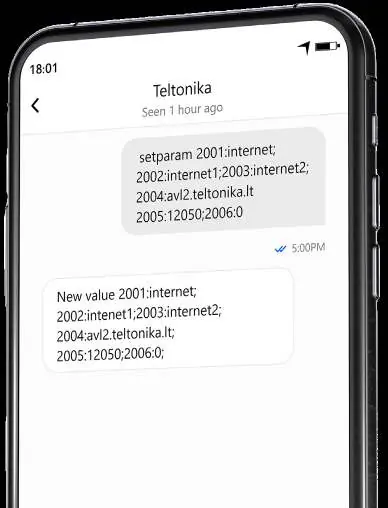
You can configure the device by sending an SMS command. Ensure two space symbols are inserted before the SMS text. The command format is: setparam 2001:APN;2002:APN_username;2003:APN_password;2004:Domain;2005:Port;2006:0.
Mounting Recommendations
For optimal performance, mount the TAT100 so that the GNSS antenna is pointed towards the sky. Ensure the device is not covered by obstructions that could interfere with GNSS signal reception.
LED Indications
- On: Start-up and self-tests.
- Off: Device is in sleep mode or turned off.
- Blink every 5 seconds: Device is working, modem is turned on.
Technical Specifications
- Connectivity: 2G (GSM/GPRS), GNSS, Bluetooth LE.
- Battery: 7.2V 2200mAh Li-SOCl2 (non-rechargeable).
- Dimensions: 78 x 63 x 28 mm.
- Weight: 119g.
- Ingress Protection: IP68.
Safety Information
Do not attempt to charge the batteries, as this may cause an explosion and void the warranty. Use only original batteries. Protect the device from moisture and extreme temperatures. Dispose of batteries at designated recycling centers.
Practical help
Common problems
Connection to server not initiated
Check if the SIM card is inserted correctly, verify APN/Domain/Port settings, ensure GPRS is enabled by your provider, and check for GSM coverage.
Device not detected by PC
Ensure the Micro-USB cable is connected properly and that the required COM port drivers are installed.
Before use
- Ensure Micro-SIM card is inserted with the cut-off corner facing forward.
- Disable PIN request on the SIM card.
- Download and install the latest Teltonika Configurator software.
- Install the required COM port drivers.
- Ensure Microsoft .NET Framework 4.6.2 is installed on your Windows PC.
Specs in practice
- Connectivity
- Supports 2G GSM/GPRS, GNSS (GPS, GLONASS, GALILEO, BEIDOU), and Bluetooth LE.
Images and diagrams
- The device features an ON/OFF button, a Micro-USB port for configuration, and a Micro-SIM slot.
- SMS configuration requires a specific command string including APN, username, password, domain, port, and protocol.
Model compatibility
- Configuration software requires Microsoft Windows OS.
- Requires MS .NET Framework 4.6.2.

Manual page author
Michael Turner
Technical manual editor
Reviews PDF manuals for structure, safety notes, and practical product details so readers can find the right information quickly.