Tools / Battery Testers
User Manual for Topdon Volcano2000Pro Jump Starter
Quick guide for the Topdon Volcano2000Pro jump starter. Includes setup, jump-starting instructions, charging, safety warnings, and troubleshooting.
Quick answers from the manual
Quick answer
- To jump start a vehicle, connect the smart clamps to the jump starter, attach the red clamp to the positive (+) terminal and the black clamp to the negative (-) terminal of the vehicle battery, then start the vehicle. p. 10
Key actions
- Jump starting a vehicle p. 10
- Charging the jump starter p. 14
First start
- Charge the device for at least 8 hours before the first use. p. 14
Problems and fixes
UV (Under voltage)
Charge the jump starter or check if vehicle battery is under 8V.
p. 11
SC (Short circuit)
Clear battery posts and clamps, check the connection.
p. 11Error codes
| Code | Meaning | Action | Pages |
|---|---|---|---|
| UV | Under voltage | Charge the jump starter or check vehicle battery. | p. 11 |
| OV | Over voltage | Vehicle battery level is higher than jump starter's. | p. 11 |
| CB | Current back flow | Charge the jump starter. | p. 11 |
| OT | Over temperature | Turn off and wait to cool down. | p. 11 |
| SC | Short circuit | Clear battery posts and clamps, check connection. | p. 11 |
Technical specifications
| Parameter | Value | Meaning | Pages |
|---|---|---|---|
| Peak Current | 2000A | Maximum starting current | p. 9 |
| Wireless Charging | 10W | Wireless output power | p. 9 |
Where to find it in the PDF
- Features p. 4, 5
- How to Use p. 10, 11
- Specifications p. 9
Table of contents
Manual images
Click an image to enlargeQuick Guide
The Topdon Volcano2000Pro is a portable jump starter for 12V vehicles. Before first use, charge the device for at least 8 hours. Ensure the jump starter has at least 50% capacity before attempting to jump-start a vehicle. Only use the provided smart battery clamps.
Product Overview
The device features a power button, LCD display, auto jump starting port, USB outputs (5V/2.1A and QC3.0), flashlight, DC output, Type-C input/output, and wireless charging.
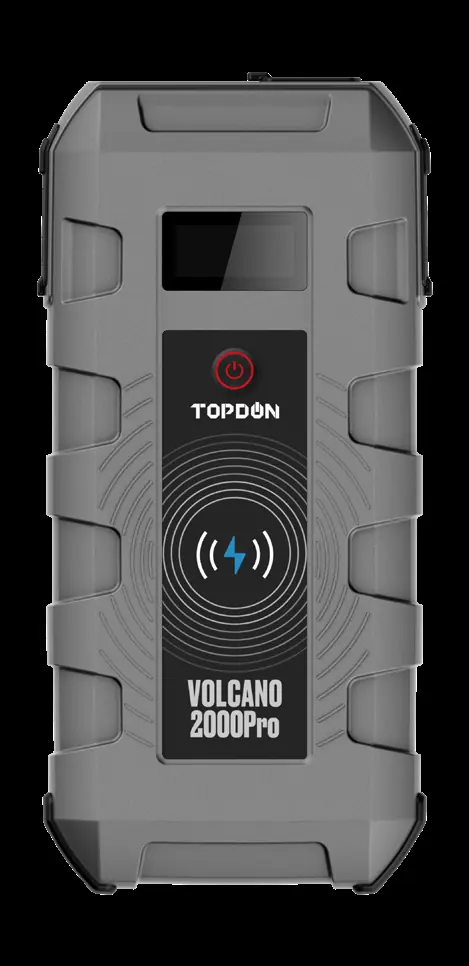
Jump Starting Your Vehicle

- Connect the smart battery clamp CP010 to the jump starter. The [OK] LED will illuminate green if ready. If the [Fault] LED illuminates red, there is an issue.
- Connect the red clamp to the positive (+) terminal of the vehicle battery.
- Connect the black clamp to the negative (-) terminal of the vehicle battery.
- Start the vehicle.
- Once the vehicle is started, disconnect the clamps from the vehicle battery.
Charging the Jump Starter
Charge the device via the USB Type-C input from a wall socket or other 5V output device. The LCD will display "Charging" during the process and "100%" when fully charged.
Charging External Devices
Press the power button to activate. Use the USB cable to charge mobile devices or the 12V DC output to power appliances like air compressors or vehicle refrigerators.
LED Flashlight
Hold the power button for 3 seconds to turn on the LED light. Press the button to cycle through modes: Steady Light, SOS, and Strobe.
Troubleshooting
The digital display shows status codes:
- UV: Under voltage. Charge the jump starter or check if the vehicle battery is under 8V.
- OV: Over voltage. Vehicle battery level is higher than the jump starter's.
- CB: Current back flow. Jump starter battery level is too low; charge it.
- OT: Over temperature. Turn off the device and let it cool down.
- SC: Short circuit. Clear battery posts and clamps, then check the connection.
- No Icon: Exceed connection time or overload. Clear battery posts and clamps, then check the connection.
Safety Warnings
- Only for use on vehicles with 12V batteries.
- Do not touch the two battery clamps together.
- If the engine does not start, disconnect and wait at least 20 seconds before reconnecting. Maximum 3 attempts in 2 minutes.
- Disconnect clamps within 30 seconds after the engine starts.
- Do not disassemble, use chemicals to clean, or expose to high temperatures/direct sunlight.
- Check charge level every four months.
Practical help
Common problems
Device displays UV (Under voltage)
Charge the jump starter or check if the vehicle battery is below 8V.
Device displays OT (Over temperature)
Turn off the device and wait for it to cool down.
Device displays SC (Short circuit)
Clear battery posts and clamps, then check the connection.
Engine does not start
Disconnect, wait at least 20 seconds, and try again. Maximum 3 attempts in 2 minutes.
Before use
- Charge the device for at least 8 hours before first use.
- Ensure the jump starter capacity is at least 50%.
- Verify the vehicle has a 12V lead-acid battery.
- Inspect cables, clamps, and cords for damage.
Specs in practice
- Peak Current
- 2000A, the maximum current the device can deliver for jump starting.
- Operation Temperature
- -20°C to 70°C (-4°F to 158°F).
- Wireless Charging
- 10W output for Qi-certified devices.
Images and diagrams
- The device features a digital display and LED indicators for battery and alternator status.
- The smart clamps must be connected to the jump starter port before attaching to the vehicle battery.
Model compatibility
- Compatible only with 12V lead-acid batteries.
- Do not use with any other type of batteries.

Manual page author
David Miller
Documentation analyst
Organizes user manual content into clear summaries, with attention to model details, product context, and everyday usability.