Electronics / Televisions
Owner's Manual for Toshiba 14AF41 Color Television
Quick guide for the Toshiba 14AF41 Color Television. Learn how to connect your devices, program channels, use the V-Chip, adjust picture and sound settings, and troubleshoot common issues.
Table of contents
Manual images
Click an image to enlargeQuick guide from the manual
This manual provides instructions for setting up and operating your Toshiba 14AF41 Color Television. Before beginning, ensure you have received all items: TV, remote control, batteries, and documentation. Place the TV on a sturdy platform with adequate ventilation to prevent overheating.
Important Safeguards
- Unplug the unit before cleaning; use a damp cloth.
- Do not block ventilation openings.
- Operate only from the power source indicated on the rating plate.
- Do not expose the unit to rain or moisture.
- Refer all servicing to qualified personnel.
Connecting your TV
The TV features various inputs for external equipment:
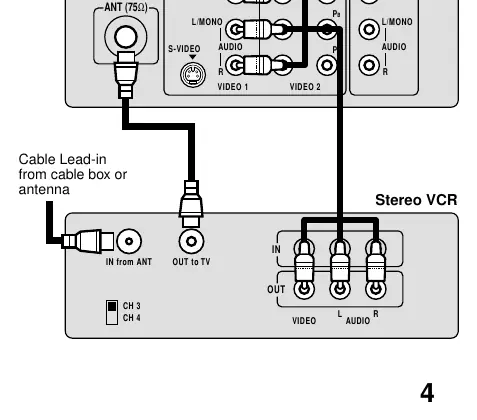
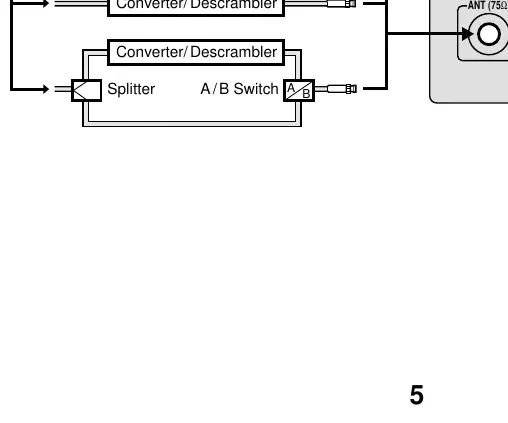
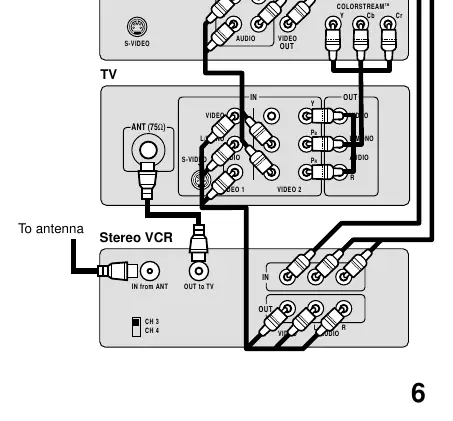
- Coaxial Cable: Standard antenna or cable box connection.
- Audio/Video Cables: Color-coded (yellow for video, red/white for audio).
- S-Video: Provides better picture performance for compatible components.
- ColorStream: Component video inputs for high-quality DVD/DTV connections.
Always turn off and unplug the TV before connecting equipment. If using a mono VCR, use only one audio cable.
Using the remote control
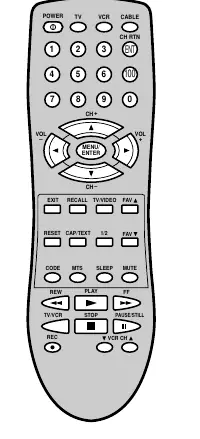
The remote control can operate the TV, most VCR models, and cable TV converters. To use with other brands, you must program the remote using the provided registration codes. Install two AAA batteries, matching the + and - signs.
Setting up your TV
- Language: You can choose between English, French, and Spanish for on-screen displays.
- Channel Programming: Use the menu to automatically detect and store active channels. You can also manually add or erase specific channels.
Using the TV's features
- V-Chip: Allows you to block programs based on ratings (MPAA, Youth TV, TV ratings) or block specific channels. You must set a 4-digit PIN code to use these features.
- Picture Adjustments: Customize contrast, brightness, color, tint, and sharpness.
- Sound Adjustments: Adjust bass, treble, and balance. The STABLE SOUND feature automatically lowers volume during loud segments.
- Closed Caption: View captions or text for programs.
- Sleep Timer: Set the TV to turn off automatically.
Cleaning and care
Clean the screen with a clean cellulose sponge or chamois cloth dampened with a mild detergent and warm water. Wipe dry with a clean cloth. Do not use strong solvents like thinner or benzene.
Troubleshooting
If you encounter issues, check the following:
- TV won't turn on: Check power cord and remote batteries.
- No picture/sound: Check antenna/cable connections.
- Poor reception: Check antenna, try another channel, or adjust picture settings.
- V-Chip PIN not working: Reset your PIN code.
Specifications
The 14AF41 features a 14-inch picture tube, NTSC standard television system, and supports VHF/UHF and cable channels. It includes S-Video, ColorStream, and standard A/V inputs.
Practical help
Common problems
TV will not turn on
Ensure the power cord is plugged in and press POWER. Check if remote control batteries are dead.
No picture or sound
Check antenna or cable connections.
Poor reception
Check antenna connections, try a different channel, or adjust the PICTURE menu settings.
Unable to select a channel
The channel may be blocked by the V-Chip or erased from memory.
V-Chip PIN code does not work
Change or reset your PIN code using the V-Chip menu.
Before use
- Place the TV on a sturdy platform.
- Ensure there is adequate ventilation around the TV.
- Install two AAA batteries in the remote control.
- Connect your antenna or cable box.
- Perform automatic channel programming.
Specs in practice
- Picture Tube
- 14-inch (357 mm) diagonal screen.
- Power Source
- 120V AC, 60 Hz.
Images and diagrams
- Wiring diagrams illustrate how to connect VCRs, DVD players, cable boxes, and audio amplifiers.
- The remote control diagram identifies all buttons and their specific functions.
Model compatibility
- ColorStream inputs are for compatible component video devices only.
- S-Video provides better picture quality than standard video cables.
- If using a mono VCR, connect only one audio cable to the L/Mono jack.

Manual page author
Michael Turner
Technical manual editor
Reviews PDF manuals for structure, safety notes, and practical product details so readers can find the right information quickly.