Electronics / Headphones Earbuds
User Guide for Trevi 12E60 BT Wireless HiFi Headphones
Quick start guide for Trevi 12E60 BT wireless headphones, covering pairing, charging, playback controls, call management, and wired connection instructions.
Table of contents
Quick guide from the manual
This document provides essential instructions for operating the Trevi 12E60 BT wireless headphones. Key procedures include charging the internal battery, pairing the device via Bluetooth, managing music playback, handling phone calls, and using the headphones in wired mode.
Description of controls and accessories
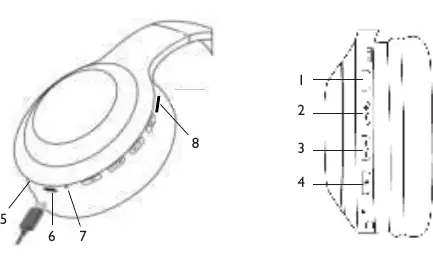
- 1: Play/Pause button; also used for answering/ending calls and toggling LED lights.
- 2: Next track button; long press to increase volume.
- 3: Previous track button; long press to decrease volume.
- 4: Power On/Off button.
- 5: Audio In jack.
- 6: USB Type-C charging port.
- 7: LED indicator.
- 8: TF card slot.
Charging the battery
The headphones feature an internal rechargeable battery. To charge:
- Connect the supplied USB Type-C cable to the headphones (6) and an external USB power source (5V 1A).
- The LED indicator (7) turns red during charging and blue when fully charged.
- The device will issue a vocal warning when the battery level reaches 20%.
Switching on and off
Press and hold the power button (4) to turn the unit on or off. A voice message will confirm the status.
Pairing with a wireless device
- Turn on the headphones; the LED (7) will flash red and blue.
- Enable Bluetooth on your external device (smartphone, tablet, etc.).
- Search for and select DJ 12E60 BT. If prompted for a code, enter 0000.
- Once paired, the LED (7) will flash slowly in blue.
Playback and call management
Once paired, use the buttons on the headphones to control playback:
- Play/Pause: Press button (1).
- Next/Previous track: Press button (2) or (3).
- Adjust volume: Long press button (2) to increase or (3) to decrease.
- Answer/End call: Press button (1) once.
- Reject call: Long press button (1).
- Redial last number: Press button (1) twice quickly.
Wired connection
You can use the headphones as wired headphones by connecting them to an external device using a standard 3.5mm stereo jack cable (not supplied). Connect one end to the Audio In jack (5) and the other to the device's headphone output.
Safety and maintenance
To avoid hearing damage, limit listening time at high volumes. Battery removal and disposal must be performed only by qualified technical personnel. Do not dispose of the product with urban waste; use designated collection centers.
Manufacturer information
TREVI S.p.A.
Practical help
Common problems
Connection interrupted
Ensure devices are within 8 meters. If the connection fails to restore automatically, repeat the pairing procedure from step 1 to 4.
Device not found during pairing
Ensure the headphones are in pairing mode (LED flashing red and blue) and that the external device's Bluetooth is enabled.
Before use
- Charge the battery fully before first use.
- Ensure the charging environment is between 5°C and 35°C.
- Keep devices within 1 meter during the initial pairing process.
- Check that your external device supports Bluetooth connectivity.
Specs in practice
- Wireless Version
- V5.3
Images and diagrams
- The diagram on page 2 identifies the physical buttons (1-4) and ports (5-8) on the headphones.
- Button 1 is the main control for playback and calls.
- Buttons 2 and 3 handle track navigation and volume control.
- Button 4 is dedicated to power management.
Model compatibility
- Some devices may not be fully compatible due to the continuous evolution of wireless technology.
- The headphones can be used as wired headphones with any device featuring a standard 3.5mm headphone jack.

Manual page author
David Miller
Documentation analyst
Organizes user manual content into clear summaries, with attention to model details, product context, and everyday usability.