Electronics / Headphones Earbuds
User Manual for Trevi DJ 12E45 BT Bluetooth Headphones
Quick guide for Trevi DJ 12E45 BT Bluetooth Headphones. Learn how to pair, charge, manage music, handle calls, and use microSD/FM radio features.
Quick answers from the manual
Quick answer
- This manual provides instructions for charging, pairing, operating, and maintaining the Trevi DJ 12E45 BT Bluetooth headphones. p. 7, 8, 9, 10
Key actions
- Charging the battery p. 8
- Pairing with a Bluetooth device p. 8
- Managing music playback p. 9
First start
- Initial charge p. 8
- Powering on p. 8
Show 4 more answers Show less
Problems and fixes
Connection interrupted
Ensure devices are within 10 meters or repeat the pairing procedure.
p. 8
Battery low
Charge the device.
p. 8Maintenance and reset
- Battery removal p. 10
Technical specifications
| Parameter | Value | Meaning | Pages |
|---|---|---|---|
| Bluetooth version | V5.2 | Bluetooth standard version | p. 10 |
| Working distance | 10m | Maximum range for operation | p. 10 |
| Bluetooth transmission power | 2.5mW | Transmission power | p. 10 |
| Bluetooth frequency | 2.4GHz | Transmission frequency | p. 10 |
| FM range | 87.5-108MHz | Radio frequency range | p. 10 |
| Battery | 3.7V, 200mAh | Internal battery capacity | p. 10 |
| Charging voltage | 5V | Required input voltage | p. 10 |
| Weight | 136g | Device weight | p. 10 |
Where to find it in the PDF
- Safety Precautions p. 7
- Description of Controls p. 7
- Battery Charging p. 8
- Power On/Off p. 8
- Music Playback p. 9
- Technical Specifications p. 10
- Battery Removal p. 10
Table of contents
Quick Guide
This guide provides essential instructions for operating your Trevi DJ 12E45 BT headphones. Before first use, it is recommended to charge the battery for 3-4 hours. Ensure the device is within 1 meter of your phone or tablet during the initial Bluetooth pairing process.
Description of Controls
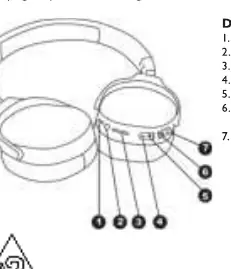
- 1. USB Type-C Charging Socket: For battery charging.
- 2. 3.5mm Audio Jack: For wired connection.
- 3. microSD Card input: For playing music from a memory card.
- 4. '-' key: Volume down / Previous song.
- 5. '+' key: Volume up / Next song.
- 6. M key: Mode change (Bluetooth / microSD / FM Radio).
- 7. Power button: Power On/Off / Play/Pause / Call handling.
Battery Charging
The headphones feature an internal rechargeable battery. Connect the included USB/USB Type-C cable to a 5V power source. The red LED indicator will light up during charging and turn off when complete. A full charge provides approximately 10 hours of music playback.
Bluetooth Pairing
- Turn on the headphones; the LED indicator will flash blue.
- The voice guide will announce "Bluetooth mode".
- Enable Bluetooth on your external device and search for "DJ12E45BT".
- Select the device to pair. A confirmation sound will be heard upon successful connection.
Note: If the connection is interrupted, move the devices closer. To pair with a new device, disconnect the headphones from the current device first.
Music Playback and Calls
Use the buttons on the headphones to manage playback:
- Play/Pause: Press the Power button (7).
- Next Song: Press the '+' key (5).
- Previous Song: Press the '-' key (4).
- Volume Adjustment: Press and hold '+' or '-' keys.
- Answering a Call: Press the Power button (7) once.
- Ending a Call: Press the Power button (7) once.
- Rejecting a Call: Long press the Power button (7).
- Redial Last Number: Quickly press the Power button (7) twice.
MicroSD and FM Radio
Insert a microSD card into the input (3) with contacts facing outward. Press the M button (6) to switch to "Play by TF card" mode. For the FM Radio (available on export versions), press the M button (6) until "FM mode" is announced, then press the Power button (7) to start automatic station storage.
Wired Connection
You can use the headphones as passive headphones by connecting them to an external device using a 3.5mm stereo jack cable (not supplied). In this mode, music playback is controlled by the connected device.
Technical Specifications
- Bluetooth Version: V5.2
- Working Distance: 10m
- Battery: 3.7V, 200mAh
- Charging Voltage: 5V
- Weight: 136g
Manufacturer information
TREVI S.p.A.
Practical help
Common problems
Connection interrupted
Devices may be too far apart. Move them closer or re-pair the connection.
Cannot pair with a new device
Disconnect the headphones from the old device first, then repeat the pairing procedure.
Battery low
The device will announce 'Please charge' a few times before automatically turning off.
Before use
- Charge the battery for 3-4 hours before the first use.
- Ensure the Bluetooth device is within 1 meter during pairing.
- Verify the Bluetooth device is in pairing mode.
- Check that the microSD card is inserted with contacts facing outward.
Show more Show less
Specs in practice
- Bluetooth V5.2
- The wireless communication standard used for connectivity.
Images and diagrams
- The control panel is located on the side of the ear cup.
- Button 7 is the primary multi-function button for power and calls.
- Button 6 (M) is used to toggle between Bluetooth, microSD, and FM modes.
Model compatibility
- FM Radio feature is only available on the Export version.
- Passive wired mode requires a 3.5mm jack cable (not supplied).
- Some devices may not be fully compatible due to Bluetooth technology evolution.

Manual page author
Michael Turner
Technical manual editor