Electronics / Headphones Earbuds
User Manual for Trevi DJ 12E90 ANC Bluetooth Headphones
Quick guide for the Trevi DJ 12E90 ANC Bluetooth headphones. Learn how to pair via Bluetooth, use Active Noise Control (ANC), charge the battery, manage calls, and use the wired connection.
Table of contents
Quick guide from the manual
The Trevi DJ 12E90 ANC headphones feature Bluetooth connectivity, Active Noise Control (ANC), and a wired connection option. Ensure the battery is charged before first use. The device supports Bluetooth V5.3 and has a range of approximately 10 meters.
Description of Controls
The headphones feature the following controls and ports:
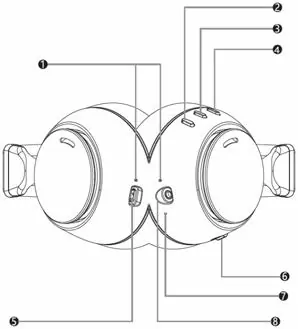
- 1: LED indicator: Shows Bluetooth connection, charging, and ANC status.
- 2: '-' key: Volume down / Previous song.
- 3: Power button: ON/OFF, Play/Pause, Call handling.
- 4: '+' key: Volume up / Next song.
- 5: USB Type-C port: For battery charging.
- 6: ANC switch: Activates or deactivates Active Noise Control.
- 7: Microphone: For calls and ANC functionality.
- 8: 3.5mm Audio Jack: For wired connection.
Battery Charging
The headphones have an internal rechargeable battery. To charge:
- Connect the included USB/USB Type-C cable to the headphones (5) and an external device or power supply (5V).
- The red LED (1) will light up during charging.
- The LED will turn off when charging is complete.
Note: If the battery is low, you will hear a 'LOW BATTERY' message before the device turns off automatically.
ANC (Active Noise Control)
The ANC function reduces external noise. To use:
- Turn On: Move the ANC switch (6) to the active position. The LED (1) will turn green.
- Turn Off: Move the ANC switch (6) to the inactive position. The LED (1) will turn off.
Important: Do not cover the microphone with your hand, as this may cause the ANC function to malfunction or produce buzzing sounds.
Power On and Off
- Power On: Press and hold the Power button (3) for a few seconds until you hear 'Power On'.
- Power Off: Press and hold the Power button (3) for a few seconds until you hear 'Power Off'.
- Auto Power Off: The headphones will turn off automatically after a period of inactivity if not connected via Bluetooth.
Bluetooth Pairing
- Turn on the headphones. The LED (1) will flash red/blue.
- Enable Bluetooth on your external device (phone, tablet, etc.).
- Search for 'DJ12E90ANC' and select it.
- The voice guide will confirm 'Your Bluetooth device is connected'.
Note: Keep devices within 1 meter during pairing. If the connection is lost, it usually restores automatically; otherwise, repeat the pairing procedure.
Music and Call Controls
- Play/Pause: Press the Power button (3).
- Next Song: Press and hold the '+' key (2).
- Previous Song: Press and hold the '-' key (4).
- Volume Up: Press the '+' key (2).
- Volume Down: Press the '-' key (4).
- Answer Call: Press the Power button (3) once.
- End Call: Press the Power button (3) during the conversation.
- Reject Call: Press and hold the Power button (3).
- Redial Last Number: Quickly press the Power button (3) twice.
Wired Connection
You can use the headphones as passive headphones by connecting them via a 3.5mm cable (not supplied) to an external device. The ANC function must be set to the desired state before connecting the cable.
Technical Specifications
- Bluetooth Version: V5.3
- Working Distance: 10m
- Driver: 40mm
- Frequency Response: 20Hz - 20kHz
- Impedance: 32 Ohm ±15%
- Battery: 3.7V, 400mAh
- Charging Voltage: 5V
- Weight: 240g
Battery Removal
Warning: Battery removal should only be performed by qualified personnel.
- Remove the seat cushion from the right ear cap.
- Unscrew the screws and open the pavilion.
- Locate the battery and disconnect it from the power cables.
Manufacturer information
TREVI S.p.A.
Practical help
Common problems
Bluetooth connection drops
Ensure devices are within 10 meters. If disconnected, re-pair the devices.
ANC not working or buzzing
Ensure the microphone is not covered by your hand.
Low battery
The device will announce 'LOW BATTERY' and turn off automatically. Recharge using the USB Type-C cable.
Before use
- Charge the battery fully before first use.
- Ensure the device is within 1 meter during pairing.
- Check that the ANC switch is in the desired position.
- Ensure the 3.5mm cable is fully inserted if using wired mode.
Specs in practice
- Bluetooth Version
- V5.3 for stable wireless connection.
- Working Distance
- Up to 10 meters without obstacles.
- Charging Voltage
- 5V DC input.
Images and diagrams
- 1: LED indicator (Bluetooth/Charging/ANC status)
- 2: '-' key (Volume down/Previous song)
- 3: Power button (On/Off/Play/Pause/Call)
- 4: '+' key (Volume up/Next song)
- 5: USB Type-C charging port
Model compatibility
- Compatible with Bluetooth-enabled devices (phones, tablets, etc.).
- Wired mode works with any device featuring a 3.5mm headphone jack.
- ANC function is most effective for low-frequency noise.

Manual page author
Emily Carter
User documentation editor
Prepares concise manual descriptions and highlights the most useful setup, operation, and maintenance information for readers.