Electronics / Televisions
User Manual for Trevi LTV 2014HE Portable TV
Comprehensive user guide for the Trevi LTV 2014HE portable TV. This manual covers installation, remote control operation, menu settings, USB/SD card media playback, and troubleshooting.
PDF source: italiano · summary: English
Quick answers from the manual
Quick answer
- The Trevi LTV 2014HE is a 14.1-inch portable TV with DVB-T2/HEVC support. It features USB/SD card playback, HDMI/AV inputs, and runs on 12V DC power. p. 1, 14, 18
Key actions
- First Installation p. 7
- USB Playback p. 11, 23
First start
- Power on, select language and country, then start auto-scan. p. 7
Show 4 more answers Show less
Problems and fixes
No image or sound
Check power supply and ensure the device is switched on.
p. 13, 24
Remote control does not work
Check batteries and ensure alignment with the IR sensor.
p. 13, 24Maintenance and reset
- Unplug the power adapter for 30 seconds to perform a reset. p. 13
Technical specifications
| Parameter | Value | Meaning | Pages |
|---|---|---|---|
| Screen Size | 14.1 inches | Display size | p. 14, 25 |
| Resolution | 1280x800 | Maximum resolution | p. 14, 25 |
Where to find it in the PDF
- Controls and Connections p. 3, 18
- Remote Control p. 6, 19
- Troubleshooting p. 13, 24
Table of contents
Manual images
Click an image to enlargeQuick Guide
The Trevi LTV 2014HE is a portable television supporting DVB-T2/HEVC. Before using the device, ensure it is placed on a flat surface with at least 10 cm of space for ventilation. Connect the power adapter to a 110-240V outlet or use the 12V car adapter. Upon first power-on, the TV will prompt you to select your language and country to begin the automatic channel scan.
Device Overview
The TV features a side panel with the following ports and controls:
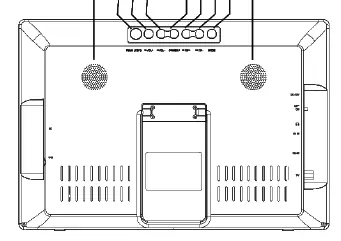
- Power Switch: Turns the device on/off.
- Inputs: 12V DC, AV IN, HDMI, External Antenna, USB, and Micro SD Card slot.
- Control Keys: MODE, CH+/-, VOL+/-, MENU/OK, and Return/LCD.
Installation and Connections
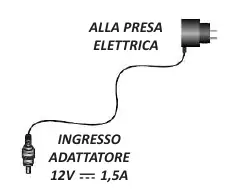
Power Supply: Use only the provided adapter. Connect the AC adapter to a wall outlet or the 12V car adapter to a vehicle cigarette lighter socket. Note: Do not use the car adapter in heavy vehicles providing 24V.
Antenna and External Devices: Connect the provided antenna or a domestic 75-ohm antenna to the antenna input. You can connect external devices like DVD players or cameras via the AV IN or HDMI ports. Select the appropriate source using the INPUT button on the remote or the TV.
Remote Control
The remote control allows full operation of the TV. Key functions include:
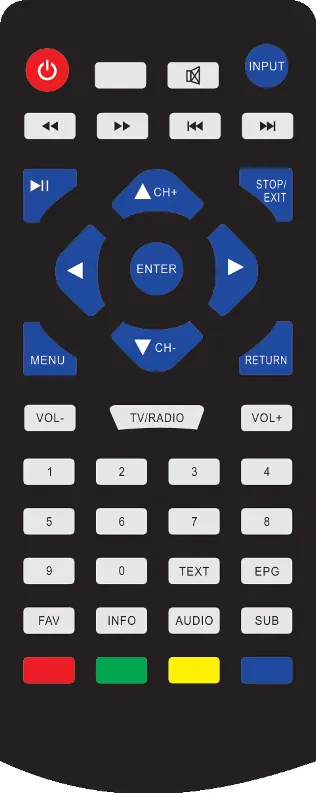
- INPUT: Selects the signal source (DTV, ATV, AV, HDMI, USB, CARD).
- MENU: Accesses the main system settings.
- CH+/CH-: Changes channels or navigates menus.
- VOL+/VOL-: Adjusts volume.
- EPG: Accesses the program guide.
- Numeric Keys: Used for direct channel selection.
Menu Settings
Press the MENU button to access the main settings:
- Picture: Adjust mode (Standard, Dynamic, etc.), contrast, brightness, color, and aspect ratio.
- Sound: Adjust mode, balance, auto volume, and surround sound.
- Time: Set clock, sleep timer, and auto-off settings.
- Option: Change OSD language, audio/subtitle language, and restore factory defaults.
- Lock: Set parental guidance, block channels, and change the system password (default: 0000).
- Channel: Perform auto/manual tuning, edit channels, and check signal information.
USB and SD Card Playback
The TV supports multimedia playback from USB drives or SD cards (up to 32GB):
- Insert the storage device.
- Press the INPUT button and select USB or CARD.
- Choose the media category: Photo, Music, Movie, or Text.
- Use the remote control to navigate and play files.
Troubleshooting
If you encounter issues, check the following:
- No image or sound: Ensure the power is connected and the device is switched on.
- No signal: Check the antenna connection and perform a new channel scan.
- Remote not working: Check batteries and ensure the remote is aligned with the IR sensor.
- Device unresponsive: Disconnect the power for 30 seconds to perform a reset.
Technical Specifications
The LTV 2014HE features a 14.1-inch TFT LCD screen with a resolution of 1280x800. It supports DVB-T2/HEVC, has 2x2W speakers, and operates on 12V DC power.
Manufacturer information
TREVI S.p.A.
Practical help
Common problems
No image or sound
Check if the power supply is connected correctly and the power switch is in the ON position.
No signal on TV
Verify the antenna connection and ensure you are in the correct mode (DTV/ATV).
Remote control does not work
Check if batteries are inserted correctly and ensure the remote is pointed at the IR sensor.
Device unresponsive
Unplug the power adapter for 30 seconds to perform a system reset.
Before use
- Check that all accessories (TV, remote, adapters, antenna) are present.
- Ensure the TV is placed on a flat surface with 10cm of ventilation space.
- Charge the internal battery if using without the power adapter.
- Ensure the antenna is securely connected.
Show more Show less
Images and diagrams
- Side panel: Contains DC input, power switch, headphone jack, AV input, HDMI input, antenna input, USB port, and SD card slot.
- Remote control: Includes dedicated buttons for input selection, menu navigation, volume, channel control, and media playback.
Model compatibility
- Supports DVB-T2/HEVC digital television.
- USB/SD card capacity must be 32GB or less.
- Do not use the car adapter in heavy vehicles providing 24V.

Manual page author
Emily Carter
User documentation editor