Electronics / Headphones Earbuds
User Manual for Trevi DJ 12E35 BT Wireless Headphones
Quick start guide and user manual for the Trevi DJ 12E35 BT wireless stereo headphones. Learn how to pair, charge, manage calls, and use wired mode.
Table of contents
Quick guide from the manual
The Trevi DJ 12E35 BT headphones feature wireless connectivity, an integrated microphone for calls, and an optional wired connection. Before first use, it is recommended to charge the battery for 3-4 hours. The headphones include voice prompts for status updates (Power On, Power Off, Pairing, Connected, Low power) which are pre-set in English and cannot be disabled.
Description of controls
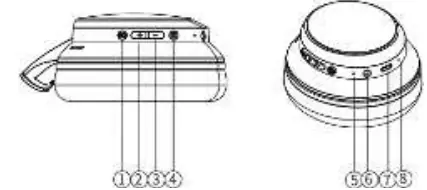
- 1. EQ button: Pre-equalizations.
- 2. + button: Next song, Volume up.
- 3. - button: Previous song, Volume down.
- 4. Power button: ON/OFF, Play/Pause, Call Start/End.
- 5. LED indicator: Status light.
- 6. 3.5mm Audio Jack: Wired audio input.
- 7. USB Type-C Charging Socket: Battery charging port.
- 8. Microphone: For phone calls.
Battery charging
The headphones have an internal rechargeable battery.
- Connect the included USB/USB Type-C cable to an external device with a USB port (computer, tablet) or a 5V USB power supply (not included).
- Connect the cable to the charging socket (7) on the headphones.
- The LED indicator (5) will turn red during charging and blue when fully charged.
- When the battery is low, a "Low power" voice prompt will sound before the device turns off automatically.
Power on and off
To turn the device on or off, press and hold the Power button (4) for a few seconds until the corresponding voice prompt is heard. The headphones will turn off automatically after a period of inactivity if not paired.
Pairing with a wireless device
- Turn on the headphones. The LED indicator (5) will flash blue and red, and a "Pairing" voice prompt will sound.
- Enable wireless audio connection on your external device (phone, tablet, etc.).
- Search for available devices and select "DJ12E35BT".
- A "Connected" voice prompt will confirm successful pairing.
Note: Keep devices within 1 meter during pairing. If the connection is interrupted, it may restore automatically; otherwise, repeat the pairing procedure.
Music playback and volume
- Play/Pause: Press the Power button (4).
- Next song: Press and hold the + button (2).
- Previous song: Press and hold the - button (3).
- Volume up: Press and hold the + button (2).
- Volume down: Press and hold the - button (3).
- EQ settings: Press the EQ button (1).
Call handling
- Answer a call: Press the Power button (4) once.
- End a call: Press the Power button (4) once during the conversation.
- Reject a call: Long press the Power button (4).
- Redial last number: Quickly press the Power button (4) twice.
Wired connection
You can use the headphones as passive headphones by connecting them to an external device using a standard stereo jack/jack cable. Music playback is controlled by the connected device.
Technical specifications
- Wireless Version: V5.4
- Working distance: 10m (without obstacles)
- Transmission power: 2.5mW
- Frequency: 2.4GHz
- Battery: Rechargeable Lithium 3.7V, 200mAh
- Charging voltage: 5V
- Weight: 157g
Safety and battery disposal
Keep the device away from heat sources, moisture, dust, and strong vibrations. Do not cover ventilation slots. The battery removal and disposal should only be performed by qualified technical personnel. Do not dispose of the battery or the device in household waste; use designated collection centers.
Manufacturer information
TREVI S.p.A.
Practical help
Common problems
Connection interrupted
Ensure devices are within range (10m). If the connection does not restore automatically, re-pair the devices.
Device not pairing
Ensure the headphones are in pairing mode (flashing blue/red) and select 'DJ12E35BT' on your source device.
Low battery
Charge the device using the provided USB-C cable. The LED turns blue when charging is complete.
Before use
- Charge the headphones for 3-4 hours before the first use.
- Ensure the battery is fully charged (LED turns blue).
- Keep the device on a flat surface during charging.
- Keep the headphones and the source device within 1 meter during the pairing process.
Specs in practice
- Bluetooth Version
- V5.4 for efficient wireless connectivity.
- Charging Voltage
- 5V DC input.
- Working Distance
- Up to 10 meters without obstacles.
Images and diagrams
- 2: + button (Next song/Volume up)
- 3: - button (Previous song/Volume down)
- 4: Power/Play/Pause/Call button
- 5: LED indicator
- 6: 3.5mm Audio Jack
Model compatibility
- Some devices may not be fully compatible with the wireless technology used.
- Wired mode allows use as passive headphones.

Manual page author
Emily Carter
User documentation editor
Prepares concise manual descriptions and highlights the most useful setup, operation, and maintenance information for readers.