Power / Wireless Chargers
User Guide for Trust Laro Laptop Power Bank
Quick guide for the Trust Laro laptop power bank. Learn how to charge the device, understand port outputs, and manage power distribution for multiple devices.
Table of contents
Manual images
Click an image to enlargeQuick guide from the manual
The Trust Laro laptop power bank is designed to charge laptops and mobile devices. This guide provides instructions on how to charge the power bank itself, how to connect your devices, and how to understand the power distribution capabilities of the different ports.
Charging the power bank
To charge the power bank, connect a USB-C cable to the input port. Charging times vary significantly based on the power source used:

- 100W PD Charger: Approximately 1.5 hours for a full charge.
- 18W QC3.0 Charger: Approximately 8 hours for a full charge.
Ports and power distribution
The power bank features three output ports with different power capabilities. The total power output depends on how many devices are connected simultaneously:
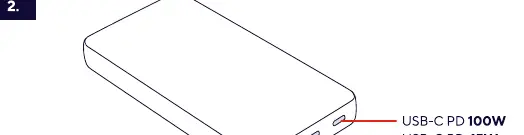
- USB-C PD 100W: High-speed port for laptops.
- USB-C PD 45W: Secondary USB-C port.
- USB-A QC3.0 18W: Quick Charge port for mobile devices.
Combined Output Scenarios:
- 100W Total: Using both USB-C ports simultaneously provides 40W and 60W respectively.
- 93W Total: Using all three ports simultaneously provides 18W (USB-A), 15W (USB-C), and 60W (USB-C).
Operation
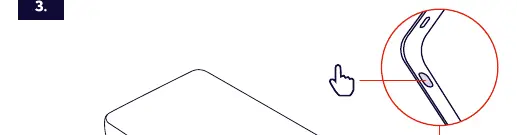
To use the power bank, connect your device to the appropriate port using a compatible USB cable. The power bank is designed to detect the connected device and provide the necessary power. Use the power button on the side of the device to check the status or activate the output if required.
Manufacturer information
Trust International B.V.
Practical help
Common problems
Slow charging of the power bank
Ensure you are using a 100W PD charger to achieve the 1.5-hour charging time. Using an 18W QC3.0 charger will result in an 8-hour charging time.
Before use
- Ensure you have a compatible USB-C cable for charging the power bank
- Verify the power requirements of your laptop
- Charge the power bank fully before the first use
Specs in practice
- USB-C PD 100W
- High-speed Power Delivery port capable of charging most laptops.
- USB-A QC3.0 18W
- Quick Charge port optimized for mobile phones and tablets.
Images and diagrams
- Step 1 illustrates charging the power bank via USB-C with different time estimates based on charger wattage.
- Step 2 details the specific output ports and how power is distributed when multiple devices are connected.
- Step 3 indicates the location of the power button on the side of the device.
Model compatibility
- The power bank supports simultaneous charging of multiple devices with dynamic power distribution.

Manual page author
David Miller
Documentation analyst
Organizes user manual content into clear summaries, with attention to model details, product context, and everyday usability.