Home Appliances / Food Dehydrators
User Manual for TurboTronic 14L Digital Food Dehydrator TT-FD14-D
Quick guide for the TurboTronic 14L Digital Food Dehydrator (TT-FD14-D). Learn how to operate the control panel, set temperature and time, clean the unit, and follow safety precautions.
Table of contents
Quick guide from the manual
This guide provides essential information for operating your TurboTronic 14L Digital Food Dehydrator. Before first use, ensure you wash all accessories in hot soapy water and clean the cabinet with a wet cloth. Run the oven at 80°C for at least 1 hour without food to remove protective oils; some smoke or smell is normal during this process.
Safety instructions
- For household indoor use only.
- Do not immerse the cord, plug, or oven in water.
- Keep at least 10 cm (4 inches) of free space on all sides for air circulation.
- Do not use abrasive cleaners, steel wool, or metal utensils to clean the interior or exterior.
- Always unplug and allow the unit to cool before cleaning.
- Do not operate with an external timer or remote control system.
Control panel operation
The control panel features a digital screen and touch-sensitive buttons:
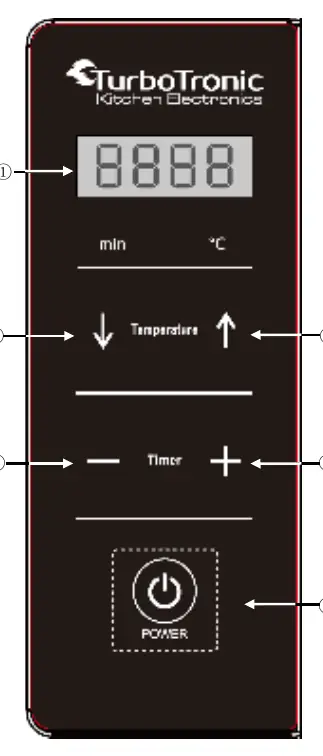
- Screen: Displays time and temperature.
- Temperature Up/Down: Adjusts temperature from 35°C to 80°C.
- Timer Up/Down: Adjusts time from 30 minutes to 24 hours.
- POWER / CONFIRM: Turns the unit on/off and starts the process.
Operating the dehydrator
- Slice food (e.g., fruit) into 5 to 8 mm thickness and place on wire racks.
- Insert racks into the cabinet.
- Plug in the unit; a beep will sound.
- Use the temperature buttons to set the desired heat (35°C to 80°C).
- Use the timer buttons to set the duration (30 minutes to 24 hours).
- Press the POWER button to start.
- The unit will beep 4 times and switch off automatically when the process is finished.
Note: You cannot change time or temperature while the machine is running. To make changes, press POWER to stop the process, adjust settings, and restart.
Care and cleaning
Always unplug the unit and let it cool before cleaning. Accessories are dishwasher safe or can be washed in hot soapy water. Wipe the interior and exterior with a damp sponge. Do not use abrasive cleaners or metal scouring pads, as these will damage the continuous clean coating and exterior finish.
Practical help
Common problems
Smell or smoke during the first run
This is normal and harmless. Run the oven at 80°C for at least 1 hour without food to burn off the protective shipping oil.
Cannot change time or temperature while running
Press the POWER button to stop the process, adjust your settings, and then press POWER again to restart.
Before use
- Read all instructions in the manual
- Wash all accessories in hot soapy water
- Clean the oven cabinet with a wet cloth
- Run the oven at 80°C for at least 1 hour without food
Specs in practice
- Temperature Range
- 35°C to 80°C, adjustable degree by degree.
Images and diagrams
- The control panel includes a digital screen, temperature adjustment buttons (up/down), timer adjustment buttons (up/down), and a Power/Confirm button.
Model compatibility
- For household indoor use only.
- Not intended for use with external timers or remote control systems.

Manual page author
David Miller
Documentation analyst
Organizes user manual content into clear summaries, with attention to model details, product context, and everyday usability.