Home Appliances / Air Fryers
User Manual for Cosori Premium Pro 10-Tray Food Dehydrator User Manual
Quick guide for the Cosori Premium Pro 10-Tray Food Dehydrator. Learn how to set up, operate, clean, and troubleshoot your dehydrator, including temperature and time settings for model CFD-P101-SUS.
Table of contents
Manual images
Click an image to enlargeQuick Guide
The Cosori Premium Pro 10-Tray Food Dehydrator is designed for preserving snacks, fruits, vegetables, bread, and flowers. It features an automatic fan for horizontal air circulation. Important: This unit is for household use only and must be used with a 120V, 60Hz power supply. Do not run the dehydrator for more than 48 hours at a time; allow it to cool for 2 hours after a 48-hour cycle.
Package Contents
- 1 x Premium Pro 10-Tray Food Dehydrator
- 10 x Trays
- 1 x Fruit Roll Sheet
- 1 x Mesh Screen
- 1 x Recipe Book
- 1 x User Manual
Specifications
- Model: CFD-P101-SUS
- Power Supply: 120V, 60Hz
- Rated Power: 1000W
- Capacity: 55 qt / 52 L (serves 10–12 people)
- Temperature Range: 95°–165°F (1°F adjustment)
- Time Range: 0:30–48:00 hours (30-minute adjustment)
Safety Precautions
- Do not touch hot surfaces; use handles.
- Do not immerse the cord, plug, or housing in water.
- Keep the dehydrator away from flammable materials and use on a flat, stable, heat-resistant surface.
- Do not store items on top of the dehydrator while in use.
- Do not use third-party parts or accessories.
- Unplug when not in use and before cleaning.
Getting to Know Your Dehydrator
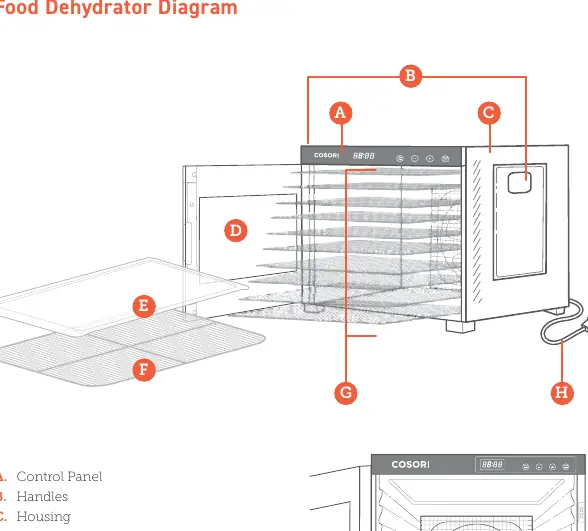
The unit consists of a housing, door, control panel, and an internal fan. The trays are removable for easy loading. The fan circulates warm air horizontally to ensure even drying.

Before First Use
- Remove all packaging.
- Clean the housing, trays, and tray liners with a damp cloth.
- Place the dehydrator on a solid, level surface and plug it in.
- Run the dehydrator for 30 minutes at 165°F without food to burn off any manufacturing residues. Ensure the room is well-ventilated.
- Rinse the trays with water and dry all parts.
Operation
- Place food on trays. To avoid scratching the interior, insert trays with the smooth side of the frame facing down.
- Plug in the unit; it will beep and enter standby mode.
- Press TEMP/TIME to select temperature, then use + or - to adjust (95°–165°F).
- Press TEMP/TIME again to select time, then use + or - to adjust (0:30–48:00).
- Press START/STOP to begin.
- When the timer finishes, the display shows "End" and the unit beeps 5 times.
Accessories
- Fruit Roll Sheet: Use for fruit rolls, strips, or purees. Can be placed on the bottom of the dehydrator to catch drips.
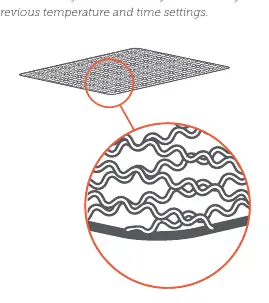
- Mesh Screen: Use for foods that shrink when dried to prevent them from falling through the tray grates.
Care & Maintenance
Note: Do not use abrasive chemicals or metal scouring pads. The trays are dishwasher-safe, but the mesh screen and fruit roll sheet are not dishwasher-safe.
- Unplug and allow to cool.
- Soak trays in hot, soapy water.
- Use a soft brush if needed.
- Clean the housing with a damp cloth.
- Dry all parts thoroughly before storing.
Troubleshooting
- Dehydrator won't turn on: Unplug and plug in again.
- E1, E2, E3 errors: Device may be damaged; contact Customer Support.
- E4 error: Voltage is too high (220–240V). Use only 120V, 60Hz.
- Uneven drying: Cut food evenly and avoid overlapping.
Manufacturer information
COSORI
Practical help
Common problems
Dehydrator will not turn on or fan is not working
Unplug the dehydrator and plug it in again. If it still does not work, contact Customer Support.
E1, E2, or E3 appears on the display
The dehydrator may be damaged or malfunctioning. Contact Customer Support.
E4 appears on the display
The voltage is too high (e.g., 220–240V). Unplug and use only with a 120V, 60Hz outlet.
Food is dried unevenly
Cut foods evenly to ensure they finish at the same time and avoid overlapping food on the trays.
Before use
- Remove all packaging from the dehydrator and accessories.
- Clean the housing, trays, and tray liners with a damp cloth.
- Place the dehydrator on a solid, level surface.
- Run the dehydrator for 30 minutes at 165°F without food.
- Ensure the room has sufficient ventilation during the first run.
- Rinse the trays with water and dry all parts.
Specs in practice
- Power Supply
- Must be 120V, 60Hz. Do not use with 220-240V outlets.
- Temperature Range
- 95°–165°F, adjustable in 1°F increments.
Images and diagrams
- The control panel features Temp/Time, +, -, and Start/Stop buttons.
- The internal fan is located at the back to circulate air horizontally.
- Trays should be inserted with the smooth side of the frame facing down to prevent scratching.
Model compatibility
- Trays are dishwasher-safe.
- Mesh screen and fruit roll sheet are NOT dishwasher-safe.
- Not for commercial use; household use only.

Manual page author
Emily Carter
User documentation editor
Prepares concise manual descriptions and highlights the most useful setup, operation, and maintenance information for readers.