Automotive / Jump Starters
User Manual for TYPE S Adjustable Wireless Backup Camera BT534014
Quick guide for the TYPE S Adjustable Wireless Backup Camera (BT534014). Learn how to install, pair with the TYPE S Drive app, and maintain your solar-powered backup camera.
Table of contents
Manual images
Click an image to enlargeQuick Guide from the Manual
This guide provides essential information for the TYPE S Adjustable Wireless Backup Camera (Model BT534014). Before installation, it is highly recommended to fully charge the camera for 5-6 hours using the provided USB-C cable. Ensure you download the TYPE S Drive app and test the camera connection before mounting it to your vehicle.
Package Contents
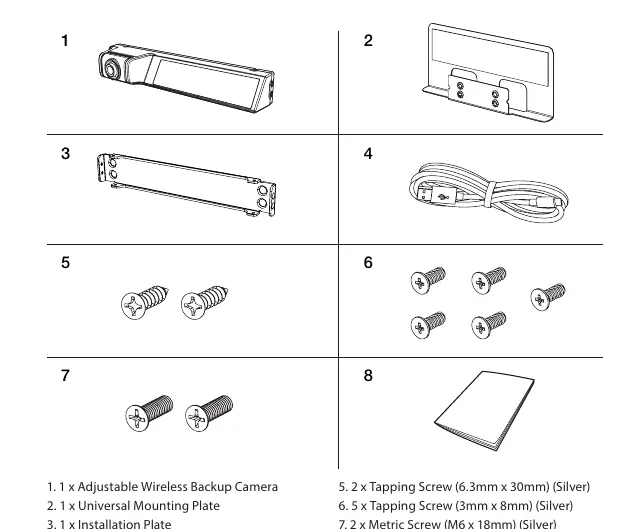
- 1 x Adjustable Wireless Backup Camera
- 1 x Universal Mounting Plate
- 1 x Installation Plate
- 1 x 33” / 84cm USB-C Cable
- Various screws (Tapping and Metric)
Product Specifications
- Frequency: 2.4 GHz
- Operating Voltage: DC 5V (USB-C)
- Operating Temperature: 14°F to 122°F (-10°C to 50°C)
- Water Resistance: IP67 Rating
- Battery Capacity: 2,500mAh
- Maximum Signal Range: 33 Feet / 10 Meters (without obstruction)
Installation Guide
There are two mounting options provided:
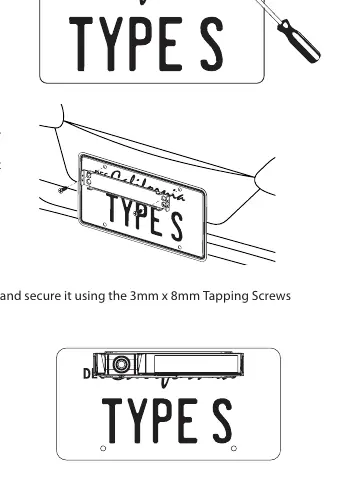
Option 1: Mount with Installation Plate
- Remove your existing license plate.
- Attach the Installation Plate onto your license plate and back onto the vehicle using the provided M6 x 18mm Metric Screws or 6.3mm x 30mm Tapping Screws.
- Secure the camera onto the Installation Plate using the 3mm x 8mm Tapping Screws.
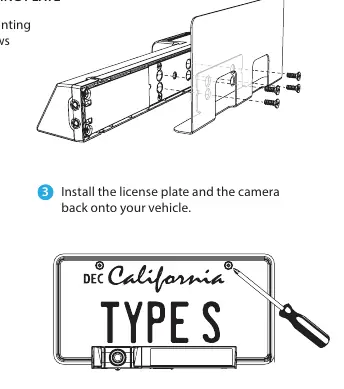
Option 2: Mount with Universal Mounting Plate
- Attach the camera to the Universal Mounting Plate using the 3mm x 8mm Tapping Screws.
- Peel off the 3M VHB double-sided tape backer and attach the plate to your license plate.
- Reinstall the license plate and camera assembly onto your vehicle.
App Setup
To pair the camera:
- Download the TYPE S Drive app from the App Store or Google Play.
- Open the app and select Backup Camera.
- Select ADJUSTABLE BACKUP CAMERA from the device list and click Set Up Device.
- For Android: Click the settings icon, select Pair Camera, and connect to the device named "TYPE_S_BUC05_1080P_XXXXXX".
- For iOS: Follow the on-screen prompts to enable Bluetooth and connect to the camera.
Camera Status & LED Indicators
- Power On: Click power button once (Blue LED flashes twice).
- Power Off: Press & hold power button > 2 seconds (Red LED flashes once).
- Factory Reset: Press & hold power button > 5 seconds (Blue LED flashes 5 times).
- Hardware Reset: Insert a paper clip into the reset hole (Red LED flashes once).
- Low Voltage Protection: Red LED flashes continuously.
Maintenance & Cleaning
Keep the camera lens clean for optimal performance. If dirt, rain, or snow accumulates, rinse with water and wipe with a dry cloth. Do not use alcohol, benzene, or thinners, as these can cause discoloration and damage the unit.
Safety Information
The backup camera is an aid, not a substitute for safe driving. Always check behind and around the vehicle manually. Do not rely solely on the app screen, as objects may appear differently than in reality. Ensure the camera is not obstructed and that the vehicle's trunk or hatch is securely closed.
Practical help
Common problems
Camera is unresponsive or malfunctioning
Perform a hardware reset by inserting a paper clip into the reset hole on the camera body.
App cannot find the camera
Ensure the camera is powered on and Bluetooth is enabled on your smartphone. Verify you are using the correct app (TYPE S Drive).
Image is unclear or blurry
Clean the camera lens with a damp cloth. Do not use alcohol or chemical cleaners.
Before use
- Fully charge the camera for 5-6 hours using the provided USB-C cable.
- Download the TYPE S Drive app on your smartphone.
- Test the camera by powering it on and connecting to the app before installation.
- Check local laws regarding the use of backup cameras in your area.
- Ensure your smartphone meets the minimum requirements (iOS 9+ or Android 5.0+).
Specs in practice
- 33 Feet / 10 Meters
- The maximum effective wireless signal range without interference or obstructions.
Images and diagrams
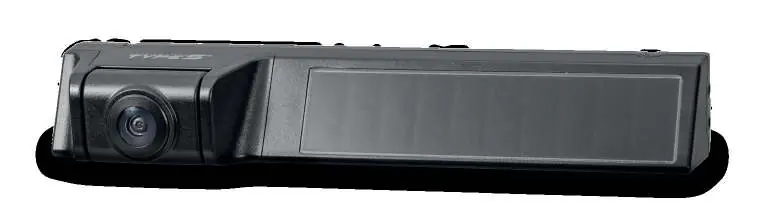
- The camera features a power button, LED indicator, reset button, and USB-C charging port on the rear/side.
- Installation options allow for mounting either directly behind the license plate or using an adhesive universal plate.
Model compatibility
- Compatible with smartphones running iOS 9 or newer, and Android 5.0 or newer.
- Not compatible with tablets, browsers, or PCs.

Manual page author
Michael Turner
Technical manual editor
Reviews PDF manuals for structure, safety notes, and practical product details so readers can find the right information quickly.