Power / USB Chargers
User Manual for UGREEN 100W 2-in-1 GaN Desktop Charger 100W2CIA
Quick guide for the UGREEN 100W 2-in-1 GaN Desktop Charger (100W2CIA). Includes power distribution charts, wireless charging tips, troubleshooting, and technical specifications.
Table of contents
Manual images
Click an image to enlargeQuick Guide
The UGREEN 100W 2-in-1 GaN Desktop Charger is a versatile power solution combining wired USB charging and magnetic wireless charging. This guide provides essential information on setup, power distribution, and troubleshooting.
Package Contents
- 100W 2-in-1 GaN desktop charger
- Power cable
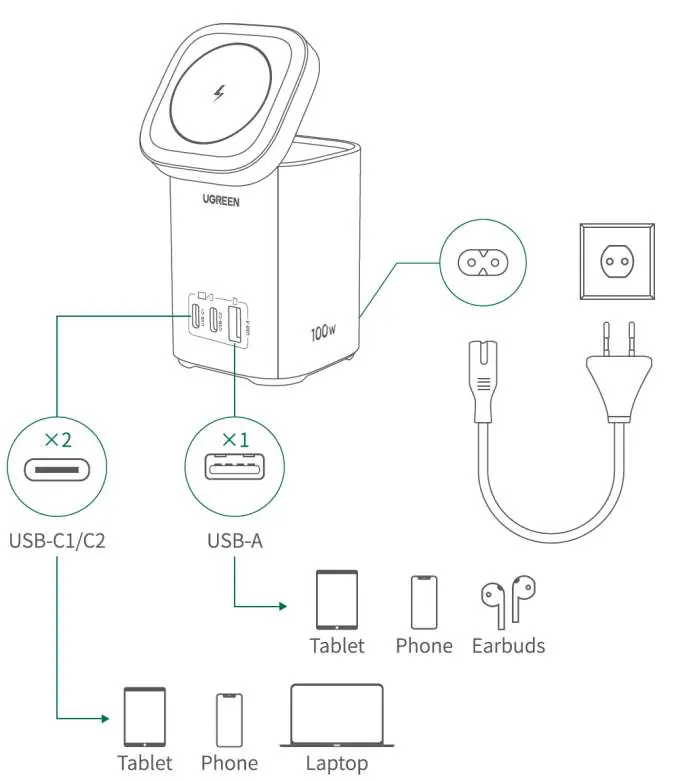
USB Wired Charging
Connect the power cable to the charger and a wall outlet. Use the USB-C1, USB-C2, or USB-A ports to charge your devices such as tablets, phones, laptops, or earbuds. Ensure you use a charging cable that matches the rated charging power of your device for optimal performance.
Magnetic Wireless Charging
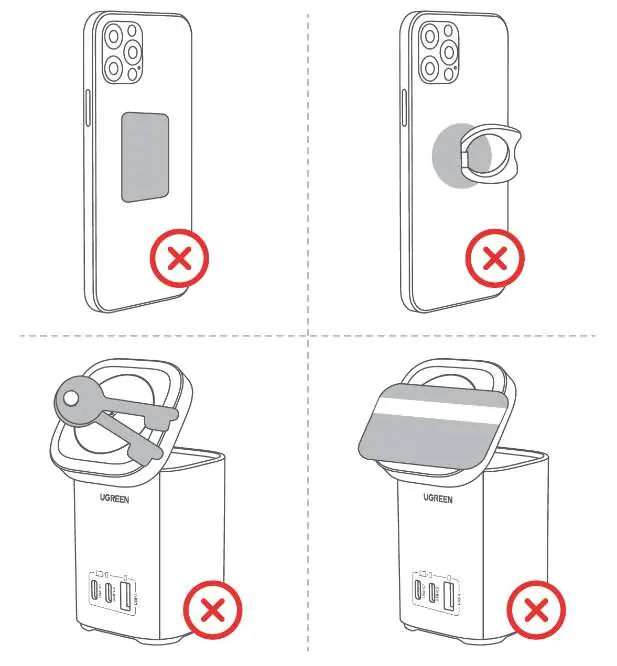
The wireless charging function is compatible with iPhones that support magnetic wireless charging and AirPods that support wireless charging. For best results with a phone case, use an official MagSafe case or a MagSafe-compatible case. Do not place metal objects (such as ring holders or metal plates) or magnetic cards on the charging area, as this will trigger a safety disconnect.
Power Distribution
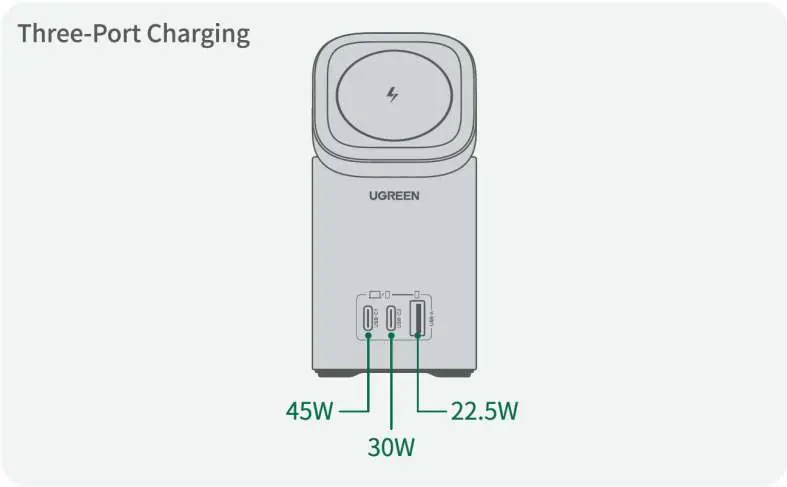
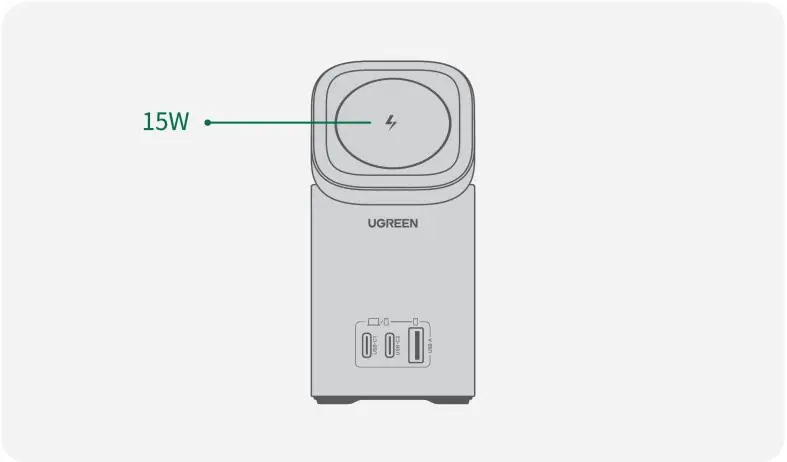
The charger intelligently distributes power based on the number of devices connected. Power output varies significantly depending on whether you are using one, two, or three ports, and whether the wireless charger is active. Refer to the power distribution diagrams in the manual to understand the wattage output for your specific configuration.
Troubleshooting
If you experience abnormal wireless charging, ensure your phone supports MagSafe and that no metal foreign objects are on the charging pad. If the charger and phone get warm, this is a normal phenomenon due to magnetoelectric conversion loss. Always disconnect the charger from the power supply after the device is fully charged to avoid continuous heating.
Specifications
- Input: 100-240V ~ 50/60Hz 1.8A Max.
- USB-C1/C2 Output: 5V/3A, 9V/3A, 12V/3A, 15V/3A, 20V/5A, 2.2-21V/5A (100W Max.)
- USB-A Output: 5V/3A, 9V/2A, 12V/1.5A, 10V/2.25A (22.5W Max.)
- Wireless Charging Output: 5/7.5/15W Max.
- Total Output Power: 100W Max.
- Frequency Band: 110-205kHz
Safety Notes
- Unplug the charger if not in use for a long time.
- Keep away from pacemakers or defibrillator implants.
- Do not use unapproved or incompatible power adapters or cables.
- Do not expose to high temperatures, humidity, or strong magnetic environments.
- Do not dismantle or repair the device yourself; contact customer service if faulty.
- Dispose of the product according to local regulations; do not treat as household waste.
Manufacturer information
UGREEN
Practical help
Common problems
Abnormal wireless charging
Ensure your phone supports MagSafe. Use an official or compatible MagSafe case. Remove any metal objects or magnetic cards from the charging area.
Charger and phone get hot
This is a normal phenomenon caused by magnetoelectric conversion loss during wireless charging.
Charging stops unexpectedly
The charger has detected a metal foreign object. Remove the object to resume charging.
Before use
- Verify your phone supports magnetic wireless charging (MagSafe).
- Use a MagSafe-compatible case if charging with a case on.
- Ensure the charging area is free of metal objects (rings, plates, cards).
- Connect the power cable securely to the charger and wall outlet.
- Use cables that match the rated charging power of your devices.
Specs in practice
- Total Output Power
- The maximum combined power the charger can deliver across all ports and wireless charging simultaneously (100W).
- USB-C1/C2 Output
- High-speed ports capable of delivering up to 100W for laptops and other power-hungry devices.
- Wireless Output
- Supports 5W, 7.5W, and 15W charging depending on the device requirements.
Images and diagrams
- USB Wired Charging: Illustrates connecting USB-C and USB-A cables to various devices.
- Power Distribution: Charts showing how wattage is split between ports when 1, 2, or 3 devices are connected, including wireless charging usage.
Model compatibility
- Wireless charging is only compatible with iPhones supporting magnetic wireless charging and AirPods supporting wireless charging.

Manual page author
Michael Turner
Technical manual editor
Reviews PDF manuals for structure, safety notes, and practical product details so readers can find the right information quickly.