Power / USB Chargers
User Manual for Verbatim 4 Port 100W PD & QC 3.0 GaN USB Charger VAPUC057
Quick guide for the Verbatim VAPUC057 4-port USB charger. Includes power distribution specifications, safety instructions, and operating procedures for optimal charging.
Table of contents
Important Information
This guide provides essential instructions for the Verbatim 4 Port 100W PD & QC 3.0 GaN USB Charger (Model: VAPUC057). Please read all safety warnings before use. The device is designed for indoor use and should be kept away from moisture, heat sources, and direct sunlight. Do not attempt to disassemble or modify the charger, as there are no user-serviceable parts inside.
Product Description
The Verbatim 4-port charger utilizes GaN technology to provide high power output in a compact size. It features two Type-C PD 3.0 ports and two USB-A QC 3.0 ports, allowing for simultaneous charging of up to four devices.
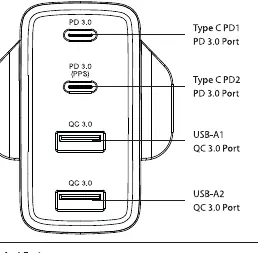
Input and Output Specifications
Input: 100-240 V AC 50/60 Hz 1.6 A
Output Capabilities:
- Type C (PD1 / PD2): Each supports 5V/3A, 9V/3A, 12V/3A, 15V/3A, 20V/5A (Max 100W). PD2 also supports PPS mode (3.3-21V/5A).
- USB-A (QC 3.0): Each supports 5V/3A, 9V/2A, 12V/1.5A (Max 18W).
- Total Maximum Output: 100W.
Power Distribution Notes: When multiple ports are used simultaneously, the power output is dynamically shared between ports. For example, using both Type-C ports (PD1+PD2) provides 60W and 45W respectively. Using both USB-A ports simultaneously shares a total of 18W.
Operation
- Unpack the USB charger and connect it to a wall power supply.
- Connect your USB charging-compatible device to the charger using a suitable charging cable (not included).
- Charging will begin automatically.
- Disconnect the device once it is fully charged and store the charger in a safe place when not in use.
Smart Charging Technology
The charger features smart charging technology that automatically detects the specifications of the connected device. It scans the device to define the maximum current and adjusts the output to provide the optimal charging speed and performance.
Safety and Maintenance
- Ventilation: The charger generates heat during operation. Always charge in a well-ventilated area.
- Temperature Limit: Do not charge in environments where temperatures exceed 40°C (104°F).
- Cleaning: Use a damp, soft cloth to clean the surface. Do not use chemical solvents.
- Electrical Safety: Unplug the charger from the power source before attempting any maintenance or cleaning.
- Damage: Do not operate the charger if it has been dropped or damaged.
Disposal
This product must not be disposed of with household waste. Please follow local regulations regarding the disposal of electrical and electronic equipment (WEEE).
Practical help
Common problems
Device not charging
Ensure the charger is securely connected to the power outlet and the charging cable is properly inserted into both the charger and the device.
Charger overheating
Ensure the charger is used in a well-ventilated area and the ambient temperature is below 40°C (104°F).
Before use
- Verify the power source is 100-240V AC.
- Ensure you are using a high-quality charging cable compatible with your device.
- Check that the charger is not damaged or dropped.
- Ensure the environment is dry and well-ventilated.
Specs in practice
- PD 3.0 (Power Delivery)
- High-speed charging standard for laptops and compatible mobile devices.
- QC 3.0 (Quick Charge)
- Fast charging standard for compatible smartphones and tablets.
- GaN Technology
- Gallium Nitride technology allows for higher efficiency and smaller physical size.
- PPS (Programmable Power Supply)
- Allows for dynamic voltage adjustment to optimize charging efficiency.
Images and diagrams
- The top two ports are Type-C PD 3.0 ports.
- The bottom two ports are USB-A QC 3.0 ports.
Model compatibility
- Supports MacBook, PD-enabled laptops, iPhones, iPads, smartphones, tablets, and MP3/MP4 players.

Manual page author
Michael Turner
Technical manual editor
Reviews PDF manuals for structure, safety notes, and practical product details so readers can find the right information quickly.