Power / Power Banks
UGREEN 145W Portable Charger PB205 User Manual
Quick guide for the UGREEN 145W Portable Charger (PB205). Learn how to charge devices, use low-current mode, understand power distribution, and check technical specifications.
Table of contents
Manual images
Click an image to enlargeQuick Start Guide
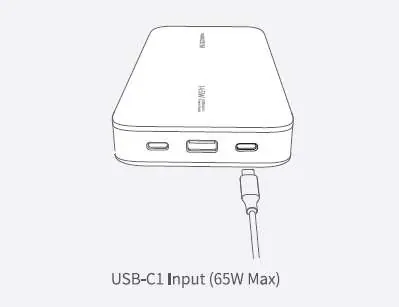
Please fully charge the product before using it for the first time. For faster recharging of the power bank itself, it is recommended to use a 65W or stronger charger.
Button Operations
The power button controls the device status:
- Wake/Check: Press the power button once if charging does not start automatically.
- Turn Off: Press the power button twice.
Low-Current Mode
This mode is designed for charging small devices like earbuds or smartwatches.
- Enter Mode: Press and hold the power button for approximately 3 seconds.
- Exit Mode: Press and hold the power button for 3 seconds, or wait 3.5 hours for the mode to automatically deactivate.
Power Distribution
The charger adjusts power output based on the number of connected devices:
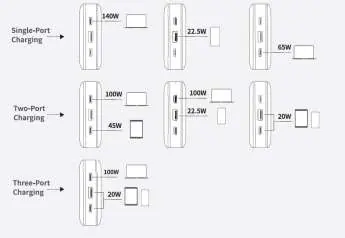
- Single-Port Charging: 140W (USB-C1), 22.5W (USB-A), or 65W (USB-C2).
- Two-Port Charging: 100W (USB-C1) + 45W (USB-C2) OR 100W (USB-C1) + 22.5W (USB-A).
- Three-Port Charging: 65W (USB-C1) + 20W (USB-C2) + 20W (USB-A).
Specifications
- Battery Type: Lithium-ion
- USB-C1 Input: 5V=3A, 9V=3A, 12V=3A, 15V=3A, 20V=3.25A
- USB-C1 Output: 5V=3A, 9V=3A, 12V=3A, 15V=3A, 20V=5A
- USB-C2 Output: 5V=3A, 9V=3A, 12V=3A, 15V=3A, 20V=3.25A
- USB-A Output: 10V=2.25A, 5V=4.5A, 9V=2A, 12V=1.5A
- Total Output: 65W (when using all three ports)
- Operating Temperature: 0°C - 40°C (32°F - 104°F)
- Storage Temperature: -20°C - 50°C (-4°F - 122°F)
Manufacturer information
UGREEN
Practical help
Common problems
Device does not start charging automatically
Press the power button once to wake the charger.
Charging small devices like watches or earbuds
Activate Low-Current Mode by pressing and holding the power button for 3 seconds.
Before use
- Fully charge the power bank before first use.
- Use a 65W or stronger charger to recharge the power bank efficiently.
Specs in practice
- USB-C1 Input
- Supports up to 65W input for fast recharging of the power bank.
- Total Output
- The combined power output is 65W when all three ports are used simultaneously.
Images and diagrams
- The power distribution diagram illustrates how the 145W total capacity is split between the USB-C1, USB-C2, and USB-A ports depending on the number of devices connected.

Manual page author
Emily Carter
User documentation editor
Prepares concise manual descriptions and highlights the most useful setup, operation, and maintenance information for readers.