Electronics / USB Hubs & Docking
User Manual for UGREEN PowerRoam 1200W Portable Power Station
Quick guide for the UGREEN PowerRoam 1200W (GS1200) portable power station. Learn how to charge, operate, use U-Turbo mode, and troubleshoot your device.
Table of contents
Manual images
Click an image to enlargeQuick Guide from the Manual
Before using your UGREEN PowerRoam 1200W for the first time, please charge the unit fully. Ensure the device is properly grounded and placed in a well-ventilated area. Use only original or safety-certified cables for charging. If the unit is not used for a long time, check the battery level periodically and charge it to maintain battery health.
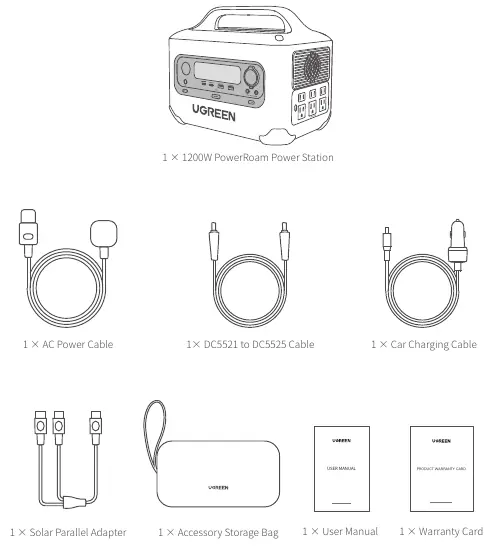
Product Overview
The power station features a variety of ports and controls:
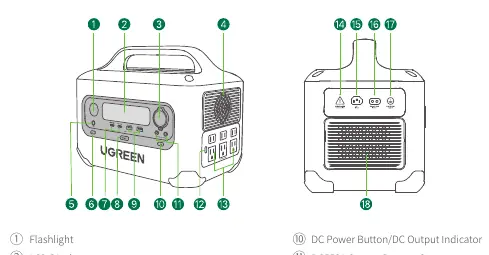
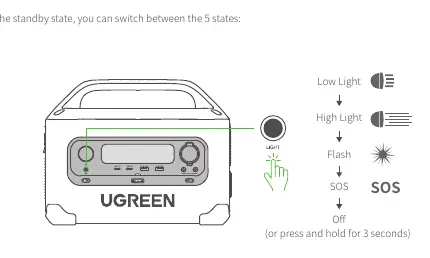
- Flashlight: Located on the front, supports 5 states (Low, High, Flash, SOS, Off).
- LCD Display: Shows input/output power, battery level, remaining time, and connection status.
- Output Ports: Includes AC outlets, USB-C, USB-A, Car charging port, and DC5521 ports.
- Input Ports: AC input for utility power and DC input for solar/car charging.
Recharging Your Power Station
You can recharge the unit using three methods:
- AC Recharging: Connect to a wall outlet using the provided AC power cable.
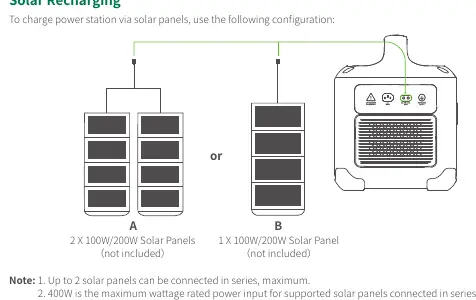
- Solar Recharging: Connect solar panels to the DC input port. You can connect up to 2 solar panels in series (400W max).
- Car Recharging: Use the car charging cable connected to the vehicle's cigarette lighter port. Start the vehicle before connecting to prevent battery drain.
Powering Your Devices
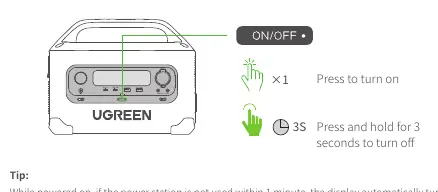
To turn the unit on, press the Main Power Button once. To turn it off, press and hold for 3 seconds. To use specific outputs (AC, DC), press the corresponding button on the front panel. If the unit is not used for 1 minute, the display will turn off automatically.
Operating Modes
- U-Turbo Mode: Enabled by default, this allows the AC output to support devices up to 2500W. It is not recommended for inductive or high-power devices like air conditioners or coffee machines.
- Power Reduction Mode: Automatically activates during low/high temperatures, low battery charging, or trickle charging to protect the battery.
- 0% Battery Emergency Mode: Allows limited use of the flashlight and USB ports when the battery is at 0%. Enable by holding the DC and Flashlight buttons for 10 seconds.
- Factory Reset: With no devices connected, hold the AC and DC buttons simultaneously for 10 seconds.
Troubleshooting
If you encounter issues, check the LCD display for error codes:
- OVERLOAD: Remove connected devices and restart.
- Low-Temperature Protection: Move the unit to a warmer environment.
- High-Temperature Protection: Stop charging/using, allow the unit to cool down for 10 minutes, then restart.
- F05 (Discharge Undervoltage): Battery is low; charge immediately.
Maintenance and Safety
Store the unit in a dry place at room temperature. For long-term storage, charge and discharge the unit at least once every 3 months. Do not disassemble, puncture, or expose the unit to fire or water. Keep out of reach of children.
Manufacturer information
UGREEN
Practical help
Common problems
Output Overload
Remove all connected external devices and restart the power station.
Low-Temperature Protection
Move the power station to a working environment temperature as specified in the manual.
Discharge Undervoltage Protection (F05)
The battery is low; please charge the power station promptly.
High-Temperature Protection
Stop charging or using the device, place it in a cool, well-ventilated area, and wait 10 minutes before restarting.
Before use
- Charge the power station before initial use to activate the battery.
- Ensure the power station is properly grounded.
- Use only original or safety-certified power cables.
- Ensure the power station is well-ventilated and free from combustibles during charging.
- Check that ventilation outlets are not blocked during use.
Images and diagrams
- Page 3 provides a detailed diagram of all ports, buttons, and the LCD display layout.
- Page 5 illustrates the correct configuration for connecting solar panels (up to 2 in series).
- Page 6 shows the sequence for switching between the 5 flashlight states.
- Page 7 demonstrates the button presses required to turn the unit on/off and activate AC output.
Model compatibility
- Supports up to 2 solar panels in series (400W max).
- U-Turbo mode is not applicable for all appliances; inductive and high-power devices like air conditioners are not recommended.
- The power station cannot be carried on a plane.

Manual page author
David Miller
Documentation analyst
Organizes user manual content into clear summaries, with attention to model details, product context, and everyday usability.