Home / Security
User Manual for Urmet 1099/211B Cloud Camera
Quick guide for the Urmet 1099/211B Cloud Camera. Includes installation steps, WiFi configuration, reset instructions, and safety warnings.
Table of contents
Manual images
Click an image to enlargeQuick guide from the manual
The Urmet 1099/211B is a WiFi IP cloud camera. Configuration is managed via the URMET V-Stream app. The camera automatically synchronizes date and time via the internet; if the camera is restarted without internet access, the correct date and time cannot be guaranteed, which may compromise recordings on the SD memory.
Installation
Follow these steps for correct installation:
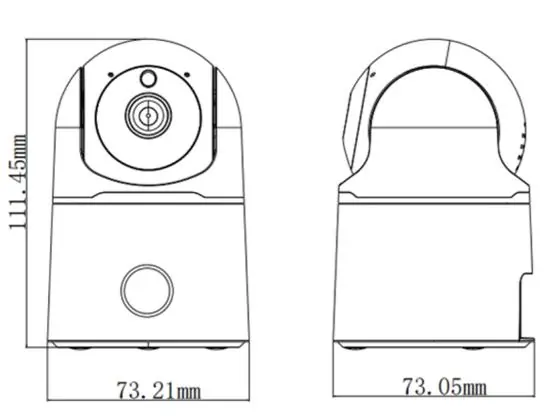
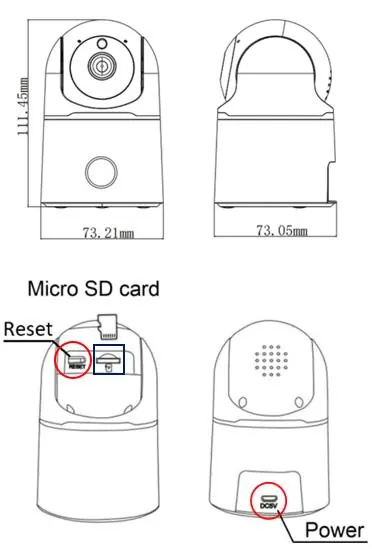

- Ensure all units are powered off before starting.
- If installing multiple cameras on the same network, it is recommended to install and configure one camera at a time.
- Connect the camera to the network. Ensure the WiFi signal strength received by the camera is 60 or higher.
- Mount the camera on a wall or flat surface and adjust the bracket to frame the desired scene.
- If using a MicroSD card (not included), insert it into the slot while the device is powered off. After powering on, use the app settings to format the card before starting the recording function.
Network & WiFi Configuration
Upon first power-on, the camera enters Access Point (AP) mode. To connect it to a WiFi network, download the URMET V-Stream app on your mobile phone and follow the quick setup guide provided in the app.
Reset Procedure
To reset the camera to factory settings, press and hold the reset button for at least 3 seconds.
Safety & Maintenance
- Do not use spray products for cleaning.
- Disconnect power before cleaning or maintenance.
- Do not install near heat sources (radiators, air ducts), in dusty environments, or where exposed to direct sunlight.
- Avoid installing in locations subject to excessive mechanical vibrations or impacts.
- Wait three hours after moving the device from a cold to a warm environment (or vice versa) before powering it on to allow it to adapt.
- The device should only be opened by qualified technical personnel.
Manufacturer information
Urmet S.p.A.
Practical help
Common problems
Camera not keeping correct date/time
Ensure the camera has an active internet connection, as it syncs time automatically upon power-up.
WiFi connection issues
Check that the WiFi signal strength received by the camera is 60 or higher.
Recording not working
Format the MicroSD card using the V-Stream app settings.
Before use
- Ensure the device is intact after unpacking.
- Check that the operating temperature is within limits.
- Verify that the installation area is well-ventilated and not dusty.
- Ensure the WiFi signal strength is adequate (>=60).
- Power off all units before starting installation.
Specs in practice
- Radio frequency band
- 2380MHz~2673.5MHz
Images and diagrams
- The camera features a reset button and a MicroSD card slot.
- The power port is located at the base of the unit.
Model compatibility
- Requires URMET V-Stream App for configuration.
- Supports up to 3 simultaneous remote connections.

Manual page author
Michael Turner
Technical manual editor
Reviews PDF manuals for structure, safety notes, and practical product details so readers can find the right information quickly.