Electronics / USB Hubs & Docking
Vention USB Car Bluetooth 5.0 Audio Receiver NAGHG
Quick guide for the Vention USB Car Bluetooth 5.0 Audio Receiver (NAGHG). Learn how to pair, connect dual devices, understand LED indicators, and troubleshoot connectivity for your car audio system.
Table of contents
Manual images
Click an image to enlargeQuick guide from the manual
This guide provides essential instructions for setting up and using the Vention USB Car Bluetooth 5.0 Audio Receiver. Ensure your car is started and the device is plugged into the appropriate USB and AUX ports before beginning the pairing process.
Pairing
- Start your car engine.
- Insert the device into the car's USB and AUX ports.
- Turn on the Bluetooth function on your phone.
- Search for and connect to the device named Vention-NAG.
- The device will automatically connect to the last paired phone in the future.
LED Indicator Status
The LED light provides feedback on the device's current operating state:
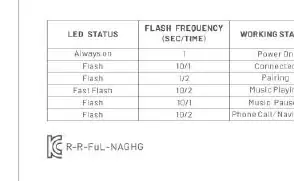
- Always on: Power On
- Flash (1s/1s): Connected
- Flash (1/2s): Pairing mode
- Fast Flash: Music Playing
- Flash (10/1s): Phone Call / Navigation
Dual-Device Connection
The device supports simultaneous connection with two devices:
- Connect to Device A first.
- Once connected, turn off the Bluetooth function on Device A.
- Connect to Device B.
- Turn the Bluetooth function back on for Device A to complete the dual connection.
Usage Notes
- If the connection fails, unplug the device, restart the Bluetooth function on your phone, and try again.
- If the connection is lost, ensure the device is within the 10m transmission range.
- Do not disassemble, hit, squeeze, or put the product into fire.
- Avoid using the product in extreme high or low temperatures and humid environments.
- Keep the product out of the reach of children.
Technical Specifications
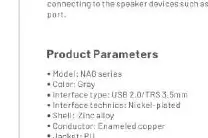
- Model: NAGHG
- Bluetooth Version: 5.0
- Interface: USB 2.0 / TRS 3.5mm
- Audio Decoding: SBC/AAC
- Transmission Distance: 10m (barrier-free)
- Shell Material: Zinc Alloy
Manufacturer information
Vention
Practical help
Common problems
Connection fails
Unplug the product, restart the Bluetooth function on your phone, and attempt to pair again.
Audio cuts out or disconnects
Ensure the device is within the 10m barrier-free transmission range.
Dual connection not working
Ensure you turn off Bluetooth on the first device before connecting the second, then re-enable Bluetooth on the first device.
Before use
- Ensure the car engine is started.
- Verify that both USB and 3.5mm AUX ports are available in your vehicle.
- Enable Bluetooth on your smartphone.
- Keep the device away from extreme temperatures and humidity.
Specs in practice
- Bluetooth 5.0
- Provides a stable, low-latency wireless connection.
- 10m Transmission
- The maximum effective range for the Bluetooth signal without obstacles.
Images and diagrams
- USB 2.0 interface: Provides power to the receiver.
- Microphone: Used for hands-free calling.
- 3.5mm audio interface: Transmits audio signal to the car stereo.
Model compatibility
- Requires both a USB port for power and a 3.5mm AUX port for audio input.

Manual page author
David Miller
Documentation analyst
Organizes user manual content into clear summaries, with attention to model details, product context, and everyday usability.